
|
https://ift.tt/2tLedcQ
Use these 3 Tricks to Delete Old Tweets in Seconds https://ift.tt/2R73CAH Would you like to delete all your tweets at once without wasting any time? If you want to delete your old tweets using Twitter, be ready for a cumbersome process where you click on each tweet to delete it. If you have more than a thousand tweets to get rid of, consider spending a few weeks just doing this. However, if you use the right tools, getting rid of your tweets is going to be a tad bit easy task. You can clear your tweets within a few seconds and not lose any extra effort or time. In this article, let’s look at three easy tricks that you can use and delete your tweets in the shortest time possible. Delete Your Twitter Archive with Circleboom: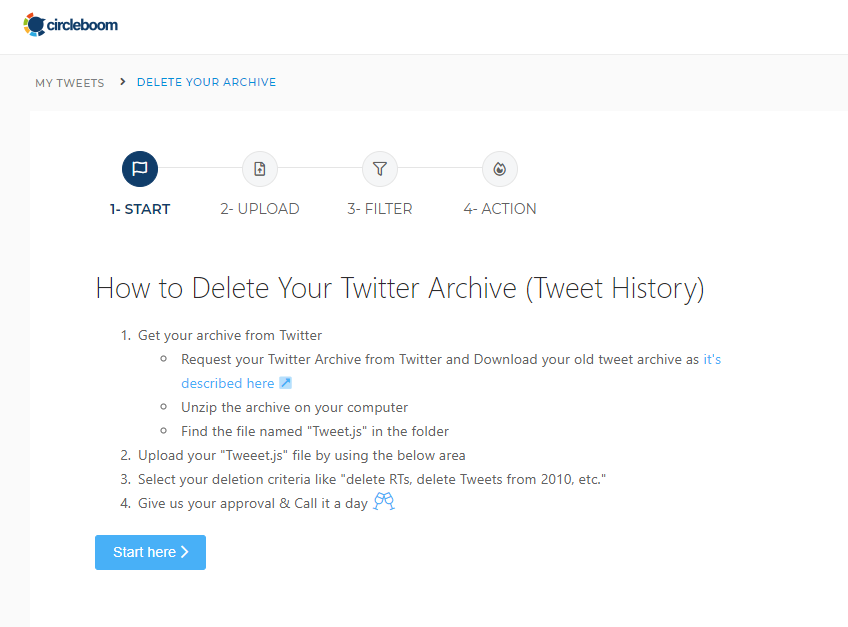
Circleboom is a Twitter management app that helps you in deleting your Twitter archive in one step. You can upload your Twitter archive in the Circleboom dashboard, and all the tweets that you have posted ever since you created your Twitter accounts can be deleted. These tweets include all your tweets, retweets, and replies. The filters can help you delete tweets within specific dates or with specific keywords. They have also a hands-on video to download and delete your Twitter archive here. If you want to look at each tweet before deleting it, then with Circleboom’s “Delete tweets” feature, you can access your last 3,200 tweets before deleting them. Here’s how to use it:

Once deleted, you cannot recover your lost tweets. So, be sure before you delete all your tweets with Circleboom. Use Grid Power Search to Delete Selected TweetsDo you want to delete tweets from a specific year or location or account or keyword? With Circleboom’s grid power search, you can search for particular tweets and delete them together. To use the grid power search, just type your text in the search box and Circleboom will filter your results. You can type “London” if you want to delete tweets that contain “London” or you can search “2018” to get rid of all tweets from 2018. Click on “Delete selected tweets” to delete all the filtered tweets at once. 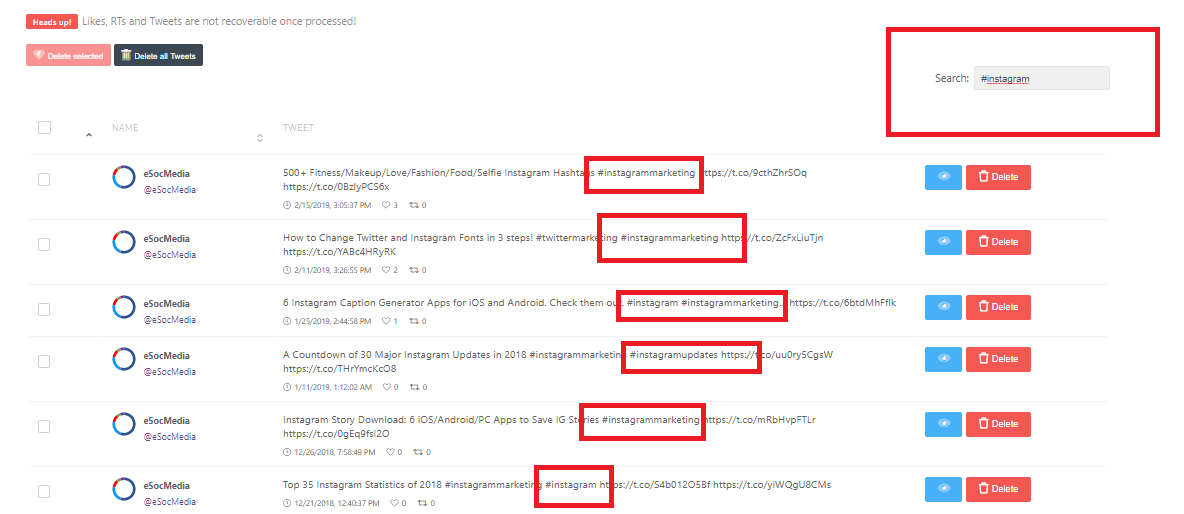
Delete RetweetsSome of us may not tweet often, but we have way too many retweets. Sometimes, the number of retweets is too high making your Twitter profile look absurd and spammy. If you want to delete all your old retweets, you can do that too. With Circleboom’s “Delete RT” function, you can delete all your retweets at once. Just like tweets, you can also delete selected retweets by using the grid power search. The delete retweet is a powerful function helping you get rid of all your retweets at once. 
Deleting all your retweets is also a permanent process and retweets cannot be recovered once done. Get Set Go:Using the three tricks above, you should be able to delete all or some of your tweets and retweets easily and quickly. As Circleboom is a Twitter compliant app, you can be sure of not violating any Twitter rules when you use this app to remove your tweets. You can use the features above with the Circleboom pro plan that starts at $7.99 per month. The pro plan also offers other features like tweet scheduling, analytics, and follower management. If you have any confusion while using the app, you can refer to their help section and blogs. The post Use these 3 Tricks to Delete Old Tweets in Seconds appeared first on Social Media Explorer. Social Media via Social Media Explorer https://ift.tt/2onGYog January 10, 2020 at 09:47AM
0 Comments
Leave a Reply. |
Amazing WeightLoss Categories
All
Archives
November 2020
|
 RSS Feed
