
|
https://ift.tt/2LEQa7k
Creative Instagram Features for Marketers https://ift.tt/2OAxsLZ
Wondering which Instagram tools can help? In this article, you’ll discover six Instagram features marketers can use to support business goals. 
Creative Instagram Features for Marketers by Christian Karasiewicz on Social Media Examiner.
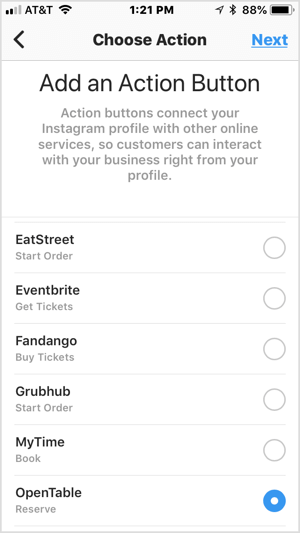
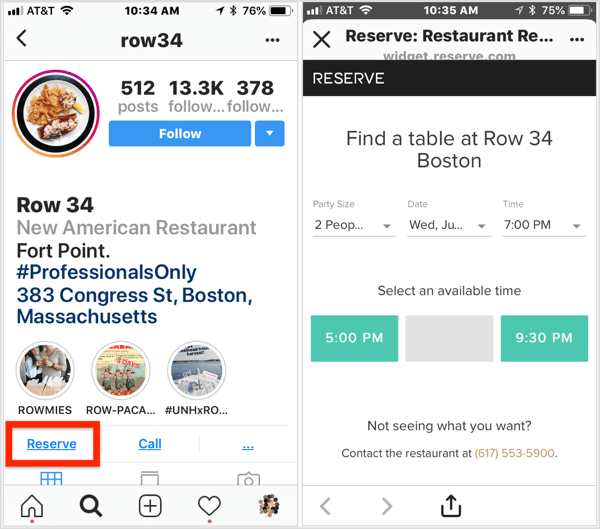
#1: Use Instagram Action Buttons to Encourage On-Platform Business TransactionsInstagram business accounts can now add action buttons to their profile that allow users to book an appointment, purchase tickets, make a reservation or appointment, and more. These call-to-action buttons are integrated with many popular third-party apps such as GrubHub, Fandango, Eventbrite, and Yelp.
When users click one of these action buttons on your profile, they can complete a transaction via the third-party service without leaving the Instagram platform. This powerful feature will help you convert more of your followers into customers.
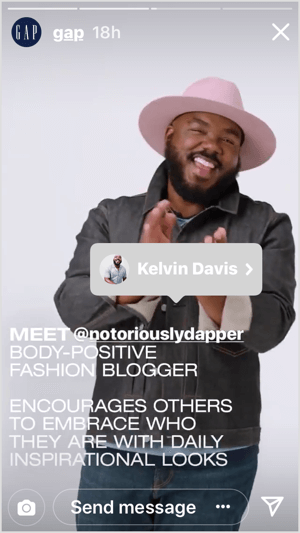
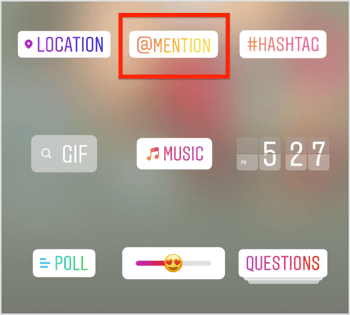
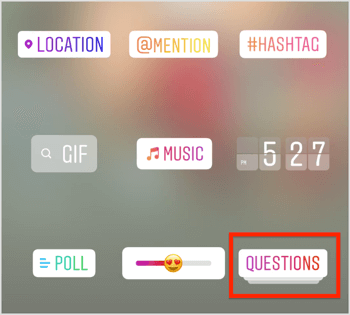
Watch for Access to Shoppable Instagram Stories With more and more users spending time on Instagram Stories, chances are you’ll want to monetize this part of your Instagram presence, too. To help you with this, Instagram is working with select partners to add shopping from Instagram Stories. While currently limited to just a few brands, this feature should make its way to all users very soon. It will let you tag products in your stories and allow your followers to click to buy any item you’ve tagged. #2: Apply @Mention Sharing Stickers to Support Key Partners in StoriesDoes your Instagram channel feel like a ghost town? Do you share posts but your followers seldom respond? If you produce or attend a lot of events, you’ll love the ability to @mention users in Instagram Stories. If you @mention someone in your story, your followers can tap on the person’s username to learn more about and connect with them.
Remember, relationship marketing is about building… relationships. If you constantly take from your followers and rarely give back, consider using this feature in your stories’ content. For example, suppose you have a weekly talk show and each week you have a new guest. You could start using the @mention sticker in your stories to highlight your guests. This makes it easy for your audience to quickly check out the guest, learn more about them, and follow them if they want to. In turn, your guest will benefit from the exposure.
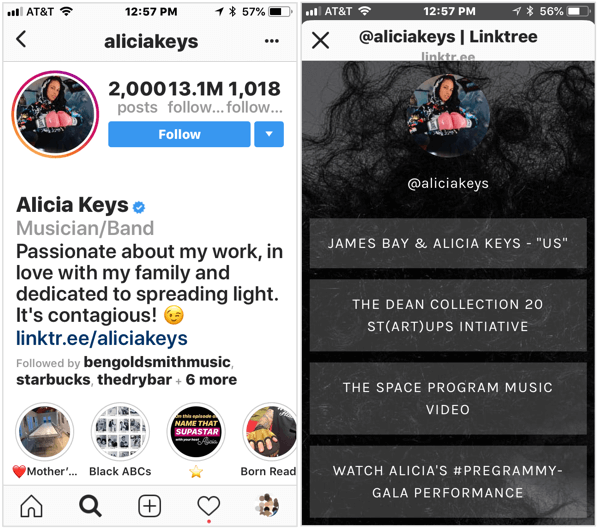
You could also use this feature to @mention a customer who won a giveaway or was on a recent podcast episode. By giving back, your business benefits because anyone you @mention has the option to add your content to their own story to share it with their followers. #3: Use the Instagram Bio Link to Drive Traffic to Resource Landing PagesAs your business grows, your number of products grows too. For instance, you may have a blog, Facebook Live show, podcast, services, or even an online community. How do you highlight all of these channels without inundating your followers with a barrage of links or junking up your Instagram profile? Previously, if you wanted to do this with your profile, you had to edit the description in your bio, which could often look messy. But now there’s a better option. Instead of having to pick one link to show users on your profile, you can direct users to a landing page filled with all of the links you want them to see. To create a landing page with links, you can use tools like Linktree, Leadpages, Lnk.Bio, and Link in Profile. Once you set up your landing page, it’s quick and easy to update the links you show customers as your business expands.
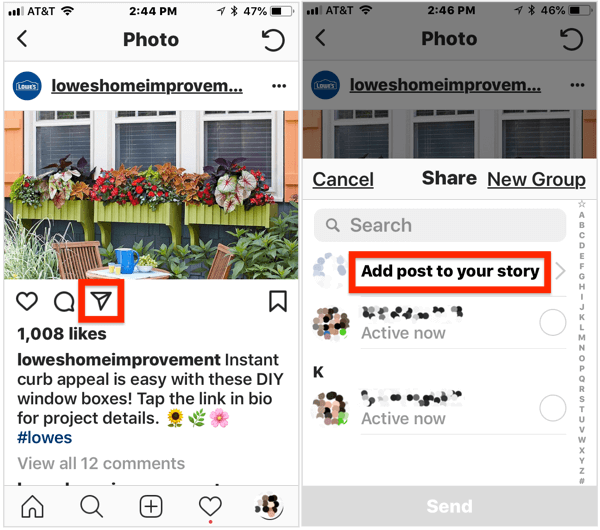
#4: Reshare News Feed Posts to Stories to Diversify Your ContentIf you struggle to come up with ideas for your Instagram stories or simply want to tweak your content mix, Instagram is adding a feature that lets you share public feed posts from other users directly to your stories. Resharing content from others can help you build stronger connections with those users, and hopefully they’ll reciprocate by sharing your content. This tactic also helps you diversify the content you share so it’s not always about your business. To add a public post to your story, open the post, tap the airplane icon below the image, and then select Add Post to Your Story from the pop-up menu.
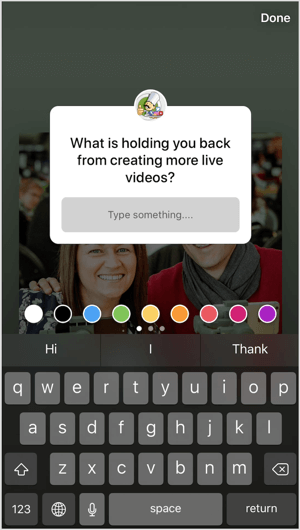
This feature is a great way to showcase user-generated content, highlight local events, and share inspirational content. You can also cross-promote posts from your own feed to capitalize on your best-performing content. #5: Add Questions Stickers to Gauge Core Audience Preferences in StoriesQuestions stickers for Stories is an Instagram feature that’s useful for businesses. While the feature itself is pretty basic, it packs a big punch. Adding questions stickers to your stories lets you poll your audience in an unobtrusive way. At the same time, you can use the feedback from your followers to inform your businesses initiatives.
To illustrate, you may want to ask your audience what type of content they want to see on your blog, get ideas for your IGTV channel, or gather feedback about the products you sell (or they want you to sell).
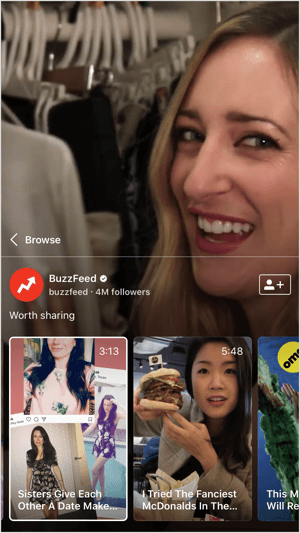
Questions stickers make it easy to engage your followers, while collecting valuable data to help your business improve its offerings and grow. #6: Broadcast on IGTV to Build a Mobile ViewershipYou’ve probably heard a lot about IGTV, Instagram’s newest product. IGTV is a mobile app for iOS and Android that lets you record and share vertical videos (up to 1 hour long) with your Instagram followers. Think of it like having your own video channel for your business. If you haven’t already, you first need to set up your IGTV channel and connect it to your Instagram account. From there, you can begin devising a strategy for it. Because an IGTV channels have similarities to a YouTube channel, you might adapt your YouTube content strategy for IGTV. Another option is to create and upload your own how-to videos (think BuzzFeed-style videos like the one below).
You can also use your channel to discuss an initiative in your business or share your latest blog post with viewers and prompt a discussion. Because Instagram is a mobile-first channel, IGTV also helps simplify your Instagram video content plan. You no longer have to guess which type of video to create. IGTV caters to the mobile user and can help you strengthen relationships with your audience. .What do you think? Are you currently using any of these new features with your Instagram presence? If so, which ones are you seeing the most impact from? Let us know in the comments below.  Social Media via Social Media Examiner https://ift.tt/1LtH18p August 1, 2018 at 05:02AM
0 Comments
Leave a Reply. |
Amazing WeightLoss Categories
All
Archives
November 2020
|

 RSS Feed
