
|
https://ift.tt/2OthPGu
Facebook to ban white nationalism and separatism content on platform https://ift.tt/2I2nWk9 
 
Facebook recently announced it will ban white nationalism and separatism related content after speaking with experts. The ban will specifically target posts that praise, support, or represent white nationalism or separatism. Read more... More about Facebook, Mashable Video, Mark Zuckerberg, Ban, and White NationalismSocial Media via Mashable https://ift.tt/2DCFv97 March 28, 2019 at 01:51PM
0 Comments
Twitter introduces a battery-saving ‘Lights Out’ dark mode option https://ift.tt/2CFyVwo As promised back in January by Twitter CEO Jack Dorsey, the company today is rolling out an even darker version of the app’s existing dark mode. Before, Twitter’s dark theme was more of a blue-ish shade instead of a true black, which not everyone seemed to like. Now, there’s an optional setting that makes the current dark mode more of a pitch black. To use the new feature, you’ll first visit the Twitter app’s “Settings and Privacy” section, then click on “Display and Sound.” From there, you can toggle on the “Dark mode” which enables the current blue-black theme. A second option, “Lights out” is offered below. If checked, dark mode ditches the blue tones and becomes black instead.
It’s an interesting choice to not just darken the existing theme, but rather introduce a third option. Most apps offering a dark mode don’t do this – they just offer a bright, white theme and another darker one. Twitter – which doesn’t always do things by the book to say the least – has gone a different route. A tweak to the dark mode may seem like a minor adjustment to be concerned with, but dark modes today have grown in popularity as larger phone screens became the norm – particularly because they can help to conserve battery life on high-end OLED devices. (And especially on apps used as regularly as Twitter!) Some people also feel a dark mode is just easier on the eyes when apps are used for long stretches of time. The topic of dark modes even made its way to The Wall Street Journal which made a case for darker themes becoming standard not only for the battery benefits, but also because they may help lessen device addiction and improve sleep. Today, a number of apps support dark themes including YouTube, Google, Medium, Reddit, Instapaper, Pocket, iBooks, Kindle, Google Maps and Waze, and others. WhatsApp is also reportedly working on a dark mode, according to recent reports. Dorsey first announced Twitter’s plans for a new dark mode a few months ago, in response to a customer complaint which called Twitter’s dark mode a “weird blue.” Twitter says the new Lights Out mode is rolling out today. Social Media via Twitter – TechCrunch https://techcrunch.com March 28, 2019 at 01:15PM
https://ift.tt/2FDXyKf
This is Your Brain on Visualization https://ift.tt/2WANGrV How long do you think your attention span is? Maybe a minute or even two, right? Sadly, your attention span is 8 seconds. That’s one second shorter than that of a goldfish. So, when you show people paragraphs of text, don’t expect them to read it all. But did you know visualizations such as infographics are thirty times more likely to be read than text? And if that’s not enough to convince you to start using visualizations within your marketing, maybe this infographic will change your mind: Click on the image below to enlarge:
Click here to view an enlarged version of this infographic. ConclusionYou should consider creating infographics because they drive 250% more traffic than ordinary blog posts do. If you don’t believe me, just look at Mashable… they get three times more tweets when a post includes an infographic than when it doesn’t. Plus, 65% of people are visual learners, which means showing data in a visual format will make it easier for your readers to learn. Once you create an infographic, make sure you check out this post as it will teach you how to make it go viral. Embed This Image On Your Site (copy code below): Social Media via Quick Sprout https://ift.tt/UU7LJr March 28, 2019 at 12:26PM
https://ift.tt/2UfQ3m7
How to Create a Popular Infographic https://ift.tt/2HLchXC
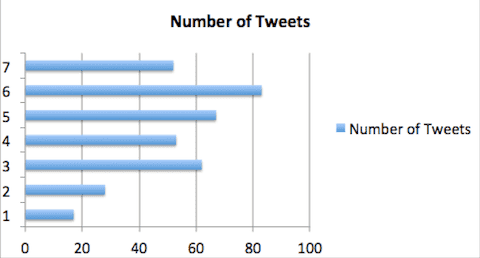
You already know infographics work. The question is: how can you create one that will be popular? If you are like me, you probably don’t have a design bone in your body. But don’t worry; that shouldn’t stop you. When I first started creating infographics, I used to hire firms like Column Five, who are great at creating them. The cost, however, was just a bit too high for a startup. So eventually, I had to learn the whole process from A to Z. Here are the steps you need to follow to create a popular infographic: Step #1: Find your data sourceThe most important element in creating an infographic is your data source. It doesn’t matter how pretty your graphic may be. If the data within the graphic sucks, it won’t do well. So how do you find good data sources? The easiest way is to browse all the blogs within your space and look for the ones that have data within them. From there, sort the posts by the number of tweets and likes. The posts that contain the most data and are the most popular tend to be the ones that do well as an infographic. If you can’t find popular posts that are data rich, you’ll have to come up with your own ideas and find your own data sources. Sure you can try to hire someone on oDesk to help you out, but they probably won’t do a great job. You yourself are going to have to create data sets through research or hire a professional blogger for a few hundred bucks to create the data set for you. You can usually find these bloggers by posting a job listing on Problogger. Step #2: Finding a designerEveryone has their own opinion on what a great infographic looks like. So, how do you find a designer that can please everyone? Sadly, you can’t please everyone, but you can please the majority. The thing with designers is that their biggest critics are other designers. So if you can find a designer that other designers love, you’ll be in good hands. Through sites like Dribbble and Behance, you can search for the word “infographic” to find designers who know how to create infographics. You can then look to see which ones have the most likes, favorites and comments as those designers are most likely respected by other designers. Once you have a list, hit them up and ask how much it would cost for them to create an infographic. Most of them won’t have a flat rate; instead, they will have an hourly rate of $50 to $85. It may seem like a lot of money, but they can typically create a graphic within 5 to 7 hours. So you should only be paying anywhere from $250 to $595 per graphic. Step #3: Create a wireframeBefore you create an infographic, you need to lay out the data points into a story. Each data point should flow into the next one. And there should only be 6 main points/parts to the graphic, or else it will be too data rich. What I’ve found is that when a graphic has 6 main data points, it tends to get more tweets compared to infographics that have 5 or 7 main data points.
Once you’ve laid out the data, you now need to work with your designer to think of ways to represent the data in a visual format that is easy to understand. Whether it is through graphs, drawings or visual examples, the data points need to be really easy to understand. If they aren’t, it defeats the point of creating an infographic. After you’ve laid it all out, you want to give this set of requirements to your designer:
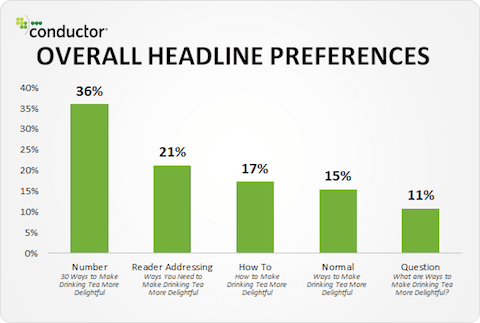
Step #4: Come up with a headlineNo matter how good your data or infographic is, if the title of your infographic sucks, no one will read it. It’s impossible for me to come up with a title for your infographic, but I can teach you what works best. Nathan Safran recently wrote a blog that broke down what headlines people click on the most.
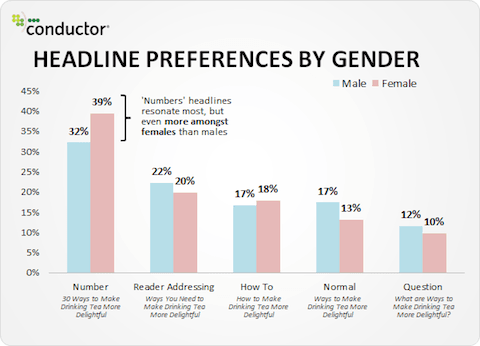
As you can see from the image above, 36% of the people prefer number-based headlines. A good example of this is “15 ways to boost your search engine traffic”. 21% of the people prefer reader-addressing headlines like “Why you ought to boost your search engine traffic”. And 17% prefer how-to headlines such as “How to increase your search engine traffic”. Based on this data, you should ideally create number-based or reader-addressing headlines for your infographics. Even when you break down the results by gender, it’s still clear that people prefer number-based headlines:
Hopefully that helps you come up with a headline, but if you are still struggling, follow tip number 1 in this blog post. Step #5: PromotionBefore you start promoting your infographic, make sure you create an embed code so that people can easily share the infographic on their websites. If you are using WordPress, you can use the embed code generator plugin. Once you have an embed code, you should create a list of all the blogs that write about topics related to your infographic. Once you have a list, you should email each of them using this simple template:
The template above may seem boring, but roughly 8% of the people you email should be embedding your infographic. If you can’t get at least 8%, it either means your infographic isn’t that great or that you are emailing sites that are too big like Huffington Post. You should ideally be targeting blogs that have a PageRank of 6 or lower as those blogs are more likely run by 1 individual versus a company that moves really slow. In addition to that template, you can also submit your infographic to the following directories:
Lastly, you should use the search feature on Twitter to find users who tweet about topics related to your infographic and direct-message them asking if they could tweet your infographic to their audience. Most of these users will ignore your direct message, but around 5% of them will tweet it to their audience. If you are unable to get 5% to tweet it, it means that your infographic isn’t great or that you are direct-messaging users with over 10,000 followers. As long as you direct-message people with under 10,000 followers, you’ll be fine. ConclusionBy following the steps above you should be able to create an infographic that does well. And if you create a few infographics that don’t go viral, don’t worry about it. It usually takes a few tries to get it right even if you know what you are doing. Learn from your audience as they may prefer infographics on certain topics over others. As long as you do this, you should be able to generate traffic and backlinks to each of your infographics. Social Media via Quick Sprout https://ift.tt/UU7LJr March 28, 2019 at 12:21PM
https://ift.tt/2tSE531
Frustrated trying to reach new followers on Instagram? I tried this automation bot and sh*t, they are GOOD! https://ift.tt/2UYvjwz The first thing that 87% people do when performing a background check on a brand is to check its Instagram page. Checking Instagram is a huge part of the modern-day consumer’s vetting process and it plays a huge role in determining whether or not someone will end up buying from that brand. That is exactly why I decided to do this experiment in the first place. I committed to using a $9.99 Instagram growth software / bot called Sara for the next year at our agency, as a marketing test. So… what happened? The great thing about Instagram Automation, especially Sara, is that it’s incredibly easy to get started with it, and all you have to do is sign up for free, choose your targets and watch everything grow automatically. Now, there are two ways to minimize the amount of time it takes to grow and maintain your brand’s Instagram account:
In this article, I’m going to explore the second alternative because it’s by far the most convenient and cost-effective one. Voted Best Instagram Automation Tool / Bot Last 3 years SaraSara is the best Instagram automation platform on the market and it’s known for its experienced complementary social media managers who can help you at any step along the way. A lot of their clients have been able to gain real Instagram followers, and grow their accounts organically because of the tried and tested methods that Sara uses to increase followers and drive engagement. They interact with 140,000 accounts on your behalf each month at 1/60th the cost of a facebook ad! This means no more having to buy likes and comments, and at the end of the day, you’ll have genuine followers that follow your Instagram page because they like your vision and want to support your brand. This is the 3rd year Sara was ranked as the best instagram growth service in the US.
Sara is an advanced social media management service that will help you grow your Instagram account organically, and using it usually leads to significantly improved engagement. They are known for helping their users make money on Instagram by bringing the right followers to the page and growing at 40-60x the normal rate. It’s definitely not about getting fake likes and followers, so you can rest assured that you’ll be gaining valuable supporters. It’s a service that’s trusted and widely used by social media professionals as well. Conclusion Running a modern-day business requires more than just managing operations, developing new products or engaging in traditional promotional activities. You also have to maintain a strong online presence, especially on Instagram. A lack of presence on Instagram or discovering a poorly managed account is a sign of unprofessionalism and usually sends the customer looking elsewhere. Well, if you’re one of those brands that only post once in a while and you don’t engage with your audience on a regular basis, then you might be losing out on a lot of potential sales. This is a time-consuming endeavor and since most entrepreneurs feel like they don’t have enough hours in the day already, it’s good to know that there are convenient tools that one can use to decrease the workload. The post Frustrated trying to reach new followers on Instagram? I tried this automation bot and sh*t, they are GOOD! appeared first on Social Media Explorer. Social Media via Social Media Explorer https://ift.tt/2onGYog March 27, 2019 at 06:19PM
https://ift.tt/2zJVuA1
Copywriting https://ift.tt/2FEWyHi Copywriting may be the most important and foundational skill in all of marketing. Every ad campaign requires it and it’s used across every single marketing channel. As a marketer, I’m so thankful that I spend some of my early years improving my own copywriting skills. That time continues to pay massive dividends in my career and across my businesses. When folks ask me what areas to focus on in order to become a great marketer, my answer is always copywriting. On Quick Sprout, we’ve put together the best practices and resources to learn copywriting. There’s no need to dig through arhiac tombs of copywriting legend, we’ve found the best tips and tricks for you. Start here to learn the basics of copywriting: In copywriting, one item matters more than everything else put together. Headlines. That’s right, get the headline perfect and your job is basically done. A common rule is to spend 50% of your time on just the headline and the other 50% on all the other copy that you need for your campaign. I used to think that rule was hyperbolic in order to prove a point, now I believe it’s not aggressive enough. I’d rather spend 70 or 80% of my time getting the right headline. Many of the biggest wins of my career have been from finding a better headline that instantly increased lead flow by 30%. I’ve run hundreds of A/B tests, no other element carries as much weight as a headline. After you’ve got the basics of copywriting down, spend the bulk of your time learning how to write better headlines:
Once you have a got handle on how to write headlines, it’s time to learn the tricks and hacks of copywriting. There are quite a few out there. All these little tricks will add up and give you a huge edge in persuasion.
When learning how to be a better copywriter, it’s tough to know how much copy to write. Does short copy or long copy convert better? Some expert copywriter’s will answer this question with: “The copy should be as long as it needs to be and no longer.” They may be right but that answer is unsatisfying. We break down a better answer in Long vs. Short Copy – Which is Better? People also love to argue over what matters more: design or copywriting. Designers love design. Copywriters love copy. I believe that it matters how design and copy blend together, we go into detail in How to Combine Copy and Design for Optimum Results. While I love tricks and best practices, all of my major wins have come from deep research and nonstop testing of ideas. During my A/B testing programs, I’d only see 20% of my tests become winners even when I was completely convinced that each test was a brilliant idea. These days, I start by doing deep copywriting research to understand my market as much as possible, then I jump into back-to-back copywriting testing until I find the option that works the best. Then whenever I’m stuck, I go back to the research, brainstorm some more tests, and keep cycling through. Sooner or later, I find the next big winner. Finally, it’s time to close the sale and convert your prospect into a customer. Lots of folks hesitate here, it can feel sleazy to ask for the sale. There are lots of ways on how to go for the sale in an authentic, genuine way that also works. Check out How to Close the Deal with Your Copy to see how. Social Media via Quick Sprout https://ift.tt/UU7LJr March 27, 2019 at 03:11PM Level Up Your Digital Campaigns by Using Automation with Mailchimp https://ift.tt/2HHTGvx Email marketing is one of the most effective ways of promoting a business, moving prospects into your sales funnel, and giving value to loyal customers. However, running marketing campaigns manually can be highly tedious especially if your business has a rapidly growing email list. This is why we need the support of automation – to automatically handle repetitive digital marketing tasks. As a business owner, one of the biggest wins you can achieve is to convert as many prospects as you possibly can into paid customers, all this in a personal and relevant way. This is exactly what you can achieve by automating your email campaigns and follow-ups. There are many marketing tools for this job, but MailChimp is hands down one of the most effective software you’ll find on the market today. Why use automation with MailChimp?Like in any other activity or process, automation is meant to make running an online business easier. For example, with a marketing tool like MailChimp, you can easily enhance the process of creating email lists, data collection and segmentation depending on your marketing goals. Additionally, you can add new subscribers into an email list and send them personalized welcome messages. If you also want people to sign up for special offers and convert them into returning customers, automating with MailChimp could be a great starting point. Another reason to use automated marketing tools is that you can track your sales and follow up customers based on their purchases. Yes, automation can do all this for you. In the following section, we expound on what you can achieve with MailChimp and other related marketing tools. Create sign up forms on your websiteLet’s admit it, every business fancies having as many people subscribing to their list as possible. A good way to do this is to create appealing sign-up forms that you embed on your website. While it’s possible to add these forms manually, it requires some knowledge in web design and programming, which of course could be discouraging to people that are less tech-savvy. Luckily, you don’t need to go through all these hassles especially now that most marketing tools allow you to customize sign up forms using a simple drag and drop editor. Customize your autoresponder emailsTo increase open and click through rates for your emails, it’s always a good idea to personalize the most important ones like the sign up confirmation and welcome emails. MailChimp, among other marketing tools, allow you to set up a customized series of autoresponder emails. This offers a great way to earn credibility and build productive relationships with your subscribers. The aim of setting an autoresponder series is to help the right customers know you better, and gradually introduce them to your product offerings. From here, you can drive potential customers into your sales funnel by enticing them to purchase products that will benefit them. If you are using MailChimp, you can easily create such an autoresponder series for your campaigns in the “workflows” section. Track and measure your campaignsAs a business owner, one of your key responsibilities is measuring your efforts and determining what works and what doesn’t. In a digital campaign, this could entail monitoring your email campaigns to figure out the key areas that need improvement. Using automation tools will help you to track your performance by providing detailed reports and statistics collected from your campaign. MailChimp, for example, allows you to see all the crucial metrics such as open rates, click through rates, bounce rates, the number of people who’ve signed up or unsubscribed from your list, etc. This is sufficient information to help you improve your campaigns. To begin, if your campaigns are recording low open rates, you can try to work on your email subjects. On the other hand, you can choose use A/B testing to check which email formats do better if looking to boost your click-through rates. Finally, if you receive too many spam reports or bounce-backs, improving your email content and adjust your mailing frequency could just be the solution. Leverage the power of integrationPopular marketing tools such as MailChimp can easily integrate with a wide range of third-party business systems and applications that you’re possibly using in your business for other processes. A few notable opportunities you may consider here include Google Analytics, PayPal, Facebook, Twitter and Pipedrive integration among others. Most of these integrations enable you to sync customer data 2-way between the respective tools which means you can access useful data from a single point and as a result enjoy improved overall efficiency. ConclusionOne of the most effective ways of enhancing customer engagement and loyalty when running an online business is by automating your marketing campaigns. Besides streamlining the sales process, automation can also help you cut down on mundane administrative tasks so you’re able to focus on other more critical functions in your business. Many online businesses have successfully put their marketing campaigns on autopilot by using automation with MailChimp, so why not you? The post Level Up Your Digital Campaigns by Using Automation with Mailchimp appeared first on Social Media Explorer. Social Media via Social Media Explorer https://ift.tt/2onGYog March 27, 2019 at 01:37PM 6 Essential Reasons to Study Social Media Marketing https://ift.tt/2FvKHKi Social media is vital to digital marketing and companies use it to reach millions of potential and current customers. Those with academic expertise in this area gain an immediate edge over competitors in the job market. Here are six ways that social media marketing optimizes customer conversion rates: Improve Brand AwarenessSocial media should be a stress-free, lucrative digital marketing vehicle. To begin with, companies should open social media profiles so that they can start networking. When marketers devote a few hours a week to their social media strategy, the user experience is enhanced. Hiring someone who already understands the importance of conversion rates and customer engagement gives companies a leg up on the competition. Reduce Costs and Increase EffectivenessSocial media marketing is the most cost-effective advertising option. Most platforms are free to sign up for and sell ads that let companies target niche markets. This makes the ads far more successful in influencing prospective customers than traditional options. Graduates with expertise in this area can help companies significantly increase an organization’s return on investment. Engage with CustomersThe more a company interacts positively with target demographics, the higher conversion rates rise. Setting up a direct communication channel on social media increases engagement and conversion. By speaking with customers and providing value-added content, a company earns the trust and respect on its online community and great insight into potential product enhancements. Marketplace AwarenessMarketplace awareness involves observing activity on a company’s profile which reveals customers’ opinions and interests. This is a unique feature of social media that isn’t available with other marketing channels. As a research tool, a company’s social media platform helps marketers better understand customer expectations and pain points. With a large following, it’s possible to examine other qualities of consumers likely to use each product. Increase TrafficOne of the main benefits of social media is the way it elevates website traffic. Sharing brand content on social media attracts users and entices them to visit the company’s website or storefront. Increasing the quality of shared content on topics customers care about also increases inbound traffic and conversion opportunities–and, ultimately, higher sales. Enhanced SEO RankingsSocial media is a pivotal element in search result rankings. To obtain higher rankings, it’s important to understand that SEO requirements are continuously changing. Therefore, simply optimizing a website and adding new content isn’t enough. Carefully curated content increases brand validity, which improves search engine results. This feat takes a certain sensitivity that comes with trial and error and the right educational background. Social media marketing is a great opportunity for startups as well as established brands. Companies are striving to onboard talented marketers with an advanced understanding of what drives better search results and improved customer loyalty. The faster they can do so, the more likely they are to snatch market share from the competition. Further, maintaining a strong social media presence helps with customer retention and makes it harder for competitors to steal a company’s hard-won customer base.
The post 6 Essential Reasons to Study Social Media Marketing appeared first on Social Media Explorer. Social Media via Social Media Explorer https://ift.tt/2onGYog March 27, 2019 at 01:37PM
https://ift.tt/2JFVkiS
The small corner of Instagram dedicated to temporary wallpaper is uncommonly magical https://ift.tt/2Yt3XRk This post is part of Hard Refresh, a soothing weekly column where we try to cleanse your brain of whatever terrible thing you just witnessed on Twitter. When I was in middle school I begged my mom to let me redecorate my room. I wanted light blue walls, realistic-looking clouds painted on the ceiling, and adhesive glow-in-the-dark star decals scattered around so that when I went to sleep at night it would feel like I was looking up at the sky. My design plans were admittedly a bit ambitious — I only ended up with the blue walls. But I did have a formative conversation with my mom about wallpaper along the way. When deciding on a paint color, I asked my mom if anyone still used wallpaper. She explained that while some people still liked it, she personally thought it was a bit dated. After she reminded me of the hideous yellow-and-burnt-orange-patterned paper that used to be in our kitchen, I, too, decided I was anti-wallpaper. Nearly every piece of wallpaper I've seen since then has been a real eyesore, so for most of my adult life I've remained confident in my opinion. Until the day I was scrolling through Instagram and a bold floral print atop a subtle blush background caught my eye. In an instant, everything changed. The photo of the Instagram-worthy wall above was shared by my friend Danielle Tullo, who had recently redecorated her apartment after enlisting the help of Jessica McCarthy, a Decorist interior designer. "I wanted my rental to feel like mine, regardless of the fact that I don't own it," Tullo said. She now finds "nothing more tranquil than returning home to a space that's as vibrant yet relaxing" as her new, wallpapered living room. Tullo's living room glow up was so undeniably gorgeous that it sent me down an Instagram rabbit hole. After scouring the site for other patterned accent walls, my negative opinions about wallpaper began to peel away — and I started to feel compelled to give my rooms some extra sprucing. As I explored hashtags like #temporarywallpaper, #removablewallpaper, and #peelandstickwallpaper, I became increasingly soothed. Those colorful patterns, flecks of gold, and illusions of marble or wood can entirely transform a room and really leave it with a newfound sophistication or sense of warmth.
It wasn't long until Temporary Wallpaper Instagram became one of my favorite social media havens. Now, I turn to the aesthetically pleasing home designs whenever my eyes need a break from consuming news (like, always). Tullo suggests anyone who plans on living in a rental unit for more than a year try out temporary wallpaper. If you're going to splurge on a redesign and aren't the most handy person in the world, she also recommends hiring someone to apply the paper. She got some help from TaskRabbit and though it cost a bit more, she feels it was "absolutely worth it" to ensure her bubble-free peace of mind. "It just really made the space feel like a home," Tullo said of the temporary wallpaper. "It's low-lift, affordable, and transforms a space. I genuinely feel happier and more relaxed since installing [it]." Want your own Insta-worthy wall to gaze at? You can try Etsy, where Tullo purchased her paper. There are also options ranging from temporary wallpaper companies like Tempaper to larger retail stores like Target. One day I plan on taking the plunge and investing in some temporary wallpaper myself. Until then I intend to live vicariously through the Instagram community like any other resourceful, social media-dependent human being would. Happy scrolling! Social Media via Mashable https://ift.tt/2DCFv97 March 27, 2019 at 01:02PM
https://ift.tt/2ynNked
Twitter took over a user’s account and joked about reading their DMs https://ift.tt/2FFE2yy At a time when tech giants have come under fire for failing to protect the private data of their users, Twitter took over one of its user’s accounts for fun and then tweeted jokes about reading the account’s private messages. The account, to be clear, was willingly volunteered for this prank by social media consultant Matt Navarra, who’s well-known in some Twitter circles for being among the first to spot new features on social media platforms like Twitter and Facebook. In fact, TechCrunch itself has credited Navarra on a number of occasions for his tweets about features like Twitter’s new camera, Facebook’s “time spent” dashboard, Facebook’s “Explore” feed, Instagram’s “Do Not Disturb” setting, and more. Several other tech news sites have done the same, which means Navarra’s private messages (direct messages, aka DM’s) probably included a lot of conversations between himself and various reporters. He’s also regularly tipped off about upcoming features or those in testing on sites like Twitter. One could assume he has regular conversations with his network of tipsters through DM’s, as well. Initially, we believed the whole “account takeover” was just a joke – perhaps a case of Navarra poking fun at himself and his own obsession with social media. After all, “takeovers” are a common social media stunt these days, particularly on Instagram Stories. But they usually involve an individual posting for a brand – not a brand posting for an individual. Navarra had the idea on Monday, and tweeted out a call for someone to run his account for a day. He tells TechCrunch he had a tragic incident in his family, and offered the chance for someone else to tweet as him for the day so he could take a day away from Twitter. He also thought it could be fun. (Twitter tells us he remained logged in while the company was tweeting from his account, however.)
Navarra says he was surprised that Twitter volunteered for the job, and he agreed to give them control. Most of his followers – fellow social media enthusiasts – were excited and amused about the plan, which they touted as “epic,” “gold,” and a “great idea!”
Navarra on Tuesday tweeted out photos of himself handing over his account key to Twitter in a DM thread.
On Tuesday, Twitter began tweeting as Navarra. This mostly involved some gentle roasting – like tweets about muting people asking for an “edit” button, and other nonsense. Twitter said then it was going to tweet out some of Navarra’s drafts, and posted things like “who has a Google Wave code?” and something about BBM, among other things.
But other jokes were less funny. Twitter said it was reading Navarra’s DMs, for example. (At the time of posting, these embedded tweets were posted from “Tweet Navarra” as Twitter temporarily changed the account name while it was tweeting as Matt. But it’s been since changed back, so these embeds show the current account name, “Matt Navarra.”)
The company then posted a screenshot of his Direct Message inbox to poke fun at the fact that he had DM’d with an account called “Satan,” in one incident.
Navarra played along, joking from his new account for the day @realmattnavarra for Twitter to “ignore that DM from Zuck.”
While I personally had not DM’d Navarra anything compromising, I can’t speak for everyone who had ever messaged him. Even if Navarra had signed up to have his account taken over, those he messaged with had not volunteered to have their privacy violated. And though my conversations with him were innocuous, it was disconcerting to know that my message history with a private individual was accessible by someone at Twitter. Reached for comment, Navarra claims his “DMs were all deleted” before Twitter entered his account. Unfortunately, there’s no way to verify this as DM deletion on Twitter is one-sided. That means that even if he deleted the DMs, the person who sent them could still view them in their own inbox. It also appears from the screenshot Twitter posted (above) that the entire inbox hadn’t been wiped. At the end of the day, Navarra may have been misguided with this stunt – perhaps he should have first demonstrated that he had cleaned out his inbox by posting a tweet of it being empty – but he is not a public social media company. It’s completely nuts that Twitter thought this was a funny idea. Whether or not Twitter actually saw private conversations, it’s bad optics for the company to take over a user’s account for a lark then joke about violating users’ privacy at a time when tech giants like Facebook and Google are under threat of increased regulations for not taking care of users’ private data. Twitter did not provide a comment, but confirmed it logged into Navarra’s account for a few hours for the takeover in the hopes of starting fun conversations with his followers. Social Media via Twitter – TechCrunch https://techcrunch.com March 27, 2019 at 11:37AM |
Amazing WeightLoss Categories
All
Archives
November 2020
|


 RSS Feed
