
“We are a landscape of all we have seen.“
Isamu Noguchi.
|
https://ift.tt/2v3e1mR
“We are a landscape of all we have seen.“ Isamu Noguchi. https://ift.tt/2LBhDaa 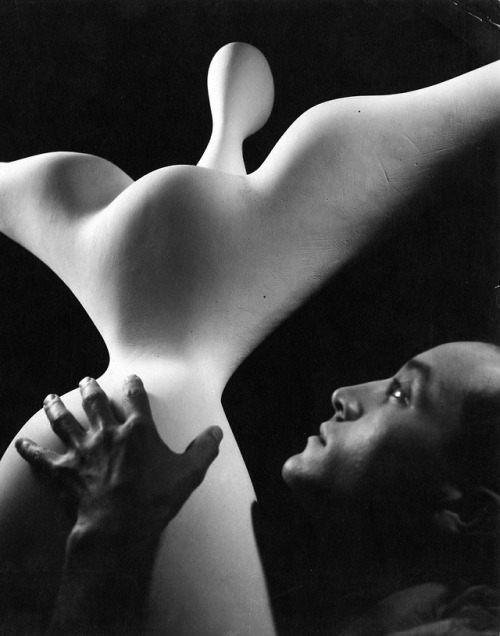 “We are a landscape of all we have seen.“ Isamu Noguchi. Photography News via The Impossible Cool https://ift.tt/2a18MfQ July 30, 2018 at 05:10PM
0 Comments
https://ift.tt/2Apz4VV
DJI Mavic 2 drones leak with Zoom and Pro model variants https://ift.tt/2AviC6m  DJI will release two variants of its upcoming Mavic 2 drone, according to a leaked product listing. The Mavic 2, which hasn't been officially announced, appeared in a catalog issued by UK retailer Argos, which lists two model variants: the Mavic 2 Pro and Mavic 2 Zoom. The catalog listing, which was shared on Twitter by Brett Thake, describes the DJI Mavic 2 as a small drone with a 45mph / 72kph top speed, 31-minute max flight time, omni-directional obstacle sensing with APAS and Active Track 2.0, and an 8km / 5-mile transmission range, including 1080p video transmission. The Mavic 2 Pro is described as having a 1-inch CMOS Hasselblad camera, while the Mavic 2 Zoom variant advertises a 24-48mm equiv. 2x optical zoom. DJI confirmed the leak in a statement to CNET, explaining that catalog was preprinted and scheduled before July 18, the date DJI originally planned to launch the Mavic 2 Assuming the catalog details are correct, this represents a significant upgrade from the original Mavic Pro and Pro Platinum. In particular, a 1-inch CMOS sensor should deliver significantly better performance than the 1/2.3" sensor found in the earlier models, and has been one of the most frequently requested features from users. Additionally, The Verge is reporting that users will be able to switch lenses on the camera. The new models will also see an increase in flight time from 27 minutes to 31 minutes, as well as a top speed increase from 40mph to 45mph. Pricing information was not leaked by the catalog, but it does feature a partial image of the two drone variants. DJI confirmed the leak in a statement to CNET, explaining that catalog was preprinted and scheduled before July 18, the date DJI originally planned to launch the Mavic 2. The event was ultimately postponed, but Argos apparently didn't get the memo, proceeding with publication of the catalog including the Mavic 2 details. We've reached out to DJI for a statement and will update this article with any new information. "This early look just hints at the many exciting features and capabilities DJI will announce at the proper time," the company said in its statement. Via: DroneDJ Photography News via Articles: Digital Photography Review (dpreview.com) https://ift.tt/i0r8o5 July 30, 2018 at 03:14PM
https://ift.tt/2M0cggN
It’s a real challenge to portray the true essence of a destination and to show it to the world the way you see it. This genre, travel photography, calls for immense creativity, technical expertise, and unflinching dedication to the art. Every little detail that can weigh off your shoulders count. I have been traveling across the most remote corners of the country and beyond for years now, and the best results are a boon of some of the non-photography decisions I’ve made. When you are on the road for long, you realize the real beauty of a travel shot goes deeper than its aesthetic value. All the technical training in the world, the best gear money can buy, and time-tested templates of composition can only take you so far. But then comes the real work. The stuff that makes a photograph, speak.
Here are six non-photography tips that will help you improve and super-charge your travel photography. #1 – Go soloThis insanely frightening, uncomfortable, non-economic travel decision is also the most rewarding of all. This might mean, you will have to make all the plans, work out all the logistics, and deal with any issues by yourself. But, in a very unexpected way, this is what you need. Travel photography does not allow for the luxury of blending and adjusting to plans of your co-travelers. The darkest hours, the first light of the sun, the busiest markets – what catches the artist’s eyes are endless. To be at the right time and the right place, you will need the freedom you only get when you have no strings attached.
You must be ready to ditch your plans and make new ones at a snap, and be prepared for longer stays to get that one single extraordinary shot. Besides, you can always find backpacker hostels, local transport, and the denizen cuisine to fit into the budget; even without a companion to share the charges. #2 – Learn the tongueThis tip is not just for the special ones with an eidetic memory though. Practically, all you need are a few dozen commonly used phrases and words to get the ball rolling. You will be amazed at how useful a little conversation with the locals can turn out to be, albeit with broken wording and all.
Learning the tongue goes beyond speaking a few words. It’s also about how you approach the culture and the people within. You have to understand them, think like them and start feeling their home like they do. That doesn’t just open up new doors and undiscovered locations but puts truth in the photographs. The more you blend in with their culture, the more un-alienated the subject can be perceived. #3 – Take the local choice
The tourist trails are often unrevealing and pompous. The rustic secrets, the basic ingredients to amazing travel photographs need to be chased by getting off track. This might mean, taking the bumpy bus rides, eating spicy street food, cramped roadside shows, and everything over and under. It adds an amazing perspective, nothing else can provide. Look for couch surfing and home-stays. Try the local cuisine and home-made meals. Take the local roads and transport, and even take part in the native leisure and social events. All of these things will add rocket fuel to your images.
#4 – VolunteerTaking time off from your camera sounds crazy, right? Being a part of the local’s life, besides gives an understanding of the destination, can be translated into unique perspectives, flavors, and themes in your work. The financial freedom, longer stays and new acquaintances are also invaluable.
This can be extended to work exchanges, internships, or any other short-term work you can find. Sites like Workaway, Volunteerhq, Helpx offer tons of opportunities all over the world. Deviating a little, one can consider online work, that can enable extended stays in a single place. The goal is to try and get an inclusive feeling into the community and culture, standing in their shoes before photographing their homes. #5 – Stay fit. Stay resistant.
Being picky when traveling is the one biggest art killers. Compatibility of body and mind in extreme of conditions is the greatest tool you can ever have. A travel photographer needs to endure heat, rain, snow, and hail alike and still be ready to go. Training so you are able to walk for miles or travel for hours is worth the effort exponentially. Being able to sleep wherever, eat whatever, and tune your body to be able to function in diverse habitats, let’s you break the physical barriers needed to visit THE photo spot. A tired body can no longer push itself for perfection.
#6 – Be ready to take the leapAdventure and nature photography are close cousins of the travel genre, and mastering them too makes you a Jedi. Most of your favorite shots are from off-beat places only the deadliest daredevils venture out. Economic travel facilities and easy gear have saturated the internet with spectacular shots.
To make the difference, you have to see like no one has ever seen and go where no one has ever been. This might mean kayaking down the stream, cycling up a valley, hiking up a hill, or flying on a glider. Sometimes this might even mean, getting your own ride, staying in tents, and living off candy bars. And more essentially, have a heart filled with enthusiasm and craving for adventure. Every step forward past other photographers is a step forward to more unique travel shots.
ConclusionNone of these skills require special training or innate power to accomplish. All of them can and will be acquired over time. But to be ready with these in mind, you can get one step ahead of every other photographer in town. More than anything, a good travel photograph tells a good story and has a strong spirit to it. The best camera is what you have with you, or so they say. So, it’s time to hack into how you are going to make the best of it! The post Six Non-Photography Tips to Super-Charge Your Travel Photography appeared first on Digital Photography School. Photography via Digital Photography School https://ift.tt/29wB9CX July 30, 2018 at 02:04PM
http://3.img-dpreview.com/files/p/E~TS590x0~articles/1909439958/LEAD-IMAGE_HORIZONTAL_18_UrbanFashion_©BrettFlorens_BTS-0374_WEB.jpeg
You can now use Elinchrom's ELB 500 TTL light with Sony, Olympus cameras https://ift.tt/2Ovwfpt 
0
You can now use Elinchrom's ELB 500 TTL light with Sony, Olympus camerasElinchrom has announced a firmware update for its Transmitter PRO — formerly named Skyport Plus HS — that brings support for its ELB 500 TTL for Sony and Olympus cameras. Firmware version 2.1 for Sony and Olympus now includes TTL, High Speed Sync (HSS) and Hi-Sync (HS) functionality when used with the ELB 500 TTL. These features, which are described in detail on Elinchrom's website, bring more robust creative control to Sony and Olympus camera systems. Now, Canon, Nikon, Sony and Olympus users can all take full advantage of Elinchrom's different flash modes. Below is a full list of the release notes for firmware version 2.10 for Sony and Olympus (Canon and Nikon are on firmware version 2.20):
Elinchrom also notes in the press release that Fujifilm users 'will soon be rewarded for their wait.' According to Elinchrom, the Transmitter PRO for Fujifilm will be available in September 2018. You can download the latest firmware on Elinchrom's firmware updater page. View Comments (0) The LG G7 ThinQ is a flagship device with a dual camera that departs from the norm: rather than the usual tele/wide combo, it offers wide and super-wide angle lenses. While it doesn't produce class-leading image quality, it's a solid option if you favor wide-angle shooting. The Wandrd Prvke (pronounced 'provoke') is one of the best-looking and most functional camera backpacks on the market. The Fujifilm X-T100 is the company's least expensive X-series camera to include an electronic viewfinder. It shares most of its guts with the entry-level X-A5, including its hybrid AF system and 24MP sensor and, unfortunately, its 4K/15p video mode. Dials and sliders and buttons, oh my! This modular set of editing controls hopes to improve your photo editing workflow – for a price. The Sony RX100 VI is a spectacularly capable travel camera, combining a flexible zoom range with impressive autofocus. But there's no getting around the fact that it's an expensive camera, and a longer lens comes with certain trade-offs. Read on for our full analysis. The instant camera market is heating up, and with four formats and 15+ cameras to choose from, we felt it was high time to examine them all and pick our favorite. Whether you're hitting the beach in the Northern Hemisphere or the ski slopes in the Southern, a rugged compact camera makes a great companion. In this buying guide we've taken a look at seven current models and chosen our favorites. What's the best camera for a parent? The best cameras for shooting kids and family must have fast autofocus, good low-light image quality and great video. In this buying guide we've rounded-up several great cameras for parents, and recommended the best. What's the best camera for shooting landscapes? High resolution, weather-sealed bodies and wide dynamic range are all important. In this buying guide we've rounded-up several great cameras for shooting landscapes, and recommended the best. What’s the best camera costing over $2000? The best high-end camera costing more than $2000 should have plenty of resolution, exceptional build quality, good 4K video capture and top-notch autofocus for advanced and professional users. In this buying guide we’ve rounded up all the current interchangeable lens cameras costing over $2000 and recommended the best. Photography News via Articles: Digital Photography Review (dpreview.com) https://ift.tt/i0r8o5 July 30, 2018 at 01:42PM
https://www.youtube.com/embed/DjN-1K6C1xY?rel=0
The Efficiency of the Godox/Flashpoint AC Adapter https://ift.tt/2LzfziO
When I initially began to integrate the Flashpoint XPLOR H1200 into my workflow, HSS, portability, and the long-lasting lithium batteries were key factors in my decision to switch from Broncolor to Flashpoint/Godox. With the release of the AD600 PRO earlier this year, I began to add more units, enough to be able to light for any conceivable studio or location requirements. I may use as many as 20 lights for a setup, or just one, but for sure I like to always have a good number of spares available. On a recent shoot with singer/actress Becky G for the cover of Galore magazine, and another shoot for Vogue, I needed to have various setups ready at once. I used only a single AD600 PRO inside a modified Broncolor Flooter S for a series of dramatic sky shots in HSS mode, and also a late afternoon pool shot, but I needed 20 units to light a series of colorful, 2000s pop inspired studio shots. 



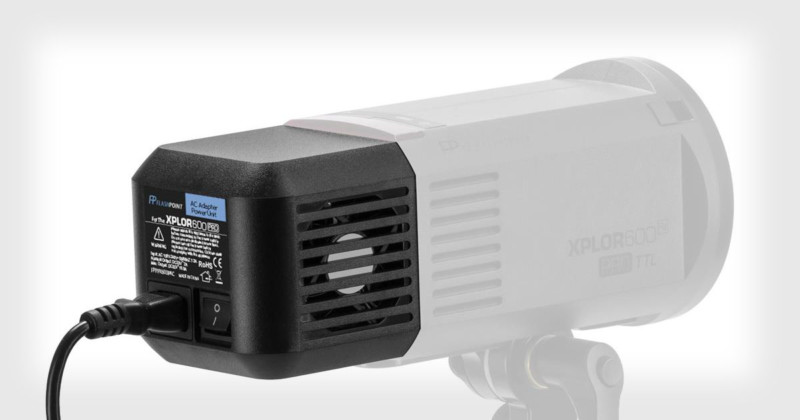
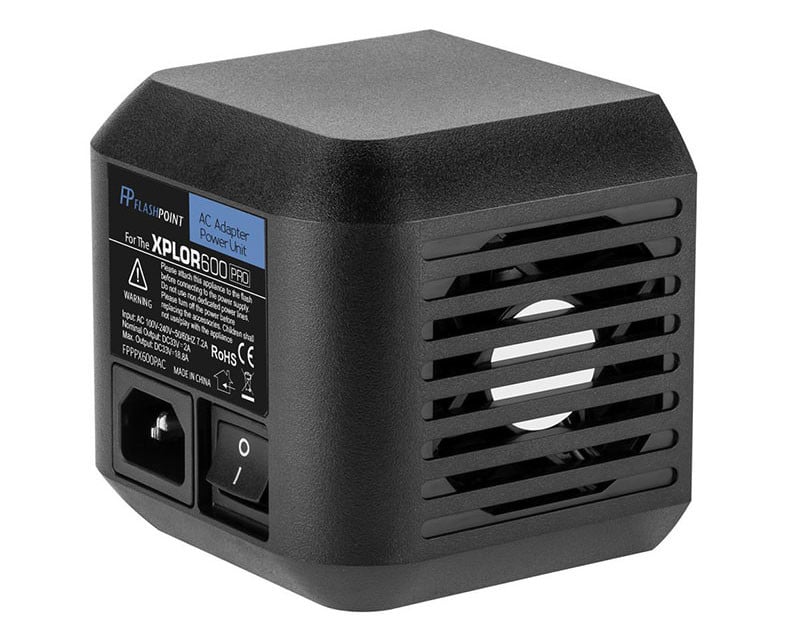
With so many units going at once, keeping track of the lithium batteries proved to be somewhat of a challenge. Coincidentally, Godox had just released an inexpensive AC adapter for the AD600 PRO at that time.
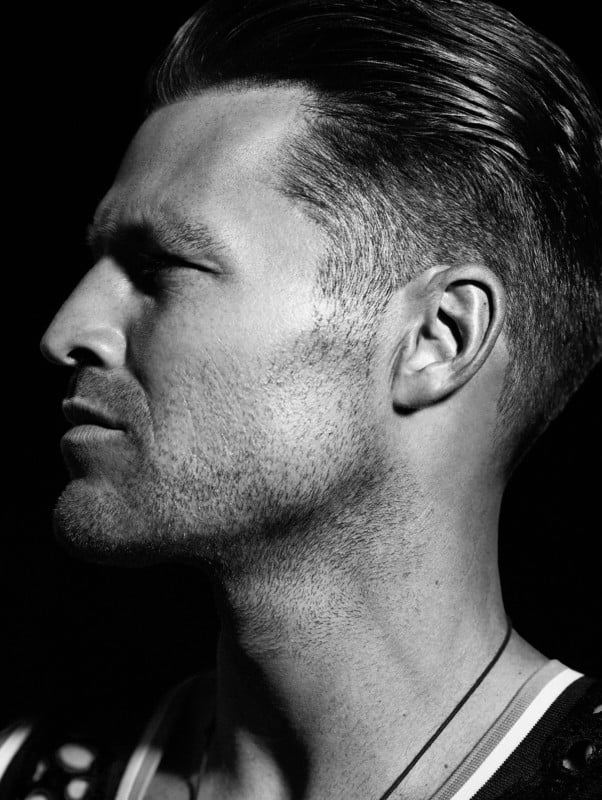
My concern with adding AC adapters was that nobody could tell me reliably how many units could be put on one typical North American breaker. I guessed that 3 or 4 units would probably max out one circuit. I worried that getting used to working with the AC adapters would limit the great flexibility I appreciated so much with the lithium batteries. Nonetheless, I decided to give the AC adapters a try. Last week, on a promotional shoot with NBC’s Extra, I shot a series of close up portraits of the program’s co-host, Mark Wright, a British soccer star turned TV personality.

I wanted to be sure to not run out of battery power during the taping of the shoot and decided to use an AC adapter for the first time. It went well and I appreciated not having to check battery levels constantly. The next day I became determined to once and forever find out how many units it takes to knock out the breaker! To my utmost surprise, I was able to run 12 Godox/Flashpoint EXPLOR AD600 PRO units at full power in HSS mode off one single circuit! This efficiency of draw is extraordinary and adds a huge benefit for anyone who needs to use multiple units when electrical power is available. Additionally, switching the AC adapter to a battery can be done in 2 seconds, so any concerns that adding the AC adapters would somehow About the author: Markus Klinko is an international fashion/celebrity photographer who has worked with many of today’s most iconic stars of film, music, and fashion. The opinions expressed in this article are solely those of the author. You can find more of Klinko’s work on his website and Instagram. Image credits: All photographs by MARKUS&KOALA Photography News via PetaPixel https://petapixel.com July 30, 2018 at 01:29PM
https://ift.tt/2LA1Lop
LG G7 ThinQ review https://ift.tt/2LDq70A

83%
Overall score
Jump to conclusion
The G7 ThinQ is the latest incarnation of LG's high-end G-series smartphone and comes with many of the latest must-have specs, including a Qualcomm Snapdragon 845 chipset, plenty of RAM and a high-resolution display. In the camera department the Korean manufacturer sticks to its strategy of offering an alternative to the tele-zoom systems of the competition by installing a super-wide-angle next to main camera in the device's dual-cam setup. For the most part, the LG G7 ThinQ produces images with balanced exposures, and even tackles low lighting conditions relatively well – though pixel-level detail suffers from overly aggressive noise reduction. Still, its super-wide lens is still relatively uncommon among high-end phones and like previous LG devices offers a surprising level of control over video settings. Behind both lenses you'll find a 16MP 1/3.1" sensor. According to the spec sheet the super-wide-angle offers an angle of view of 107 degrees (approximately 16mm equivalent) and an F1.9 aperture. The main camera comes with a 71-degree angle of view (approximately 30mm equivalent), an F1.6 aperture and optical image stabilization. The autofocus system uses both phase detection and laser assist. Key specifications:
The LG G7 ThinQ in useWe've had the chance to use the LG G7 ThinQ for a few weeks. In general use, the LG feels just like most recent high-end Android phones: swift and responsive. The screen is bright and clear and nice to view even in bright light. It's also worth mentioning that the LG still features a 3.5mm headphone jack and a microSD slot. Battery life appears to be a bit of a weak point, however. The 3000 mAh battery doesn't last as long as the beefier units in some of the competitors we've recently tested. Under heavy use, you'll likely have to recharge at some point in the evening.
Like on the V30S, the G7 ThinQ's camera operation is enhanced by LG's artificial intelligence technology that can detect objects and scenes and auto-adjust camera settings accordingly. In practice the new mode is more of a gimmick than anything else. It often detects objects correctly but has also been wrong quite frequently during our testing. The impact on image output isn't really noticeable either. For now, we recommend that you just keep shooting in standard auto mode but LG should be applauded for being among the first to implement such a feature, and we're looking forward to future iterations. But now let's have a look at the all-important image output. Photography News via Articles: Digital Photography Review (dpreview.com) https://ift.tt/i0r8o5 July 30, 2018 at 08:06AM
https://ift.tt/2LOrmZK
3 Free Guides for Perfect Black and White Photos https://ift.tt/2LA1qSF I could talk about Black and White Photography forever, for real, and today I want to share with you three free guides that will help you take better black and white photographs. And hopefully, I'm still on time for sharing them with you before you make mistakes as the ones I made in my first encounters with photography. Black and White photography has always been very appealing to me, and since my first days as a photographer, I wanted to create jaw-dropping photographs that made people stop and stare in monochrome. 
Photo by Elisabetta Foco on Unsplash Color versus Black and WhiteExcept for a couple of really expensive cameras since the appearance of digital cameras, black and white photography has been a thing that happens truly in post-production rather than in camera. Therefore deciding whether a photograph should stay in color or if it could work better in black and white is a very good place to start if you want to make amazing photographs. Here in this guide, Jason D. Little shares with us exactly that, how to decide whether a picture should be transformed into monochrome or whether it should be developed as a color photograph. Street Photography TypesStreet photography is one of those genres that works quite well in black and white. Not all street photographs look great in color because there is a huge lack of control of what is happening in front of our eyes, and that's why you'll see a lot of black and white images in Diane Wehr's freed guide on street photography. Short Guide to Black and White PhotographyLast but not least, one of the biggest treasures available for free at Photzy thanks to our friend Kent DuFault. Here you'll get a very interesting taste of what black and white photography is all about. 
Photo by William Sura Black and White photography is not a genre but a decision, and whatever you do, in post-production, you need to understand one thing. And that thing is that Black and White will always work better if there is an intention behind it, messages get delivered better in monochrome when the color versions are way too distracting. The post 3 Free Guides for Perfect Black and White Photos appeared first on Light Stalking. Photography News via Light Stalking https://ift.tt/2kwTW5i July 30, 2018 at 08:00AM
https://ift.tt/2mQNQeJ
Nokishita has posted an official Canon PDF showing the full specifications for the upcoming Canon PowerShot SX740 HS. It would seem pretty obvious an announcement is just around the corner, but it looks like it will be announced on its own as the rest of the Photokina announcements will happen in late August or early September. Full Specifications after the break.
Canon Inc. canon.com Canon Europe canon-europe.com English edition Canon Europa NV 2018
Photography via Canon Rumors https://ift.tt/xgIh23 July 30, 2018 at 07:38AM
https://ift.tt/2LCsMYg
 Our technical team worked overnight to get the forum switched over to the new software, but we’re still working on getting the blog portion of the site going. We will be actively debugging things today, so things will not work as they should for the time being. The forum is active, but the blog and the forum are not speaking to each other at this time, so direct links from the blog “comments” button to the corresponding forum thread will not be working at this time. Please refrain from contacting us with bugs or issues, we know what’s going on for the most part. When we do think we’ve got things figured out, we’ll ask for feedback at that time. I thank you for your patience during the switchover. Photography via Canon Rumors https://ift.tt/xgIh23 July 30, 2018 at 07:26AM
https://ift.tt/2vfs4VH
Hey, gang – as promised here’s a follow-up to my earlier “one-click” solution for getting rid of those nasty purple and green color fringes along the edges of things in your image. This technique takes it up a notch by showing what to do when the one-click solution doesn’t work. Luckily, it’s quick and easy. Hope you found that helpful.
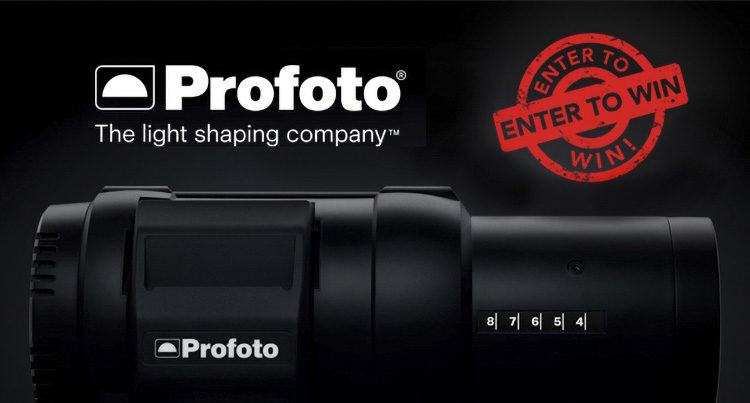
Today is the last day to enter for your chance to win the same Profoto B1x Strobe I used in that behind-the-scenes fashion shoot video I shared here on Friday We’re partnering with ProfotoUSA on this awesome giveaway, and all you have to do to enter is….enter (it’s not a photo competition – it’s a giveaway). Here’s what you get if you win:
The whole package is right around $2,800 and you could win it — but you can’t win if you don’t enter in it. Here’s the link to enter. Good luck, everybody, and have a great Monday! Best, -Scott P.S. Are you coming to spend the day with me learning Lightroom? My seminar is in Washington DC on Friday, August 17th. Come on out.
The post The Next Level of Removing Chromatic Aberrations appeared first on Lightroom Killer Tips. Photography via Lightroom Killer Tips https://ift.tt/2sh0aZ8 July 30, 2018 at 03:41AM |
Categories
All
Archives
November 2020
|
||||||||||||||||||||||||||||||||||||||||||||||||||||||||||||||||||||||||||||||||||||||||||||||||||||||||||||||||||||||||||||||||||||||||||||||||||||||||||||||||||||||||||||||||||||||










 RSS Feed
