RICK REA: Helping You Grow Through Online Marketing
  • Home
  • Blog
    • Social Media News
    • SEO Marketing News
    • Digital Trends News
    • Photography News
    • Mobile Marketing
    • Business News
    • Gadget News
    • Printing News
  • Contact
  • About
  • Subscribe

Gadget News

Mi 10T and Mi 10T Pro With 144Hz Display Launched Mi 10T Lite Debuts as Well: Price Specifications - Gadgets 360

10/1/2020

0 Comments


Mi 10T and Mi 10T Pro With 144Hz Display Launched, Mi 10T Lite Debuts as Well: Price, Specifications - Gadgets 360

https://ift.tt/3kZv8gX

Mi 10T and Mi 10T Pro have been launched as the latest flagship models by Xiaomi. Both new smartphones are the upgrades to the Mi 10 and Mi 10 Pro that debuted in February, and come with an identical hole-punch display design and 144Hz refresh rate. The phones also include Qualcomm Snapdragon 865 SoC and support 5G connectivity. However, on the part of a major distinction, the Mi 10T comes with a 64-megapixel primary camera, while the Mi 10T Pro offers a 108-megapixel primary camera. Alongside the Mi 10T and Mi 10T Pro, Xiaomi has unveiled the Mi 10T Pro Lite as an upgrade to the Mi 10 Lite with a 120Hz display.

Mi 10T, Mi 10T Pro, Mi 10T Lite price

Mi 10T price is set at EUR 499 (roughly Rs. 43,000) for the 6GB + 128GB storage variant, and at EUR 549 (roughly Rs. 47,200) for the 8GB + 128GB model. The Mi 10T Pro, on the other hand, is priced at EUR 599 (roughly Rs. 51,700) for the base 8GB + 128GB storage model, while its 8GB + 256GB storage option carries a price tag of EUR 649 (roughly Rs. 56,000). In terms of colour options, the Mi 10T comes in Cosmic Black and Lunar Silver shades, whereas the Mi 10T Pro features a Aurora Blue colour in addition to the Cosmic Black and Lunar Silver hues.

Mi 10T Lite price has been set at EUR 279 (roughly Rs. 24,000) for the 6GB + 64GB storage variant, while its 6GB + 128GB storage option is priced at EUR 329 (roughly Rs. 28,300). The phone comes in Atlantic Blue, Rose Gold Beach, and Pearl Gray colour options.

According to Xiaomi, both Mi 10T and Mi 10T Pro will go on sale starting October 1 in Europe, whereas the Mi 10T Lite sales will open October 14 in the region. There is no word on the India release right now. 

Mi 10T specifications

The dual-SIM (Nano) Mi 10T runs on MIUI 12, based on Android 10, and features a 6.67-inch full-HD+ (1,080x2,400 pixels) display with 20:9 aspect ratio, 144Hz refresh rate, and Corning Gorilla Glass 5 protection. Under the hood, the smartphone includes the octa-core Qualcomm Snapdragon 865 SoC, coupled with up to 8GB of LPDDR5 RAM. There is the triple rear camera setup that houses the 64-megapixel primary sensor, along with a 13-megapixel secondary sensor that has an ultra-wide-angle lens on top. The camera setup also includes a 5-megapixel sensor with a macro lens.

For selfies and video chats, the Mi 10T offers a 20-megapixel selfie camera sensor at the front.

The Mi 10T comes with 128GB of UFS 3.1 storage. Connectivity options include 5G, 4G LTE, Wi-Fi 6, Bluetooth v5.1, GPS/ A-GPS, NFC, infrared (IR), and a USB Type-C port. There is also a side-mounted fingerprint sensor.

Xiaomi has provided a 5,000mAh battery on the Mi 10T that supports 33W fast charging. Besides, the phone measures 165.1x76.4x9.33mm and weighs 216 grams.

Mi 10T Pro specifications

Just like the Mi 10T, the dual-SIM (Nano) Mi 10T Pro comes with MIUI 12, based on Android 10, and flaunts a 6.67-inch full-HD+ (1,080x2,400 pixels) display with 20:9 aspect ratio, 144Hz refresh rate, and Corning Gorilla Glass 5 protection. The phone is also powered by the Qualcomm Snapdragon 865 SoC, paired with 8GB of LPDDR5 RAM. The triple rear camera setup of the Mi 10T Pro includes a 108-megapixel primary sensor with optical image stabilisation (OIS), 13-megapixel secondary sensor with an ultra-wide-angle lens, and a 5-megapixel sensor with a macro lens.

The Mi 10T Pro features a 20-megapixel selfie camera sensor that is identical to what is available on the Mi 10T.

For storing content, the Mi 10T Pro comes with 128GB and 256GB of UFS 3.1 storage options. The phone has 5G, 4G LTE, Wi-Fi 6, Bluetooth v5.1, GPS/ A-GPS, NFC, IR, and a USB Type-C port on the connectivity front. Further, there is a side-mounted fingerprint sensor and dual speakers on board. 

The Mi 10T Pro packs a 5,000mAh battery with 33W fast charging support. It measures 165.1x76.4x9.33mm and weighs 218 grams.

Mi 10T Lite specifications

The dual-SIM (Nano) Mi 10T Lite runs on MIUI 12, based on Android 10, and features a 6.67-inch display with 120Hz refresh rate,  1,080x2,400 pixel resolution, and Gorilla Glass 5. It is powered by the brand-new Qualcomm Snapdragon 750G SoC, paired with 6GB of RAM. The smartphone comes with a quad rear camera setup that houses a 64-megapixel primary shooter. The other three cameras in the setup include an 8-megapixel ultra-wide-angle shooter, a 2-megapixel macro camera, and a 2-megapixel depth sensor. There is a 16-megapixel selfie shooter on board as well as a part of the hole-punch cutout. 

Xiaomi has provided up to 128GB of internal storage on the Mi 10T Lite. Connectivity options include 5G, 4G LTE, Wi-Fi, Bluetooth, GPS/ A-GPS, NFC, and a USB Type-C port. The phone comes with a Z-axis linear vibration motor and packs a 4,820mAh battery that supports 33W fast charging. It also includes a LiquidCool technology for thermal management.


Why are smartphone prices rising in India? We discussed this on Orbital, our weekly technology podcast, which you can subscribe to via Apple Podcasts, Google Podcasts, or RSS, download the episode, or just hit the play button below.


Gadget News

via "gadgets" - Google News https://ift.tt/2HwaG9f

October 1, 2020 at 12:11AM
0 Comments

Cruise Ship Technology: 7 Of The Smartest Gadgets Post Covid-19 - World of Cruising

10/1/2020

0 Comments


Cruise Ship Technology: 7 Of The Smartest Gadgets Post Covid-19 - World of Cruising

https://ift.tt/30kUDkQ

Cruising has always been ahead of the technology curve, but in a post-Covid world, innovation is more vital than ever. MSC Cruises, Royal Caribbean and Princess are leading the way when it comes to cruise ship technology, developing wearable technology, virtual assistants and coin-sized smart medallions, all of which can help reduce crowding, queuing and contact.

But technology can also be fun – just ask Virgin Voyages – so read on to find out about some of the exciting new features on board and onshore, and how they can make cruising a safer, more convenient and more enjoyable experience.

1. Princess Cruises’ Ocean Medallion

One of the most advanced pieces of kit in the cruise industry currently, the 10p-sized Ocean Medallion packs an impressive array of features into its tiny dimensions. Replacing the traditional cruise card, not only is it a wearable device (so you can’t lose it), it’s also an app and a service that provides faster internet connection. With your medallion linked up to your smartphone, you can place orders remotely, locate friends and family on the ship using GPS, and book excursions and restaurants.
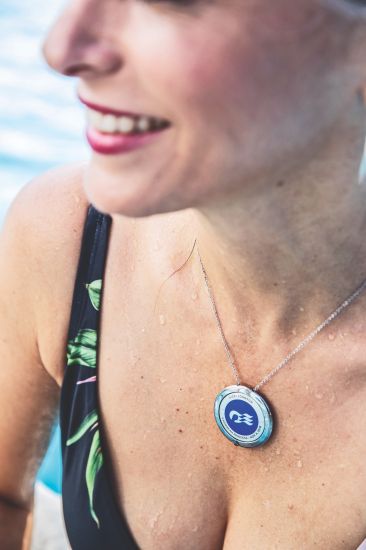
cruise ship technology: princess cruises ocean medallion

Unlocking your stateroom door as you approach, and allowing for contactless orders, Ocean Medallion is timely technology in a post-Covid world, eliminating touchpoints, queuing and contact with crew.

2. Intelligent wristbands

Passengers travelling on six of MSC’s newest megaships will get to experience the cruise line’s smart wristband, MSC for Me. Operating through an app and available before and during the cruise, the wristband connects passengers with crew and the ship, offering an impressive array of benefits and services. There’s MSC for Me Chat, allowing guests to message each other directly without the need for wi-fi, and a friends-and-family locator that should prove especially handy for keeping tabs on the kids.

msc cruises intelligent wristbands

Other useful features include a ‘what to eat’ guide, filled with destination-inspired dishes to try, and a function to book excursions and restaurant tables remotely.

Offering similar benefits and already familiar to Royal Caribbean cruisers, the line’s WOWband is a ready-to-wear, water-resistant wristband that looks like a watch strap. It works using radio frequency technology and allows guests to unlock stateroom doors without a keycard (suite guests can also unlock exclusive lounges). Another huge bonus is being able to make touchless purchases at the ship’s bars and shops, limiting contact with crew and avoiding queues.

3. Selfie recognition

Check-in and boarding are the most time-consuming and often frustrating parts of any cruise, and when thousands of passengers are boarding at once, it’s even more of an issue in today’s climate. Fortunately, the big names were already working on solutions before the pandemic, and Royal Caribbean rolled out facial recognition technology last year.

Celebrity Cruises Celebrity Edge
You can check in with a selfie on Celebrity Edge

Also available on Royal Caribbean-owned Celebrity Cruises (look out for it on Celebrity Edge and Apex), the new tech allows guests to check in by simply taking a selfie and uploading it to an app. The company’s facial recognition technology does the rest, eliminating the need for queuing, aiding with social distancing and enabling guests to go from ‘car to bar’ in just 10 minutes.

Using the same app, passengers can also see their itinerary and link their reservation to those of other guests, allowing them to book excursions and dinners together. Guests on Oasis of the Seas can even use the app as a remote for their TV.

Facial recognition may not have been designed with Covid in mind – but it’s undoubtedly a technology whose time has come.

4. Meet ZOE…

Anyone else still find themselves calling out for Alexa or Google Home while they’re away? Normally you won’t get a reply, but sail with MSC Cruises and you’ll hear that same reassuring voice under a different name. Pioneering artificial intelligence on board cruise ships, MSC has introduced its very own voice-enabled virtual assistant, ZOE.
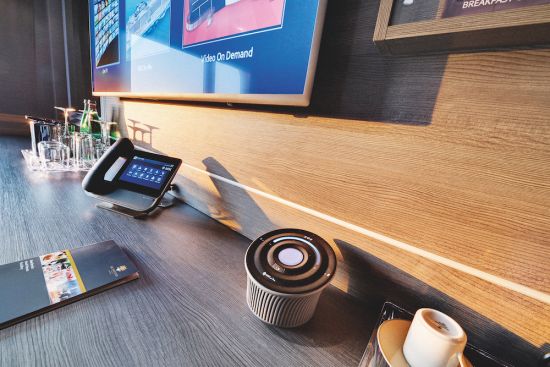
MSC Bellissima, ZOE Digital Personal Assistant

Found in your cabin, she can reserve restaurants and excursions, check your bill and even keep you entertained on sea days. You can ask her some 800 questions about life on board, and she speaks seven languages. ZOE is currently available on MSC’s two newest ships, Grandiosa and Bellissima, and will also be installed on the upcoming Virtuosa.

5. Augmented reality

Ready for a glimpse of the future? Celebrity Edge is like no other cruise ship, and Celebrity’s hi-tech app can give you an onboard tour like you’ve never experienced before.
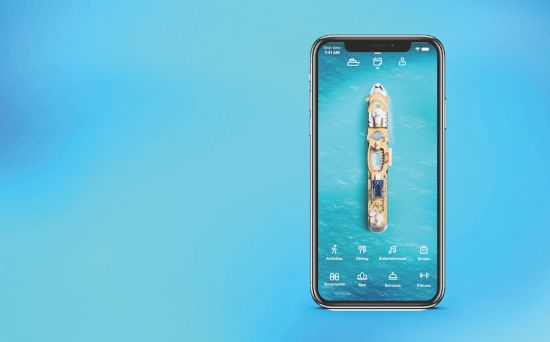
Using binaural audio, soundscaping and 3D augmented reality technology, the Celebrity Edge Access Tour takes you virtually behind the scenes on this revolutionary new ship, even allowing access to areas typically off limits, including the bridge and engine room. The app is free to download and can be used from anywhere in the world.

6. Shake for champagne

The debut of Virgin Voyages’ first ship, Scarlet Lady, may have been pushed back, but awaiting passengers when she does launch is an ultra-modern cruising experience. Everything on board is about ease and convenience, and passengers can download an app to order meals, book exercise classes and track their friends.

However, our absolute favourite piece of tech is the ‘shake for champagne’ feature on the ship’s app, which will order a glass (or bottle) of Moët to be delivered to wherever you happen to be at the time – all with a wave of your smartphone.
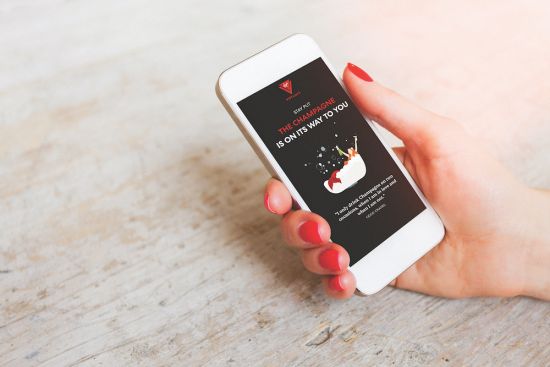
cruise ship technology shake for champagne7. Tech for teens

MSC Cruises has been busy improving the experience of its younger passengers. MSC Meraviglia has an interactive multimedia table resembling a giant iPad, which can be used to send messages and share music, thereby encouraging teens to make friends through the medium of technology. The ship also has an HP Sprout, scanner and 3D printer, allowing kids to take traditional arts and crafts to a new level.

Norwegian Cruise Line has been thinking along similar lines, with a 10,000sq ft gaming complex built into its new Norwegian Encore, where guests can enjoy virtual reality racing and an escape room challenge.
Want to read more articles like this...
Sign up for our newsletter.

Share our love for Cruising.

Register now to receive the best offers and latest cruise news, views & opinion direct to your inbox.

{"cookieName":"wBounce","isAggressive":false,"isSitewide":true,"hesitation":"","openAnimation":"bounceInRight","exitAnimation":"bounceOutRight","timer":"","sensitivity":"","cookieExpire":"3","cookieDomain":"","autoFire":"10000","isAnalyticsEnabled":true}

This website uses cookies to improve your experience. We'll assume you're ok with this, but you can opt-out if you wish.Accept Read More

Privacy & Cookies Policy


Gadget News

via "gadgets" - Google News https://ift.tt/2HwaG9f

October 1, 2020 at 12:11AM
0 Comments

Apple tells users to erase restore iPhone and Apple Watch to fix Workout GPS data bug

9/30/2020

0 Comments

 
https://ift.tt/3l01mZy

Apple tells users to erase, restore iPhone and Apple Watch to fix Workout GPS data bug

https://ift.tt/36rTaxj

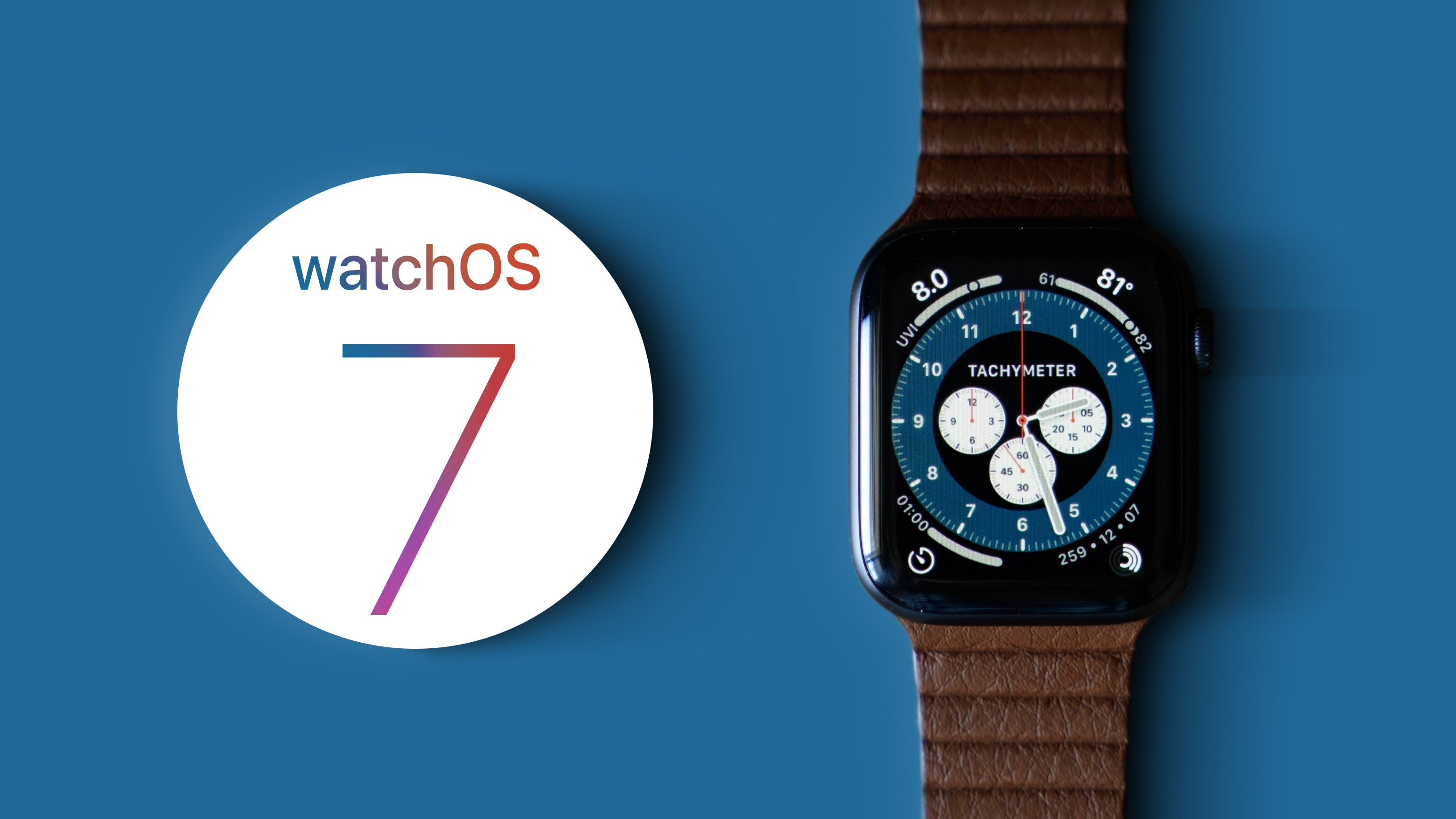
Apple on Wednesday published a support document that presents potential solutions for a bug that can in some cases lead to missing Workout GPS route data for Apple Watch users running iOS 14 and watchOS 7.

The problem was first spotted last week, when Apple Watch users found the device seemingly fail to record GPS mapping data for recent workouts. Some found missing data in the Fitness app on iPhone after using both Apple's own Workout app and third-party titles like Strava.

Apple offers a rather extreme solution to address the GPS bug, along with other related issues, in a support document published today. According to the company, users running iOS 14 on their iPhone and watchOS 7 on Apple Watch need to completely erase and restore both devices from an iCloud Backup.

Specifically, Apple says to first unpair Apple Watch from iPhone, which creates a backup of onboard content before erasing it from the device. Users are then instructed to create or update a current iCloud Backup, verifying that Health data storage is enabled in iCloud. From there, a complete iPhone reset that erases all contents and settings is required.

Once both devices are stripped of user data and settings, Apple says to first restore iPhone from the recently saved iCloud Backup, then pair and restore Apple Watch using the Watch app.

In addition to missing workout route maps, the reset routine is also recommended for the following symptoms:

  • The Activity, Heart Rate, or other health-related apps fail to launch or load data on your Apple Watch.
  • The Fitness app or Health app fail to launch or load data on your iPhone.
  • The Health app or Fitness app is reporting an inaccurate amount of data storage on your iPhone.
  • The Activity app is reporting an inaccurate amount of data storage on your Apple Watch.
  • Your environmental sound levels data or headphone audio levels data from Apple Watch is missing in the Health app on iPhone.
  • Increased battery drain on your iPhone or Apple Watch.

Apple fails to detail what, exactly, is causing the errors, but a complete system reset on both iPhone and Apple Watch is a drastic measure that suggests iOS 14 and watchOS 7 might suffer from a data handling, storage or synchronization bug. Whether the problem was fixed in the recently released iOS 14.0.1 or watchOS 7.0.1 updates.


Gadget News

via AppleInsider News https://ift.tt/3dGGYcl

September 30, 2020 at 10:56PM
0 Comments

Google's 'Hold for Me' Assistant feature appears first on new Pixel phones

9/30/2020

0 Comments

 
https://ift.tt/33g6Xos

Google's 'Hold for Me' Assistant feature appears first on new Pixel phones

https://ift.tt/3l33csw

When the Pixel 5 and Pixel 4a 5G arrive, they’ll include an early preview of Google’s new feature for the Phone app, the Duplex-powered “Hold for Me.” Mentioned during the Launch Night presentation and explained in a blog post, it lets Google Assistant wait around and wait for someone to pick up when a business is keeping you on hold.

Hold for Me saves you, and your ears, hours of elevator music.

When you’re put on hold, Google Assistant will wait and notify you when someone comes on the line, ready to talk. You’ll like it, unless elevator music is your jam.https://t.co/Jieau9GfMQ #LaunchNightIn #Pixel5G pic.twitter.com/Ap6V4eJfq8

— Made By Google (@madebygoogle) September 30, 2020

It follows Call Screen and Verified Calls as new features that use Assistant to make phone calls less annoying, and repurposes the Duplex developments to let AI detect hold music and produce a notification once someone actually picks up. According to Google, you’ll see captions produced in real-time on your phone’s screen to let you know what’s happening, as Duplex can tell when it’s picking up a recorded message vs. a live representative.

Also worth noting, it doesn’t share the audio with Google or save it to your account unless you choose to have it shared for quality control. The audio processing is actually done on-device and not in the cloud, with recorded audio and transcripts deleted within 48 hours.


Gadget News

via Engadget http://www.engadget.com

September 30, 2020 at 10:06PM
0 Comments

Apple Suggests Restoring iPhone and Apple Watch to Fix Excess Battery Drain or Missing GPS Data

9/30/2020

0 Comments

 
https://ift.tt/33EDdk1

Apple Suggests Restoring iPhone and Apple Watch to Fix Excess Battery Drain or Missing GPS Data

https://ift.tt/3l1QBWv

Shortly after the release of iOS 14 and watchOS 7, many users ran into problems with their iPhone and Apple Watch.


Multiple online support threads including our own found GPS data was not being properly recorded during activities. The issue appeared to affect all models of Apple Watches.
In the majority of cases, users record a workout on their watch while leaving their ‌iPhone‌ at home, but when they later look at the Activity app it only shows the workout's starting point on the GPS map, and nothing else.
In addition, some users have been reporting excess battery drain of their Apple Watch, ‌iPhone‌ or both under ‌iOS 14‌ and ‌watchOS 7‌. In the support threads, the unofficial fix seemed to be unpairing and restoring your Apple Watch. Jack Taylor from our forums reported resolving both issues with this method:
Both the GPS and severe battery drain issues on ‌watchOS 7‌ were fixed for me simply by in-pairing and re-pairing my watch. Both issues resolved themselves immediately after as noted in many of the support groups
It appears that Apple has adopted this advice as the official solution to this problem. In a newly published support document titled If you're missing Workout GPS routes or Health data after updating to ‌iOS 14‌ and ‌watchOS 7‌, Apple writes that users may see the following issues after upgrading to ‌iOS 14‌ and ‌watchOS 7‌:

Possible Symptoms


  • Your workout route maps are missing in the Fitness app on ‌iPhone‌ for previous GPS-enabled workouts from your Apple Watch.

  • The Activity, Heart Rate, or other health-related apps fail to launch or load data on your Apple Watch.

  • The Fitness app or Health app fail to launch or load data on your ‌iPhone‌.

  • The Health app or Fitness app is reporting an inaccurate amount of data storage on your ‌iPhone‌.

  • The Activity app is reporting an inaccurate amount of data storage on your Apple Watch.

  • Your environmental sound levels data or headphone audio levels data from Apple Watch is missing in the Health app on ‌iPhone‌.

  • Increased battery drain on your ‌iPhone‌ or Apple Watch.


If you are experiencing two or more of these symptoms, Apple suggests unpairing your Apple Watch, backing up both your ‌iPhone‌ and Apple Watch, wiping both devices and restoring from backup. Apple provides steps to accomplish these tasks in their support document which was published today.
Related Roundups: Apple Watch Series 6, iOS 14, iPadOS 14
Buyer's Guide: Apple Watch (Buy Now)

This article, "Apple Suggests Restoring iPhone and Apple Watch to Fix Excess Battery Drain or Missing GPS Data" first appeared on MacRumors.com

Discuss this article in our forums


Gadget News

via MacRumors https://ift.tt/1ZNziIk

September 30, 2020 at 09:39PM
0 Comments

iOS 14 Favorites Widget: How to Make a Replacement With Shortcuts

9/30/2020

0 Comments

 
https://ift.tt/30kKogu

iOS 14 Favorites Widget: How to Make a Replacement With Shortcuts

https://ift.tt/2GdM0Su

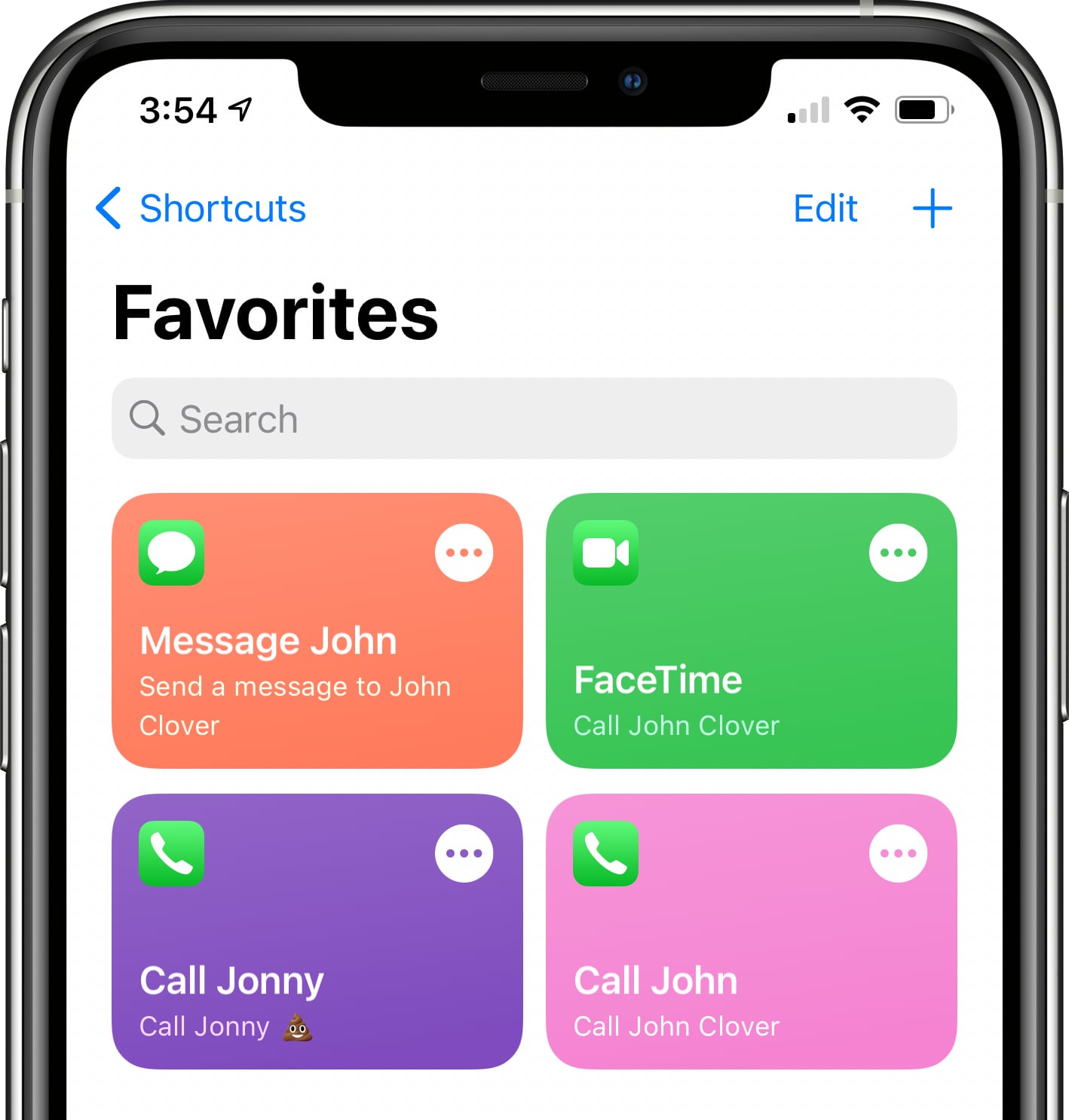
In iOS 14, Apple overhauled widgets and introduced an option for adding ‌widgets‌ to the Home Screen, but in the process, a well-loved Favorites widget that existed in iOS 13 was removed.


The Favorites widget let users set certain contacts and contact methods as favorites that were easily accessible, so you could, for example, add a favorite option for messaging Eric or calling Dan, with those actions executed with a tap.

Why the Favorites widget was removed is a mystery and it could be a simple oversight with Apple planning to reintroduce it later, but for now, those who relied on the widget can recreate its functionality with Shortcuts. It takes some effort, but it may be worth the time investment if you often relied on your Favorites.

Creating a Favorites Shortcut


Making a shortcut that replicates the behavior of the Favorites widget isn't too tough, but if you want multiple favorite options, you'll need to create a separate shortcut for each one in the Shortcuts app.

  1. Open the Shortcuts app.
  2. Tap on the "<- Shortcuts" area in the upper left hand corner.
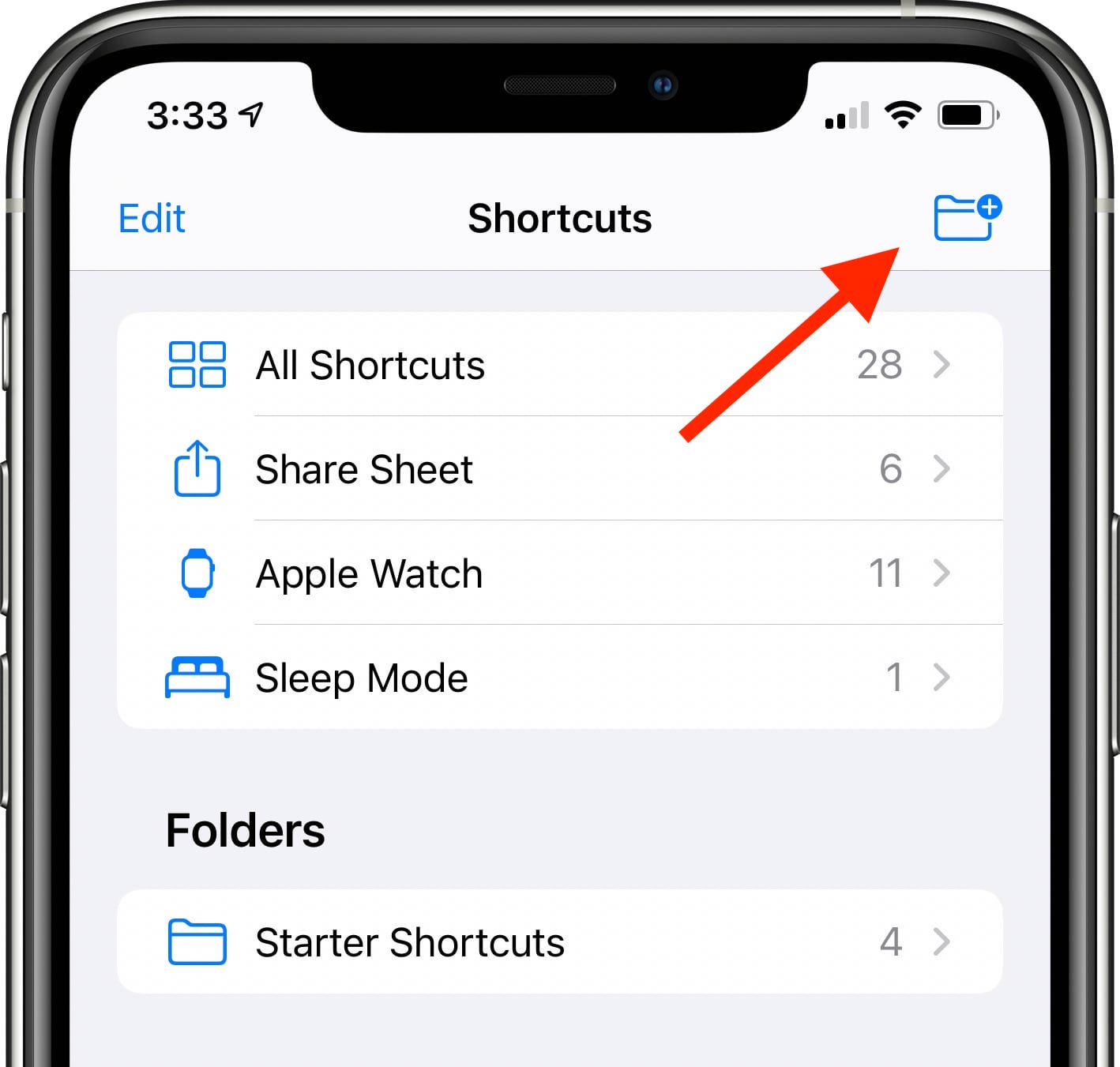
  3. Tap on the folder icon in the top right to create a new folder. Your favorites shortcuts need to be in a folder if you want to use them with the Shortcuts widget.
  4. Name the folder ("Favorites" in our case) and choose an icon.
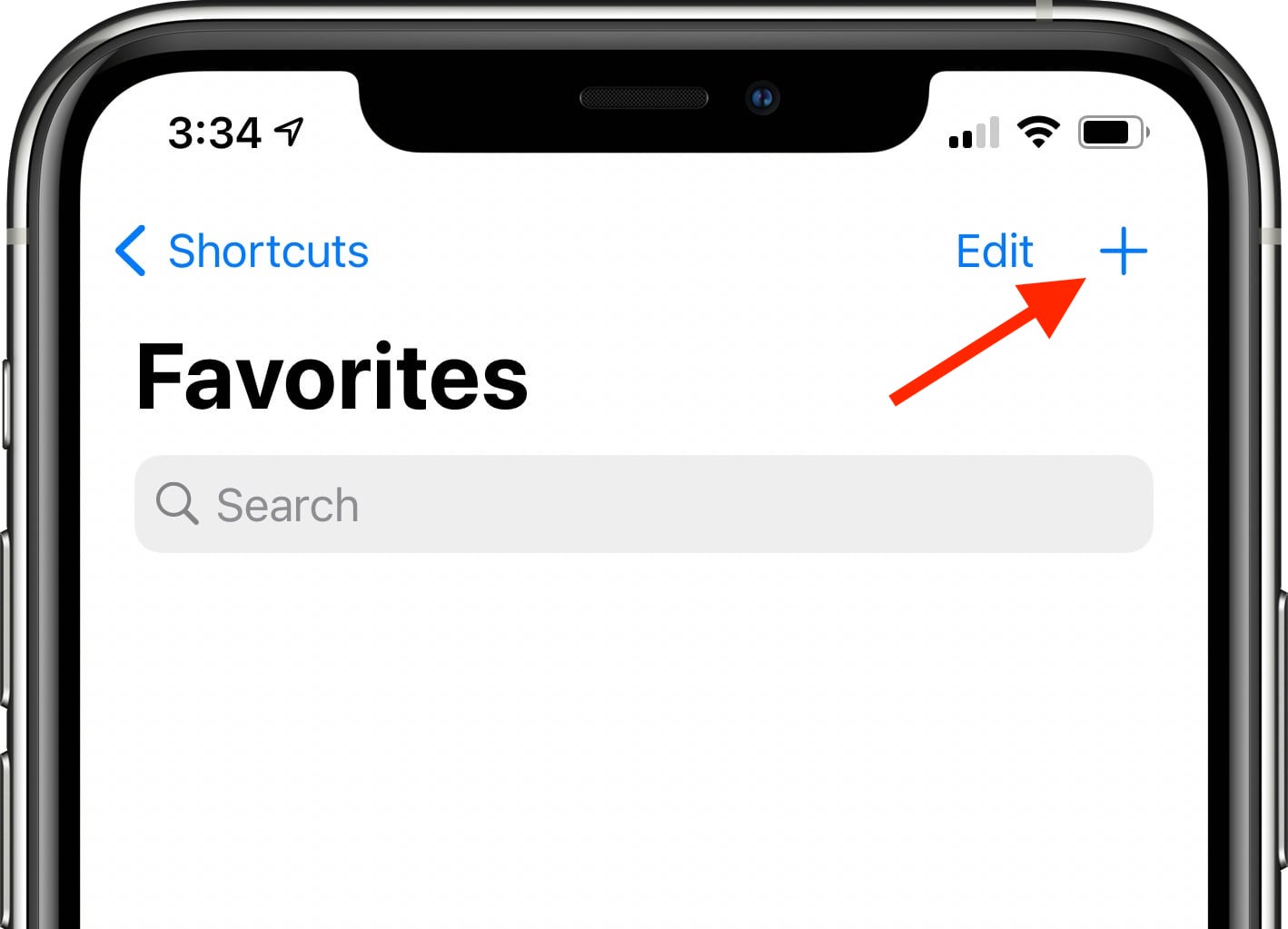
  5. Tap on the new folder ("Favorites") and then tap the "+" icon to start creating shortcuts.

After this step, there are slightly different Shortcut creation methods that can be used to create quick contact options for calling, FaceTiming, and messaging someone.

Making a Shortcut to Call Someone


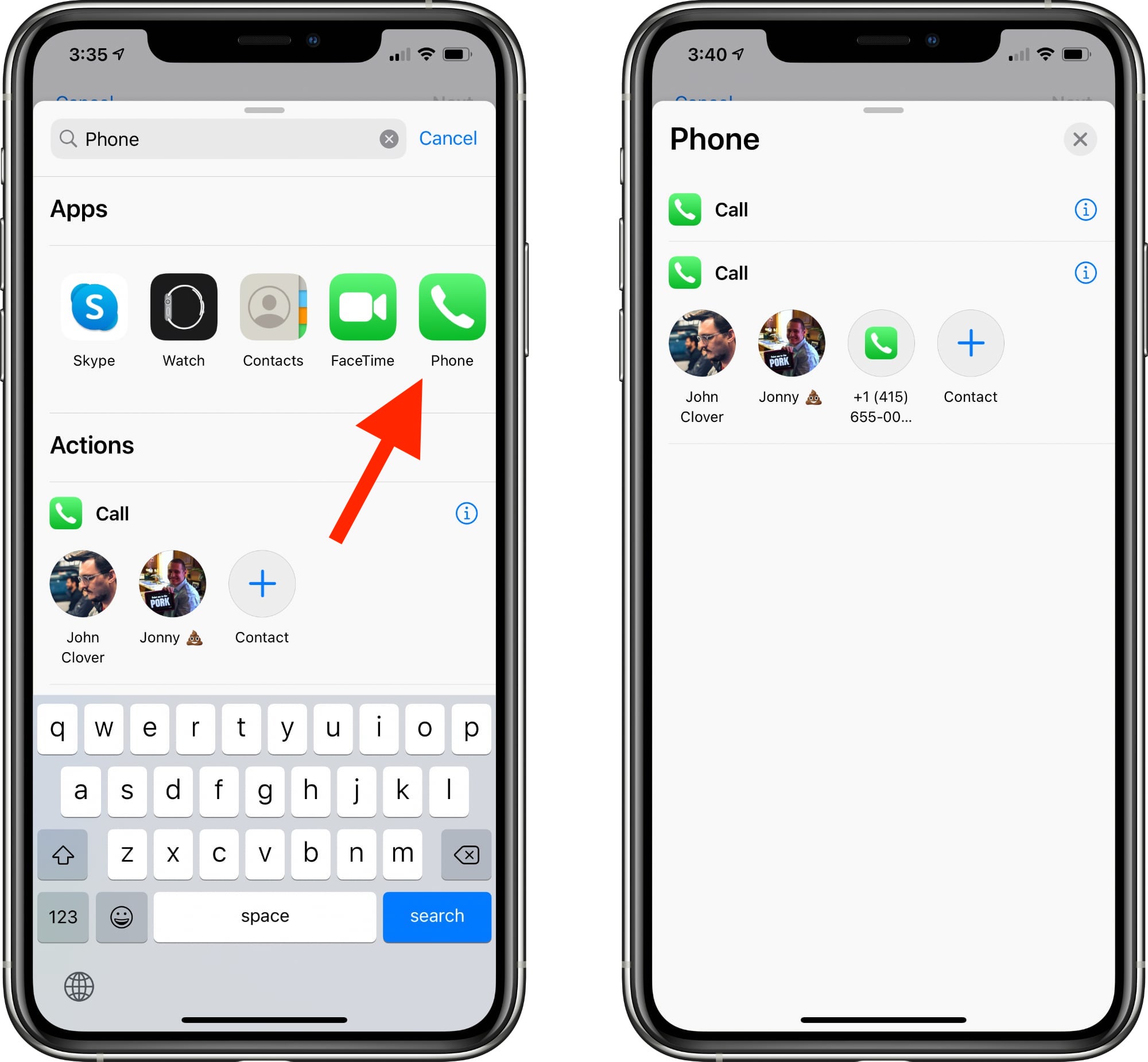
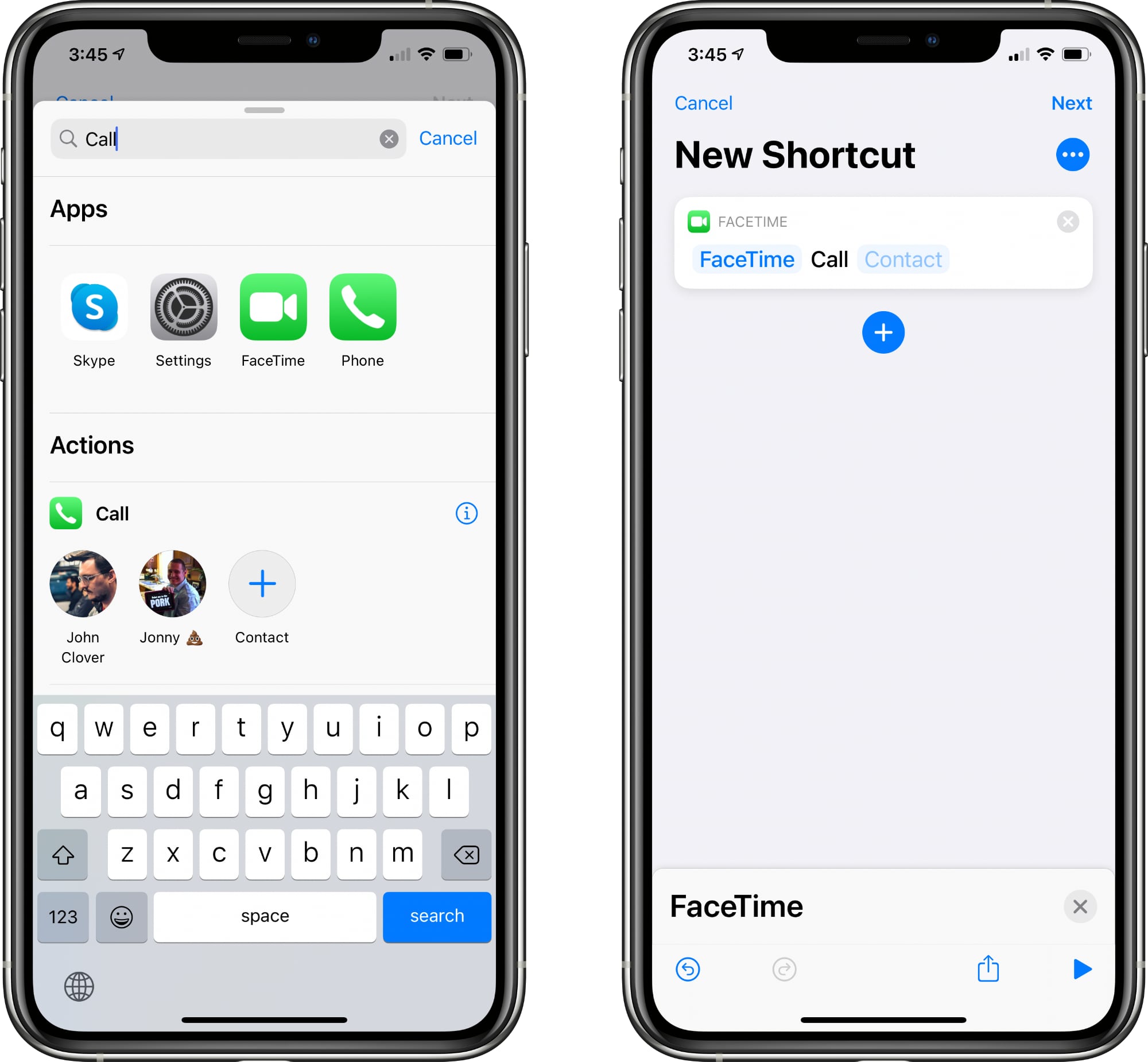
  1. Tap Add Action and then search for "Phone" or "Call."
  2. Tap the Phone app.
  3. Tap on one of the suggested contacts that Shortcuts offers or tap on the "+" button to select a different contact.
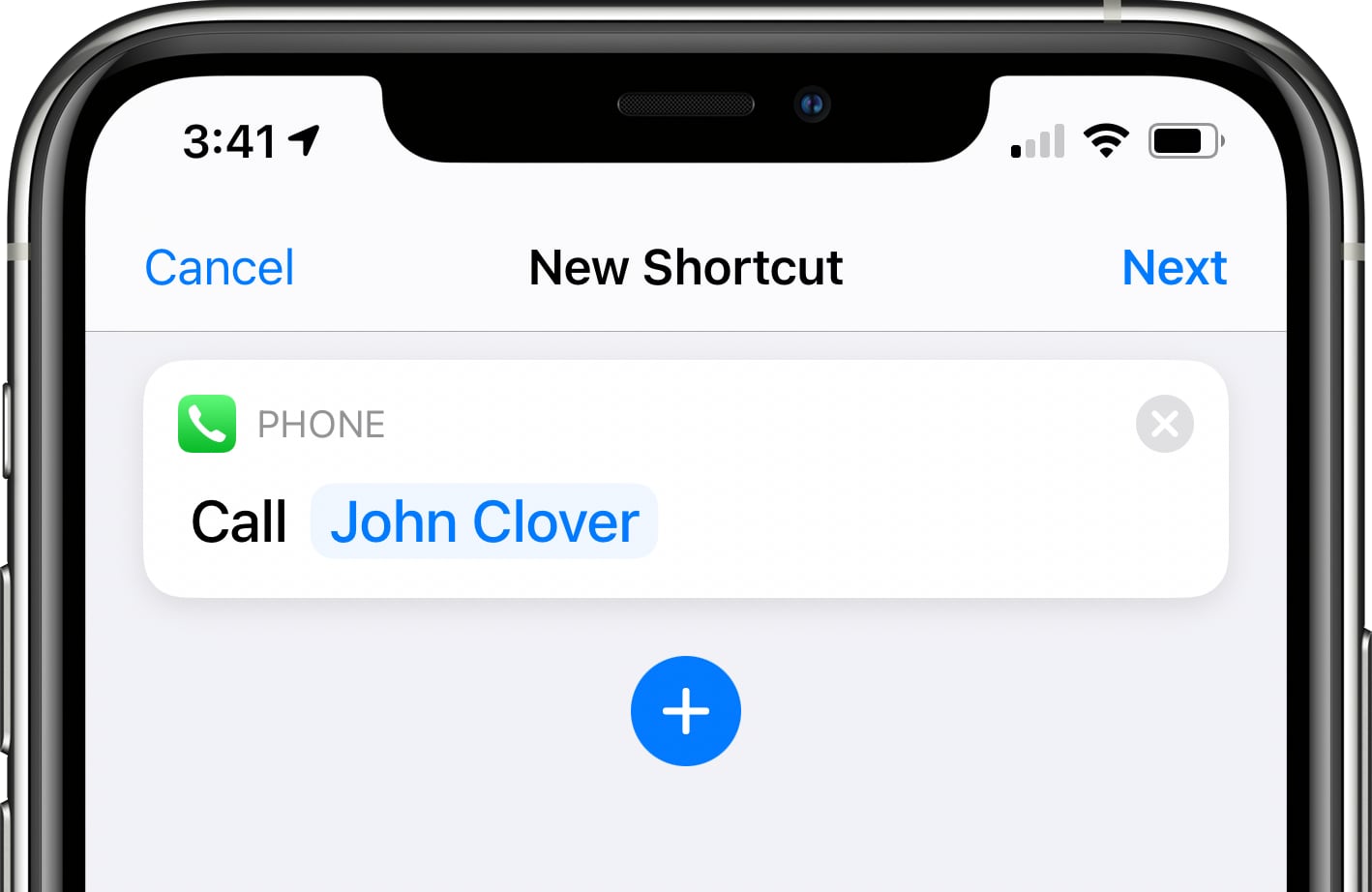
  4. Make sure the Shortcut you've created says Call [Contact Name].
  5. Tap Next.
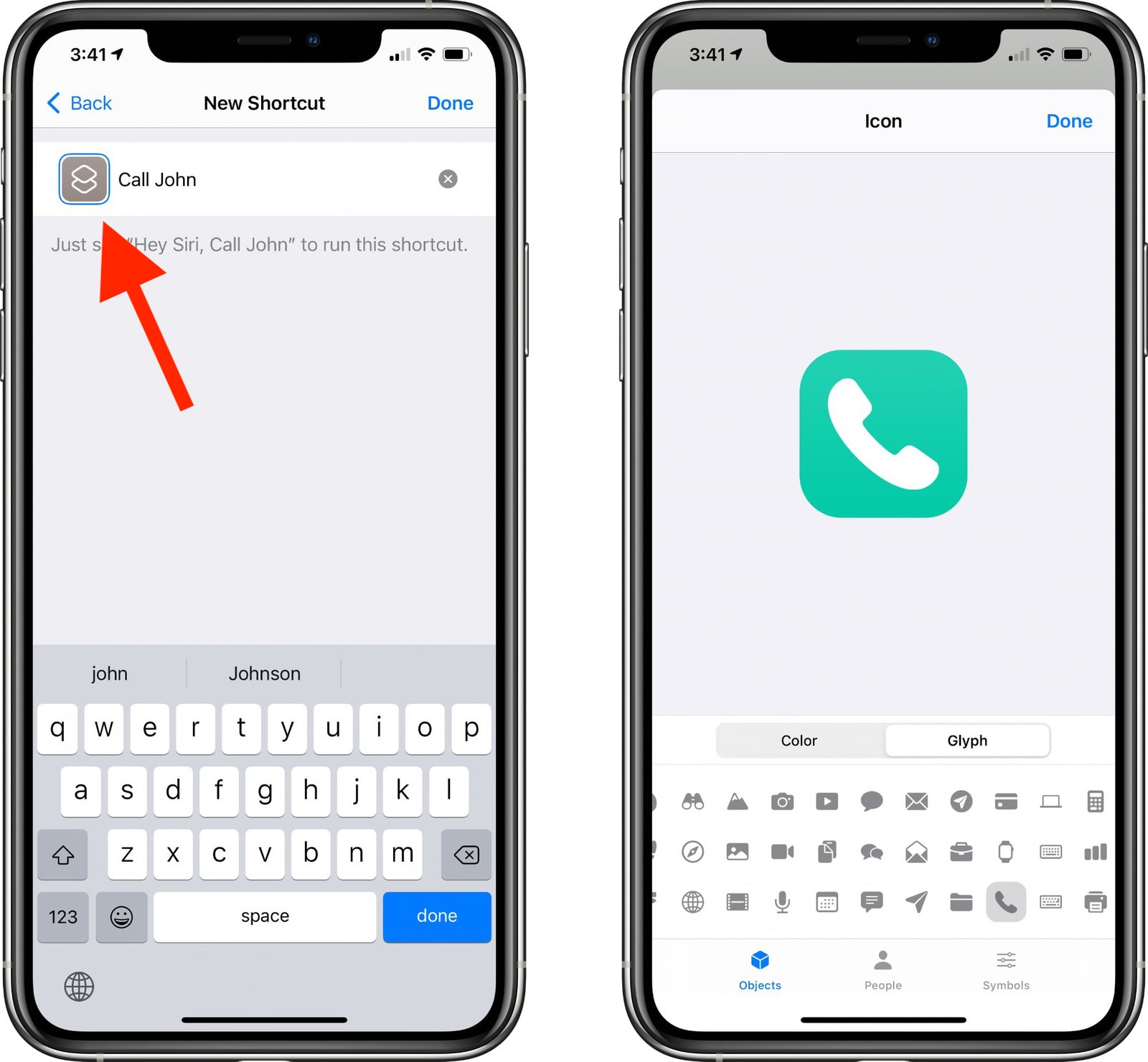
  6. Give the Shortcut a name. ("Call John" in our case)
  7. Tap the icon to the left to the name to select both a color and an icon for your Shortcut.
  8. Tap "Done."

After you tap Done, your shortcut to make a phone call to one of your contacts will be listed in the appropriate folder in the Shortcuts app. To activate it, just tap it and it will automatically call the intended person. Repeat these steps for anyone you want to create a call shortcut for.

Making a Shortcut to FaceTime Someone


  1. Tap Add Action and then search for "FaceTime" or "Call."
  2. Tap the ‌FaceTime‌ app to get to the Shortcut editing options.
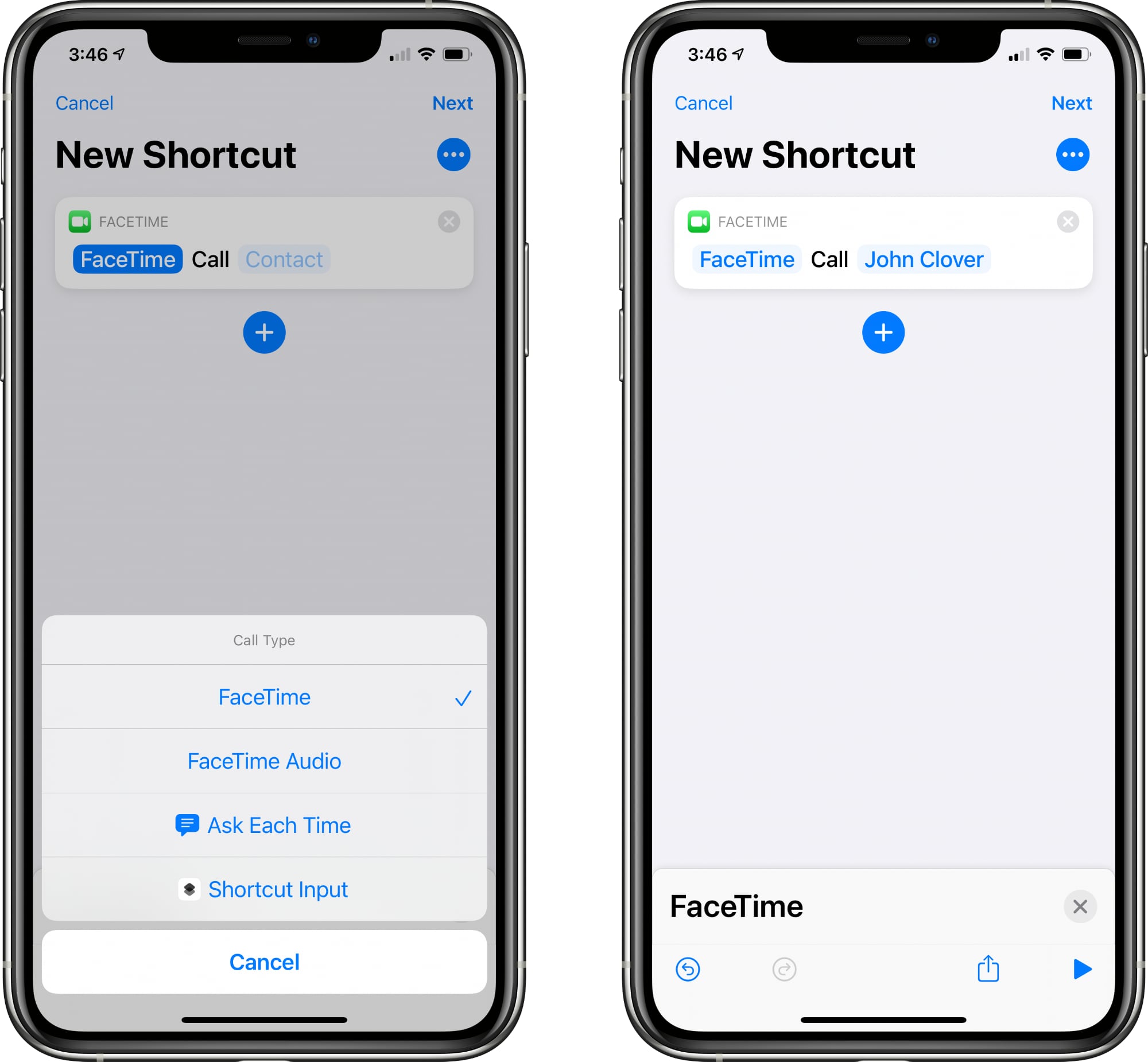
  3. Tap on "‌FaceTime‌" to select either standard ‌FaceTime‌ or ‌FaceTime‌ Audio.
  4. Tap on the [Contact] blank to select a contact from the list.
  5. Make sure the Shortcut you've created says ‌FaceTime‌ [Contact Name].
  6. Tap Next.
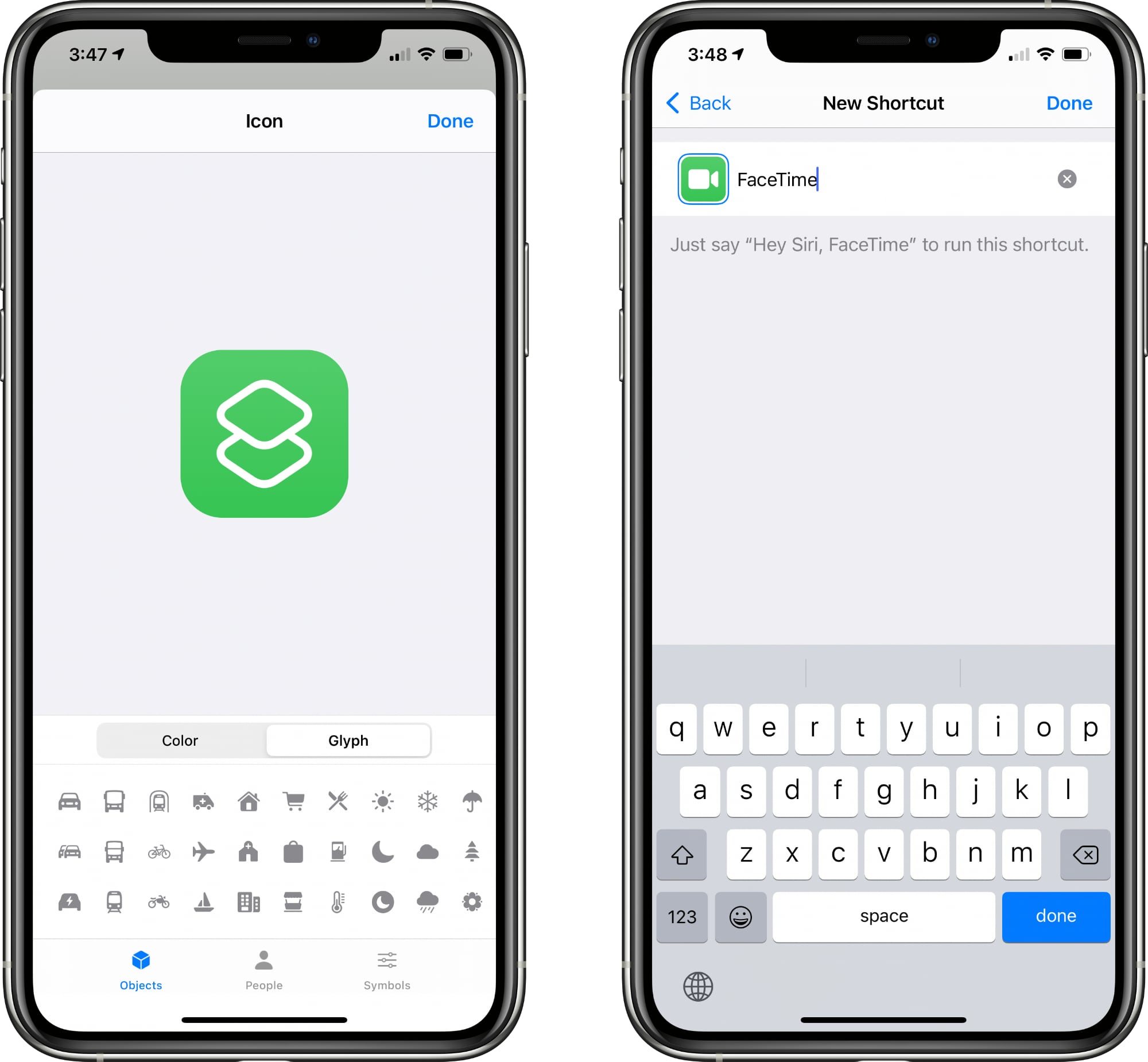
  7. Give the Shortcut a name.
  8. Tap the icon next to the name to select both a color and an icon for your Shortcut.
  9. Tap "Done."

When you tap this Shortcut, it will initiate a ‌FaceTime‌ call to the person that was added as the contact.

Making a Shortcut to Message Someone


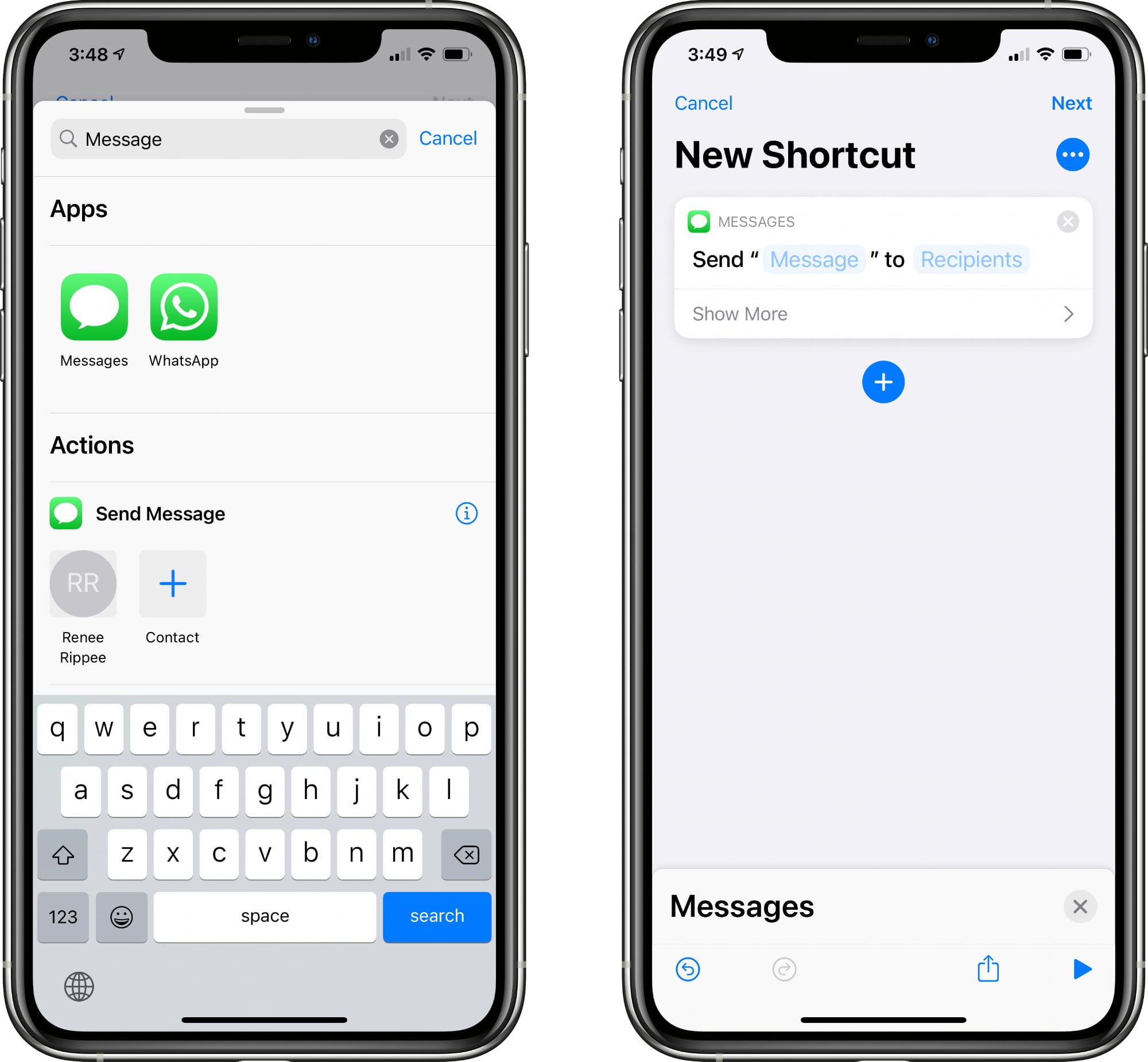
  1. Tap Add Action and then search for "Messages."
  2. Tap on "Send Message."
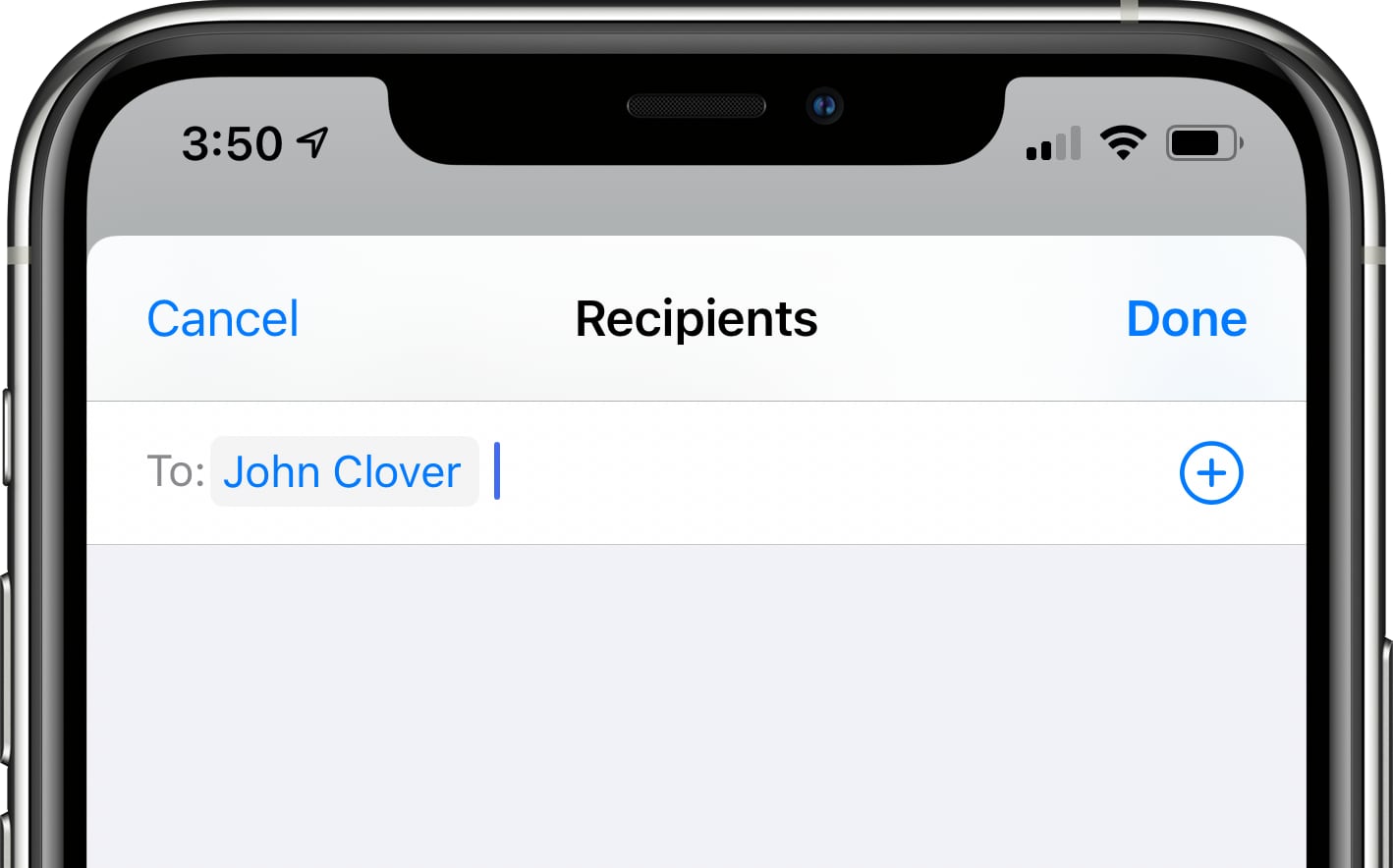
  3. Tap on the [Recipients] blank to select a contact.
  4. Type in the name of the person you want to be able to message.
  5. Make sure the Shortcut you've created says Send "Message" to [Contact].
  6. Tap Next.
  7. Give the Shortcut a name.
  8. Tap the icon next to the name to select both a color and an icon for your Shortcut.
  9. Tap "Done."

Tapping the finished Shortcut will open up the Messages app with a compose window for the person who you added as your target contact. Note that if you want to send a message to more than one person, just type in multiple names at the part where you're entering the name of your contact.

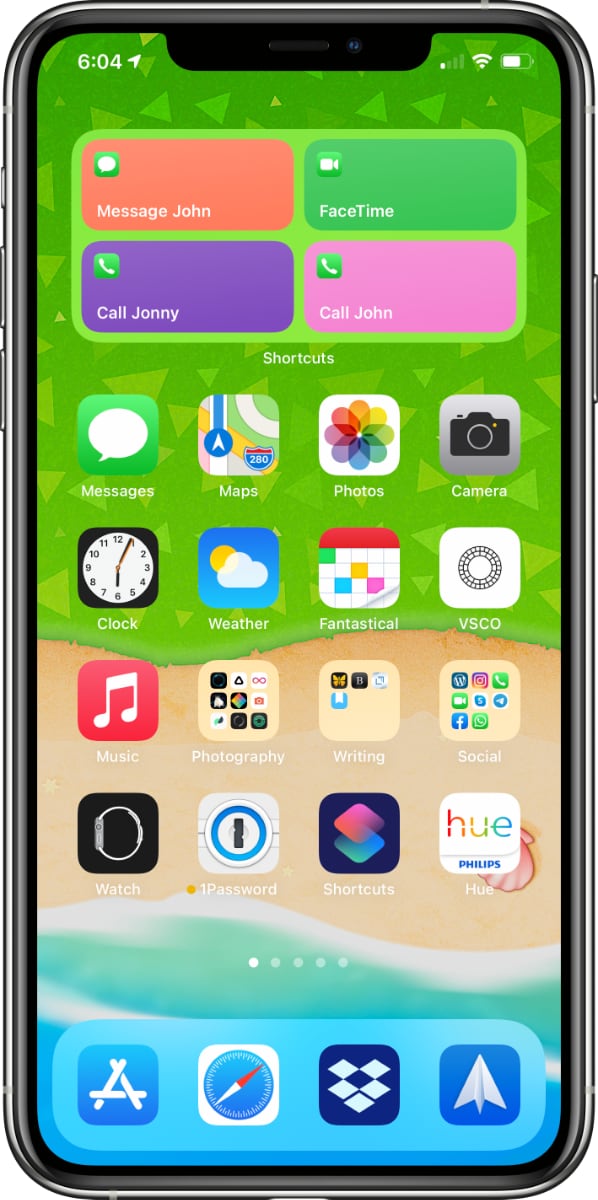
Adding the Shortcuts Favorites Widget to Your Home Screen


Once you've created all your shortcuts for quickly sending a message, calling, or FaceTiming your contacts, you're ready to add a widget that can be accessed from the widget interface or right from the ‌Home Screen‌.

  1. Go to the iPhone's ‌Home Screen‌.
  2. Swipe over to where you want to place your new Favorite Widget.
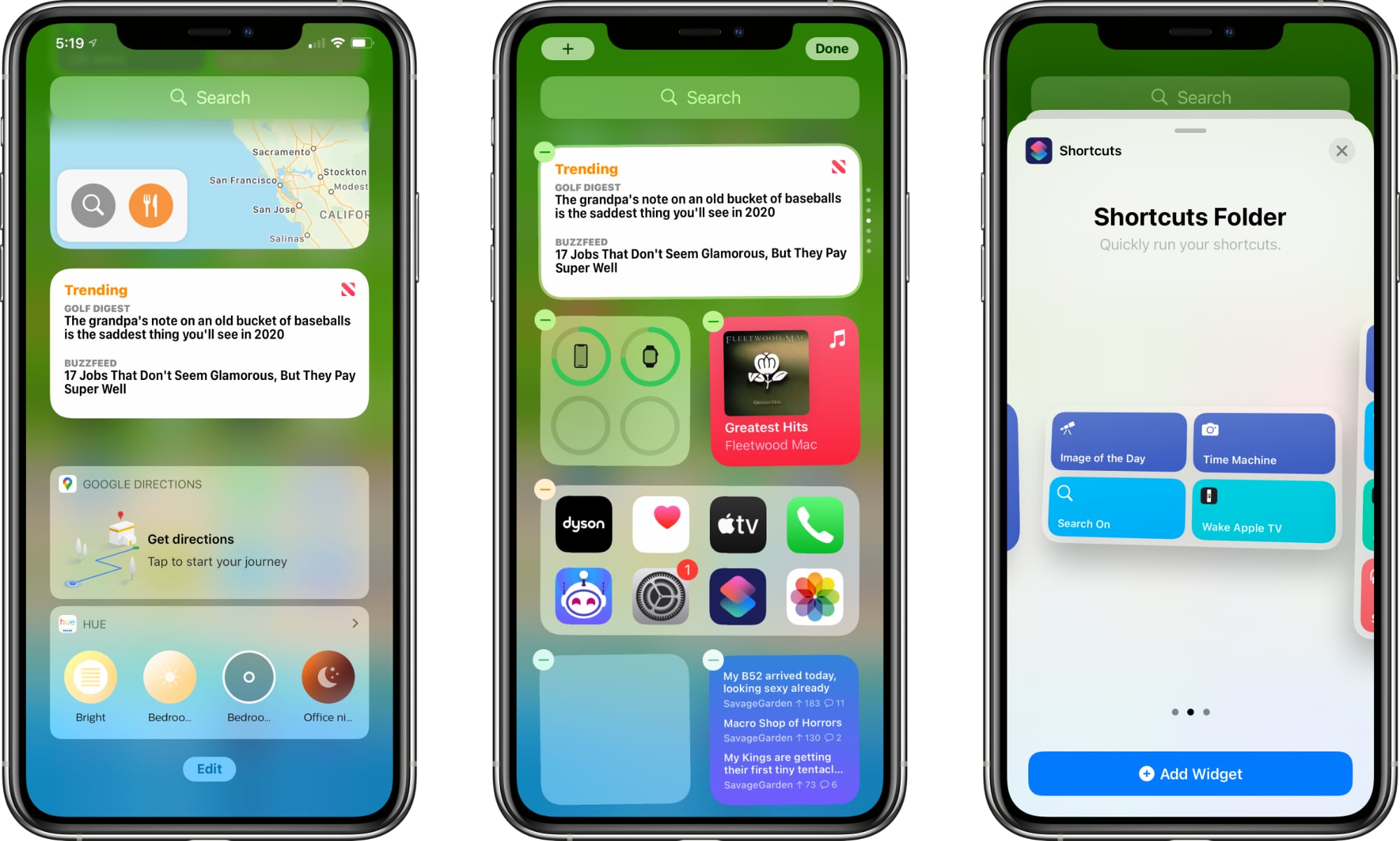
  3. Press and hold on the ‌Home Screen‌ to enter "Jiggle" Mode, and then tap the "+" button in the upper left hand corner.
  4. Search for Shortcuts and tap the icon.
  5. Choose the widget you want. If you made a single favorites Shortcut, tap the single option. If you have two to four, tap the size with four, and choose eight if you have more.
  6. Tap Add Widget.
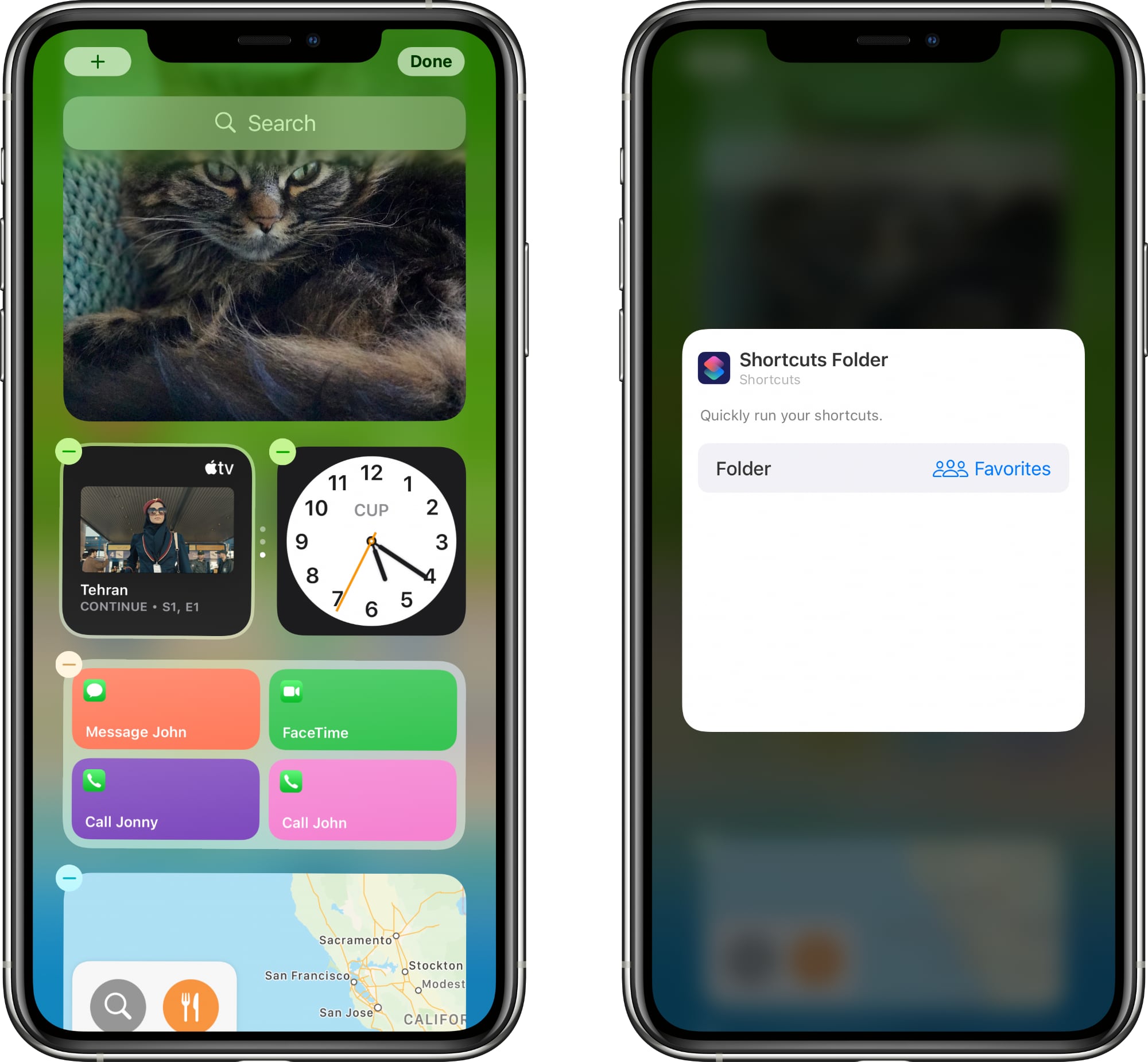
  7. Tap on the widget to customize it.
  8. Tap on the folder where you put all your favorites shortcuts.
  9. Tap out of the interface and tap "Done."

That's all there is to it. Once the Shortcuts widget is set up with the appropriate folder that contains all of your contact shortcuts, a tap on any one of the widget options will initiate the action right from the widget interface, just like the prior favorites widget.


Note that the Shortcuts widget has limited space when it comes to names, so you may need to shorten some of the Shortcut names you've created to make it clear who's going to be contacted if you have multiples.

If you need more detailed instructions on adding ‌widgets‌, see our dedicated Widgets how to.

Favorites Still in the Contacts App


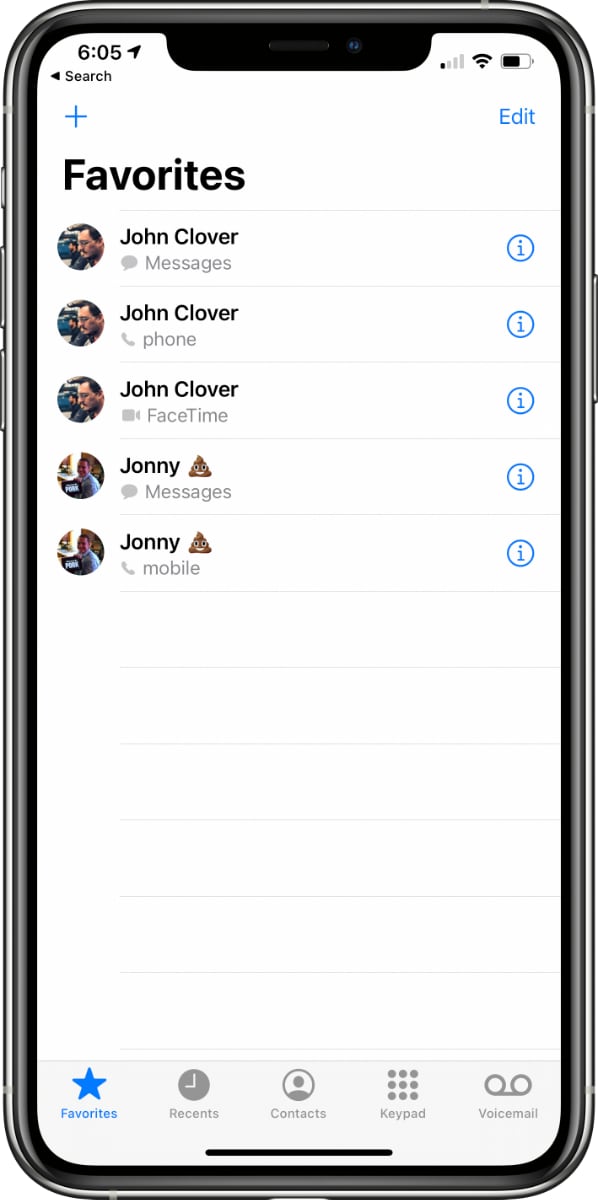
Just to be clear, it's the Favorites widget that's been removed, not the Favorites functionality in its entirety. You can still create and access your previously made favorite options in the Phone app under the "Favorites" tab if that's easier than making a whole bunch of Shortcuts.


For more on how to make use of ‌widgets‌ and the new ‌Home Screen‌ changes in ‌iOS 14‌, make sure to check out our widget how to and our Home Screen guide.
Tags: Shortcuts, widgets

This article, "iOS 14 Favorites Widget: How to Make a Replacement With Shortcuts" first appeared on MacRumors.com

Discuss this article in our forums


Gadget News

via MacRumors https://ift.tt/1ZNziIk

September 30, 2020 at 08:56PM
0 Comments

iOS 14.2 adds new emojis including bubble tea a transgender flag and more

9/30/2020

0 Comments

 
https://ift.tt/3igihp2

iOS 14.2 adds new emojis including bubble tea, a transgender flag, and more

https://ift.tt/3na4l3E

The iOS 14.2 beta gives us our first glimpse of a new round of emojis.

What you need to know

  • The iOS 14.2 beta features a new set of emojis.
  • The new release includes a black cat, blueberries, and transgender flag, and more.
  • It is unclear when 14.2 will be released to the public.

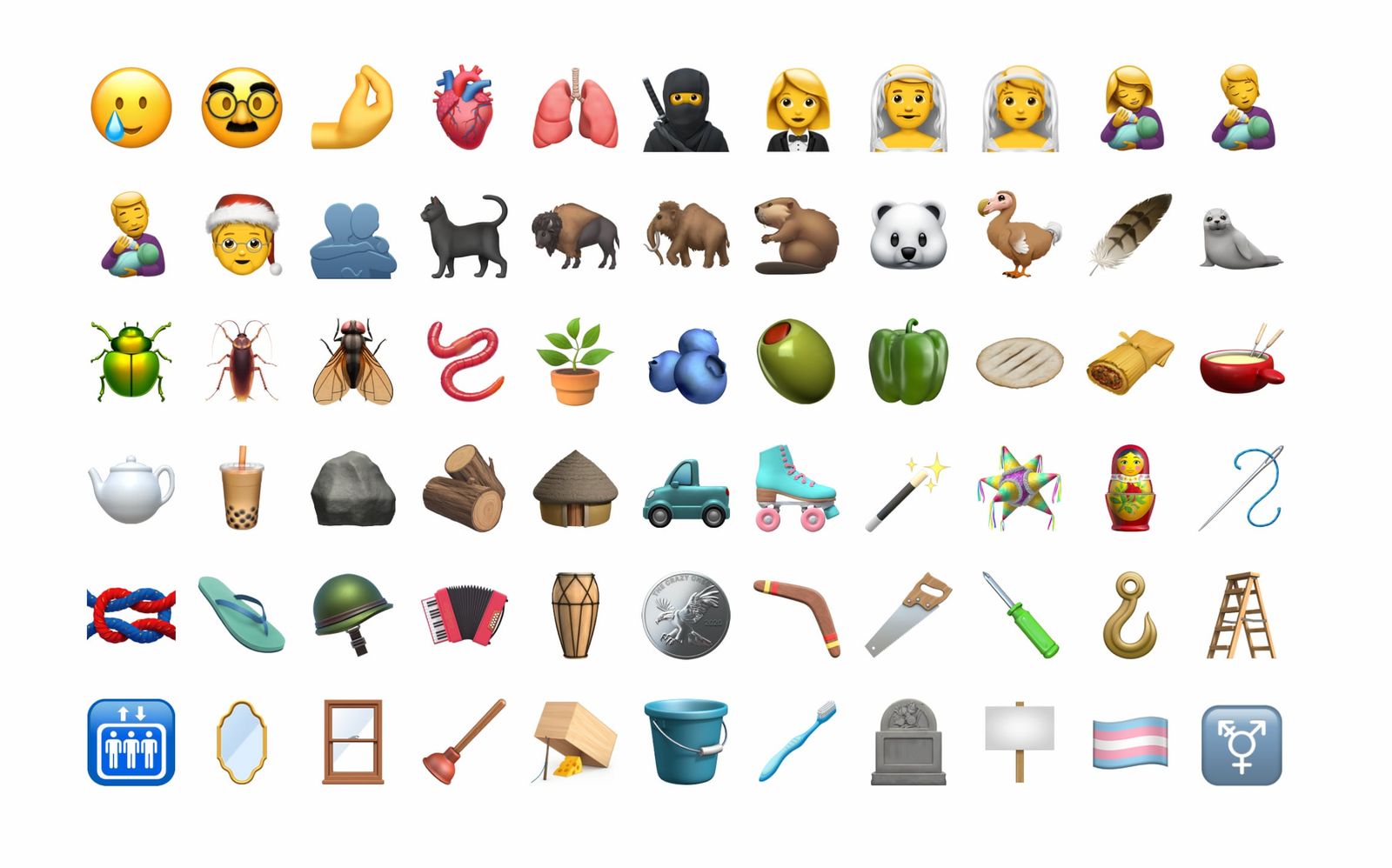
Reported by Emojipedia, the iOS 14.2 beta is bringing with it a whole bunch of new emojis. The latest iOS release includes a new bubble tea, a transgender flag, a seal, a feather, and more.

As noted by MacRumors, the full list of new emojis crosses multiple categories including faces, people, animals, and food:

  • Faces - Smiling Face with Tear, Disguised Face
  • People - Ninja, Person in Tuxedo, Woman in Tuxedo, Person with Veil, Man with Veil, Woman Feeding Baby, Person Feeding Baby, Man Feeding Baby, Mx. Claus, People Hugging
  • Body Parts - Pinched fingers, Anatomical Heart, Lungs
  • Animals - Black Cat, Bison, Mammoth, Beaver, Polar Bear, Dodo, Seal, Beetle, Cockroach, Fly, Worm
  • Food - Blueberries, Olive, Bell Pepper, Flatbread, Fondue, Bubble Tea, Tamale
  • Household - Potted Plant, Teapot, Piñata, Magic Wand, Nesting Dolls, Sewing Needle, Mirror, Window, Plunger, Mouse Trap, Bucket, Toothbrush
  • Miscellaneous - Feather, Rock, Wood, Hut, Pickup Truck, Roller Skate, Knot, Coin, Boomerang, Screwdriver, Carpentry Saw, Hook, Ladder, Elevator, Headstone, Placard, Transgender Symbol, Transgender Flag
  • Clothing - Thong Sandal, Military Helmet
  • Musical Instruments - Accordion, Long Drum

The new release includes gender-neutral emojis like a woman wearing a tuxedo, a man wearing a veil, and Mx Claus, a gender-neutral alternative to Mr. and Mrs. Claus.

Prior releases assigned a man to wear the tuxedo and a woman to wear a veil, but these have been reclassified by Unicode as gender neutral emojis in Emoji 13.0, paving the way for consistent options for women or men to wear either, in addition to the default person design. Other emojis not shown before by Apple include Mx Claus (a gender-inclusive alternative to Santa Claus or Mrs Claus) and a set of bottle-feeding people. The bottle feeding options come as an addition to the ? Breast-Feeding emoji which was added to iOS in 2017. More about this emoji from Emojipedia Lexicographer Jane Solomon.

It is unclear when iOS 14.2 will release to the public, but it will hopefully roll out to users in the coming weeks. iOS 14.0 is available now, released to users a couple of weeks ago.


Gadget News

via iMore - The #1 iPhone, iPad, and iPod touch blog https://www.imore.com/

September 30, 2020 at 08:00PM
0 Comments

Google says the Pixels Soli radar and Motion Sense will return

9/30/2020

0 Comments

 
https://ift.tt/2GlqlYm

Google says the Pixel’s Soli radar and Motion Sense will return

https://ift.tt/2ELqNyq

Image: Google

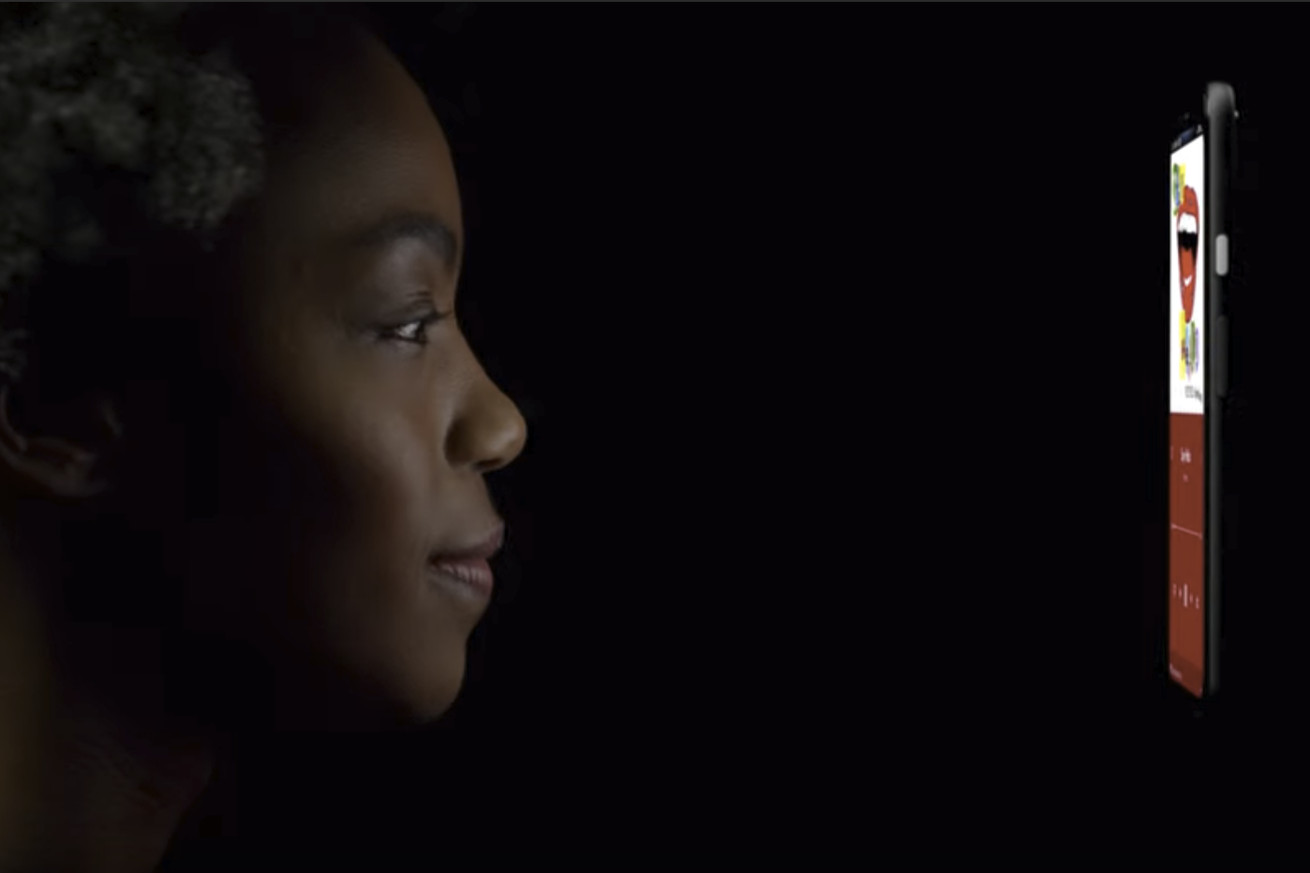
Google’s $799 Pixel 4 had built-in radar. The new $699 Pixel 5 does not — it ditches the sensor-laden forehead of its predecessor entirely in favor of thinner bezels and a hole-punch camera, like the $349 Pixel 4a before it. The result is more screen, but Google’s “Motion Sense” gestures and its answer to Apple’s Face ID are totally gone.

But Google hardware boss Rick Osterloh tells The Verge that the Project Soli radar and gestures will return. “They’ll be used in the future,” he says. They were just too expensive for the phone that Google wanted to build this time.

(He didn’t say whether they’d appear in a new phone, specifically; a recent FCC filing suggests they might come to a new Nest thermostat as well.)

And let’s not get started on Pixel 4 battery life

I doubt buyers of the Pixel 5 will really miss Google’s gimmicky air gestures, which never really advanced the way Google originally teased; not that they had time to, since Google axed the product after just 10 months. But as Dieter pointed out in his review of the Pixel 4, those gestures weren’t the best part. It was how the radar chip could detect your presence and fire up the phone’s facial recognition sensors — for a faster face unlock than even Apple’s Face ID had managed thus far.

It’s not too surprising that Google would keep its Soli radar around: it’s been working on the project for five years now, originally demoing the air gestures in speakers and smartwatches.

For now, you’ll unlock your $699-and-up Pixel 5 with the same kind of rear-mounted fingerprint sensor you can get on the $349 Pixel 4a. I have the cheaper phone, and it’s not bad! I like balancing the phone in my hand using the fingerprint divot. It’s pretty responsive. But it’s not quite the same as face unlock.

Below, find a few of our earlier stories about Google’s Project Soli.


Gadget News

via The Verge https://ift.tt/1jLudMg

September 30, 2020 at 07:41PM
0 Comments

The just-announced Pixel 5 has somehow already been unboxed

9/30/2020

0 Comments

 
https://ift.tt/33fcX0G

The just-announced Pixel 5 has somehow already been unboxed

https://ift.tt/3jjLssD

The Pixel 5, Google’s latest Android flagship, was just announced today, and someone on YouTube has already posted an unboxing video of the new device ahead of its release (via 9to5Google).

What’s in the box is fairly standard — there’s the phone itself, as well as a charger, a USB-C to USB-C cable, and a USB-C to USB-A converter. The YouTube user who has the phone, who goes by the name Sergiu, does power it on, giving us a look at the phone’s 6-inch 2340 x 1080 OLED screen and 8-megapixel hole-punch selfie camera. Sergiu doesn’t use the phone all that much in the video, though, sticking mostly to the phone’s home screen.

Sergiu also zooms in on back of the Pixel 5, showing the phone’s aluminum back, fingerprint sensor, and square camera housing. If you’ve seen the camera housing on the Pixel 4 and 4 XL, the Pixel 5’s looks pretty similar, though the Pixel 5 has a 16MP ultrawide camera instead of the 16MP telephoto camera found on the Pixel 4 and 4 XL.

Overall, there’s nothing that surprising here, as Google has already shown us the device. But it’s still interesting to see the new phone in the wild a couple weeks before it’s officially available.

The Pixel 5 launches in eight countries on October 15th and in the US on October 29th. It costs $699.


Gadget News

via The Verge https://ift.tt/1jLudMg

September 30, 2020 at 07:41PM
0 Comments

Facebook has removed more than 6500 militia groups and pages

9/30/2020

0 Comments

 
https://ift.tt/2ChGGLV

Facebook has removed more than 6,500 militia groups and pages

https://ift.tt/3jk2Hd4

Facebook has removed more than 6,500 pages and groups associated with “militarized social movements,” since the company announced it would crack down on QAnon and militia movements on its platform last month. 

Under the new rules, Facebook said it would take down accounts associated with QAnon, militia groups and other “offline anarchist groups” if they “discuss potential violence.” The company also said it would take steps to make these groups less visible in its apps.

Now, just over a month later, we have a better idea at how many takedowns have actually happened as a result of the policy. Brian Fishman, Director of Counterterrorism and Dangerous Organizations at Facebook, said the company had identified more than 300 organizations, and taken down thousands of pages and groups as a result of the updated rules. Fishman didn’t disclose exactly which groups the takedowns were associated with.

I know folks are also curious about the new Militarized Social Movements policy announced on Aug 19. Bottom line: we’ve identified more than 300 groups under this policy and removed more than 6500 Groups/Pages btw 8/19 and 9/15.

— Brian Fishman (@brianfishman) September 30, 2020

The policy came under scrutiny last month after Facebook failed to remove an event page that called for an armed response to protests in Kenosha, Wisconsin, despite several users reporting it. Mark Zuckerberg later called it an “operational mistake.”

Fishman also detailed Facebook’s actions against the far-right extremist group Proud Boys, after the group got renewed attention following Donald Trump’s comments during the presidential debate. He said Facebook had seen “an uptick” in memes and other content related to the Proud Boys, but said “much of this content” was condemning the group and Trump’s remarks. Facebook banned the Proud Boys in 2018, and has recently taken down other accounts associated with it, Fishman said.


Gadget News

via Engadget http://www.engadget.com

September 30, 2020 at 07:30PM
0 Comments
<<Previous
Forward>>

    Categories

    All

    Archives

    October 2020
    September 2020
    May 2019
    April 2019
    March 2019
    February 2019
    January 2019
    December 2018
    November 2018
    October 2018
    September 2018
    August 2018
    July 2018
    June 2018
    May 2018
    April 2018
    March 2018
    February 2018
    January 2018
    December 2017
    November 2017
    October 2017
    September 2017
    August 2017
    July 2017
    June 2017
    May 2017
    April 2017
    March 2017
    February 2017

    RSS Feed

Powered by Create your own unique website with customizable templates.
  • Home
  • Blog
    • Social Media News
    • SEO Marketing News
    • Digital Trends News
    • Photography News
    • Mobile Marketing
    • Business News
    • Gadget News
    • Printing News
  • Contact
  • About
  • Subscribe