
|
https://ift.tt/2A9jiPo
How To Create & Manage Your Monthly Instagram Strategy https://ift.tt/3c5RgS5 Do you struggle coming up with new post ideas for your Instagram page? If you’ve decided to use Instagram to market your business, you know it’s just a matter of time until you’ll start repeating yourself. When you can’t come up with an idea, you’ll end up wasting time and feel anxious. And by then it might be too late. Your followers have already started losing interest. So what can you do? There’s gotta be a better way to post on the app. And there is. Many social media markets have overcome this problem by having a strategy in place. Knowing exactly what to post ahead of time, can help you save time and stay organised. As a small business owner, you need that flexibility so you can focus your efforts on more important parts in their business. In this post, I will show you exactly how to build a monthly strategy in order to make the most of your Instagram presence. We’ll start from research, show you how to create and schedule content ahead of time and finally, teach you how to use Instagram statistics to monitor your progress. But before we jump into the strategies, how do you know whether Instagram is the best platform to market your business? If you’re a small business owner you have limited time. The last thing you wanna do is hop onto another social media platform that may turn out to be a waste of time you could spend growing your business. To help you decide if Instagram is for you, ask yourself this:
Now let’s move on to the exciting part! Want to build a successful marketing plan for Instagram? Let’s talk STRATEGY! How to Create a Monthly Instagram Strategy Step 1: Know Your Goal with Instagram Start developing your Instagram strategy by writing down at least one goal for Instagram. Think of what exactly do you plan to achieve using Instagram over the next 6 months? Without a goal in mind, you’ll burn out very fast and probably give up on your marketing efforts before you see any results. Many marketers choose to use Instagram for one of the following reasons:
Then, pick a goal that is in line with your overall business goal. This will make it easier for you to see the value of Instagram as an integrated marketing tool. Here are some examples of goals that you can use for inspiration: 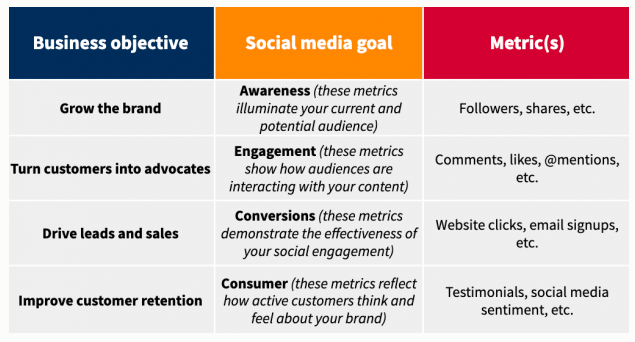
Source: Hootsuite Let’s say your overall business goal for the next 6 months is to get more leads from social media. Then, set an Instagram goal that can help you work towards achieving this big business goal. You can decide to focus your Instagram efforts into directing traffic to your website. So, with a clear goal in mind, now you can go ahead and plan your content. Business goal: Increase the no. of new customers from social media Instagram goal: Increase the website clicks by 30% Step 2: Create a Monthly Content Plan So, now that you have a clear goal in mind, you can go ahead and plan your monthly content. You know you can’t just post a series of photos and expect your clients to engage with you. So, what are you going to post then? Any good content strategy should start with a content plan that supports your Instagram goal.
Now that you understand that the content you post must be intentional, let’s create your content plan! For that, you’ll need the following:
#1. Find inspiration The thing about Instagram marketing is that you don’t have to reinvent the wheel. While your goal should be to keep your branding unique and authentic you can always look for inspiration. One of my favourite ways to get inspired is to look at top brands and influencers. These companies hire experts to create and manage their content and it’s clearly working for them. Below is an example of an Instagram feed that combines different post types. There’s a good mix of graphics, photos and quotes that when put together tell a story. 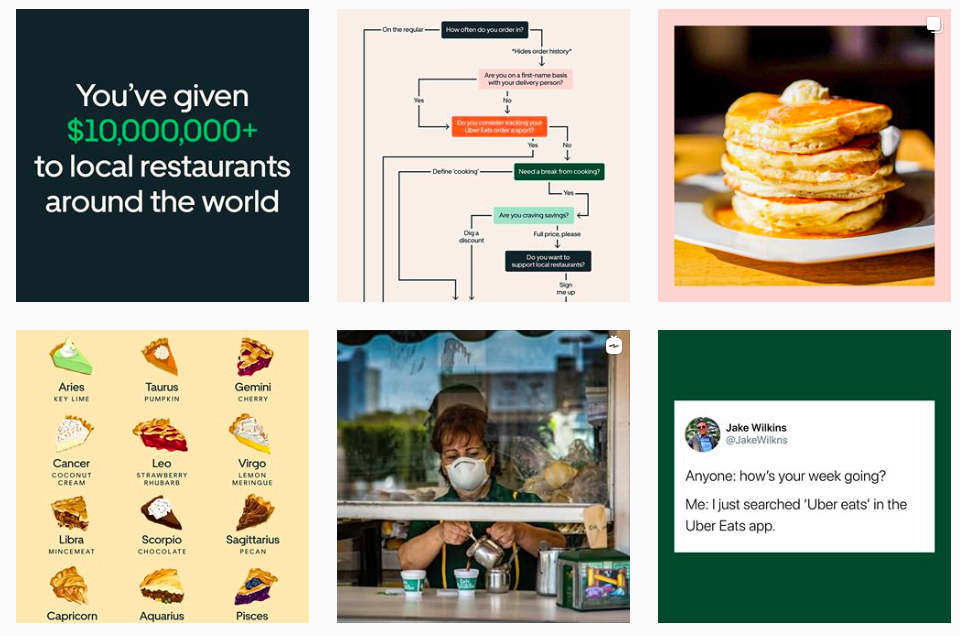
Source: @Ubereats You can also look at how famous brands write their captions. Notice how @guardian uses a friendly and casual tone that sounds as if a real person is talking. 
#2. Content Pillars (Topics) Start by defining 3 – 4 content pillars that are specific to your industry. Once you have your main pillars (topics), it’s going to be much easier to come up with content ideas. If you’re running a travel agency, your content pillars can be:
#3. Content Types These are the content types you’ll be posting on Instagram. You want to ensure you’re posting valuable content for your audience. If not, they won’t engage. So the best way to make your followers interact with your posts is to create content that matches with the buyers’ readiness. For that, each post should either:
Pro Tip: Not all customers are in the same stage of the buyer journey. So you should rotate your content types to ensure you’re reaching a broader customer base and meeting your customers at their readiness level. #4. Post Formats Create a colour coding system for your post formats. Think of what types of formats your audience will engage more on Instagram. Assign a colour code for each of the following post formats:
#5. Create a Monthly Content Plan It’s time to put it all together in a single worksheet that’s going to help you create and manage content more effectively. Start by creating a new worksheet. In the first column on the left, list your 3 – 4 content pillars as individual rows. Topic 1 (eg. travel destinations) Topic 2 (eg. travel tips) Topic 3 (eg. expat living) In the 2nd, 3rd, 4th and 5th columns write the 4 content types: educate, entertain, inspire and convert as a header. Finally, create colour codes for your content formats. Once you’re done, the worksheet should look something like this: 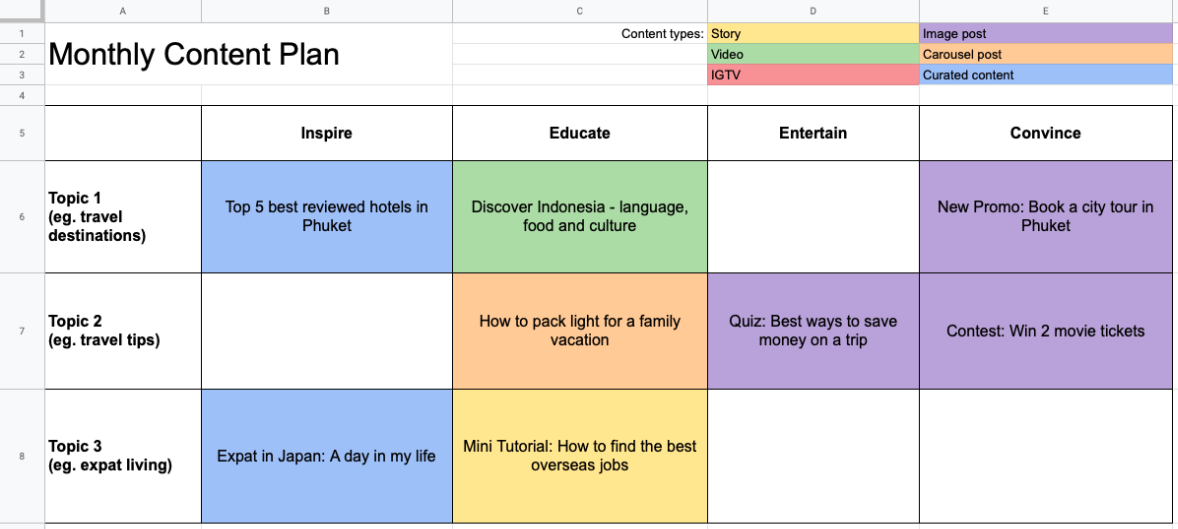
#6. Create a Posting Calendar On a separate sheet, create your posting calendar. In your posting calendar, you’ll assign each post a date and time. This will vary based on your industry, time zone and followers demographics. To find out your ideal times for engagement and comments you can check your Instagram app for more insights into your followers. 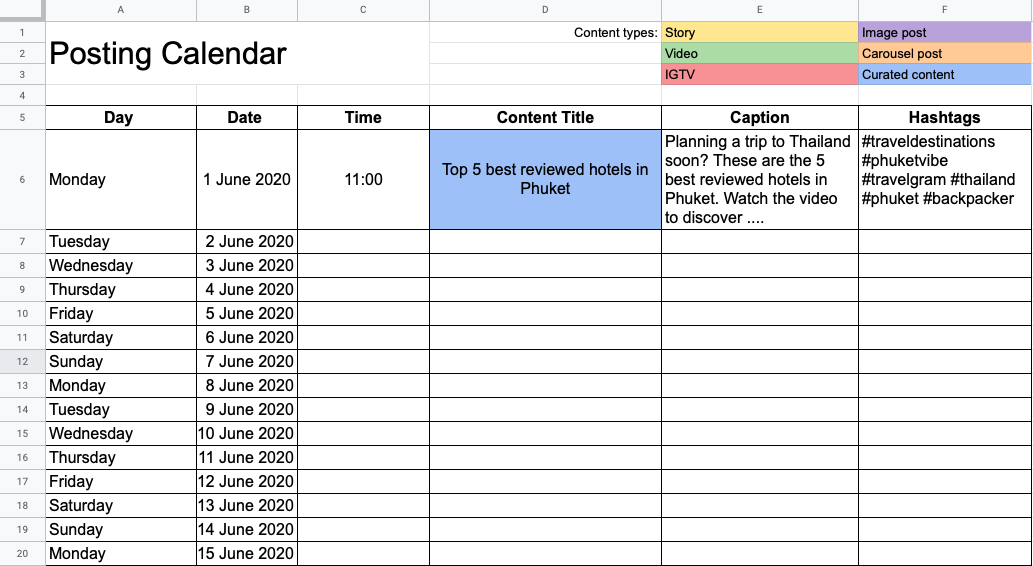
Once you’re happy with how your content calendar looks, you can go ahead and create your content. Each post should be complete with imagery, captions and a set of descriptive hashtags. As a final step, you can load your images and captions into a digital scheduling tool that will automatically post your content. Step 3: Monitor Your Monthly Progress So, now you may wonder “How do I know if my Instagram strategy is effective”? And that’s a good question. You don’t want to waste your time with something that isn’t working. To get the best picture of your monthly progress you should track relevant metrics. Here’s an example. Let’s say your Instagram goal is to increase website referrals by 30% over the next 6 months. The metrics you choose to monitor need to be able to measure your progress accurately. Instagram goal = Increase the website referrals by 30% in the next 6 months You can use the following KPIs to track your performance: KPI1 = % increase in the number of website clicks KPI2 = % increase in conversions from Instagram Once you’ve decided on your metrics, you can track them using an Instagram analytics app. Below is an illustration showing the number of website clicks. 
Source: Sharemyinsights Wondering where to find insights?
Now that you know how to create and manage your Instagram content strategy, you’re able to save more time and work efficiently. You don’t have to worry that you’ll run out of content ideas. By tracking your performance on a month-to-month basis, you’ll know exactly how effective your content is. If your content strategy isn’t working, you can take immediate actions and correct it before it’s too late. Name: Alle Ceambur Instagram: https://instagram.com/allebusinesscoachBio: Alle Ceambur is an expert in Instagram Marketing. Alle is a Content Marketing Strategist and Lead Writer on Share My Insights blog. She’s all about creating strategies and loves sharing her knowledge of content and Instagram marketing. She loves cappuccinos, has read all of Agatha Christie books – and is constantly on the lookout for her next adventure. The post How To Create & Manage Your Monthly Instagram Strategy appeared first on Social Media Explorer. Social Media via Social Media Explorer https://ift.tt/2onGYog May 27, 2020 at 06:22AM
0 Comments
Leave a Reply. |
Amazing WeightLoss Categories
All
Archives
November 2020
|
 RSS Feed
