RICK REA: Helping You Grow Through Online Marketing
  • Home
  • Blog
    • Social Media News
    • SEO Marketing News
    • Digital Trends News
    • Photography News
    • Mobile Marketing
    • Business News
    • Gadget News
    • Printing News
  • Contact
  • About
  • Subscribe

A professional photographer explains what you're doing wrong on Instagram

8/30/2018

0 Comments

 
https://ift.tt/2N0EXOp

A professional photographer explains what you're doing wrong on Instagram

https://ift.tt/2NDJ3c8


Most of us know a good Instagram feed when we see one. Even if we have absolutely no background in art (hello), we notice something satisfying — a cohesive color palette, good composition, a pleasant variety of subject matter. 

But we also notice when something's a little off. Maybe, for example, your photos often end up crooked or a oversaturated. Maybe your concert shots are always a little fuzzy. Maybe you can't put your finger on what's wrong at all. Never fear! We asked Alexa Jade, a lifestyle and portrait photographer based in Portland, what's preventing our feeds — and yours — from achieving the elusive X factor. 

You haven't chosen a theme.

Since it's your own Instagram and you answer to no one but yourself in this cruel world, you don't have to go for a cohesive feed if you don't want to. But if you do want to, it's important to decide what kind of vibe you want. "If your feed feels too inconsistent, it can be hard for your followers to keep up," Jade says. "For example, if you post someone's new headshot and then post your dinner from last night, it can be confusing, especially if a follower doesn't know you in real life."

Jade recommends sticking with a theme and a consistent color scheme. If you want your account to be noticed for professional reasons, she also recommends evaluating how much personal material you want to share. "If it feels too out of place with the rest of your images, it might be better as an Instagram story," she says. "Unless you're Justin Bieber or Beyoncé, let's be real."

'If it feels too out of place, it might be better as an Instagram story.'

She also suggests that if you want to play around with borders and unorthodox image sizing, do so consistently. "I’ve personally played around with [varying image sizes] here and there, but if you’re constantly switching, it can start to look a little messy," she says.

You're not filtering to your full potential.

No preset Instagram filter is one size fits all. Clarendon, for example, is widely cited as a great filter for sunsets because it intensifies both shadows and highlights, but it might not look as natural on images taken indoors. 

Jade doesn't use Instagram filters on her own feed, but she does have a favorite. "I would say Ludwig seems like the cleanest filter," she explains. As for the worst? Nashville.

If Instagram's native editing options aren't cutting it, there are always other apps. Jade uses VSCO, a tried-and-true favorite in the preset filter department. Jade also recommends Filmborn, an app designed to emulate film photography (in fact, each Filmborn preset filter is tied to an actual film stock). "[Filmborn] is a little less intuitive," she says, but the filters are worth any snafus you might have with the user experience.

Your photos are backlit.

Photos lit from behind aren't always a bad thing (in fact, they are often beautiful), but they can be more difficult to pull off — and even harder to edit — if all you have is your phone. 

If you take a photo that would look better if it wasn't cursed by poor lighting, Jade recommends using your editing app of choice to increase the picture's exposure, then decreasing the contrast. If you're on the Instagram app, she suggests navigating to the Tones tab, then turning up the shadows. This will generally "help lighten up darker photos," she says.

You need to adjust your focus.

Ever wonder how people take even remotely good iPhone photos at concerts? (We have. All of ours look like blurry, backlit blobs.) Your issue might be where you're focusing your camera.

"At darker concerts, I usually try to click to focus my phone camera on the musician or band, or try to click to focus a little above the band to gather more lighting," Jade explains. "Focusing your phone camera on the lights above the band on stage can [help] your phone focus on more light."

You're over-saturating.

Bright colors are great, but a lot of people (again, hello) habitually crank up the saturation on their photos to the point that they look, shall we say, corny. "This seems a little subjective, because some people really love bright colored images," Jade says. "But I can really appreciate when color is done well."

To avoid the over-edited look, she recommends experimenting with the warm and cold tones of the image. (You can do this right on on the Instagram app.) Lowering the image's contrast can also help it look more even, she says.

Of course, these aren't hard-and-fast rules — just suggestions. Instagram can be anxiety-inducing! If it will serve you better to make your feed 100 percent zoomed-in, black-and-white photos of your dog's velvety ears, please do. That's certainly a consistent theme.


Social Media

via Social Media https://ift.tt/2DCFv97

August 30, 2018 at 08:41AM
0 Comments

Is tablet or smartphone security needed?

8/30/2018

0 Comments

 
https://ift.tt/2LHbZyl

Is tablet or smartphone security needed?

https://ift.tt/2MDau9z

Your tablet or smartphone device is not necessarily as susceptible to online threats as your laptop or desktop computer. That said, you can never be too careful, and dangers still lurk for mobile internet users.

Naturally, if you’re going to protect your smartphone, you’ll want to use the best security software out there, so be sure to check out reputable review sites to ensure that what you’re getting is the best mobile antivirus app.

However, all things considered, do you really need it? The short answer is yes, you do. And this article goes on to explain why.

Viruses on tablets/smartphones

While the interface may be completely different to a desktop device, you essentially use your handheld devices for the same purposes – and that includes checking emails and downloading apps.

A tablet or smartphone is essentially a computer, which means that you could still open a dodgy email that can lead to scams and phishing sites, or click on links that may expose you to your data being harvested by scammers.

While antivirus software can never guarantee that this won’t happen, it does provide you with an added layer of security which is more likely to deter threats.

That said, virus creators tend to target traditional computers as they are easier to breach, with programmes such as Microsoft Windows having been particularly easy targets for scammers looking to spread viruses in the past.

Dodgy apps

Apps are one of the best things about smartphones and tablets – and this was one of their main marketing strategies when they were first catapulted in the mainstream. For example, the Apple’s iPhone advert which repeatedly started ‘there’s an app for that’ had particular traction with the public.

This has of course made app production a business in itself, and like almost all businesses, there are rogue traders which operate within.

That said, due to the way in which Google and Apple regulate their app store, consumers can shop for apps with a great deal of confidence – but it’s not beyond the realms of possibility that one or two could slip through the net on occasions.

Lost devices

Security apps on your mobile device can help to ensure that your personal information is not compromised in the unfortunate event that your phone or tablet is lost, stolen, left on the train etc.

Of course, your first line of defence is to lock your phone with a private password – and this is something that almost everyone does these days. In fact, in recent years, Apple now allow you the option of unlocking your phone with your fingerprint.

However, some of the security apps available to both Apple and Google users allow you to remotely wipe your lost device, giving a warning to anyone using it who shouldn’t be, or even identifying the person using it.


The post Is tablet or smartphone security needed? appeared first on Social Media Explorer.


Social Media

via Social Media Explorer https://ift.tt/2onGYog

August 30, 2018 at 08:40AM
0 Comments

How to Create LinkedIn Video Ads

8/30/2018

0 Comments

 
https://ift.tt/2Nxtxi7

How to Create LinkedIn Video Ads

https://ift.tt/2MZQyxa

social media how toDo you want to reach more prospects on LinkedIn? Interested in using LinkedIn video ads to promote your products and services?

In this article, you’ll learn how to plan and execute your first LinkedIn video ad campaign.

How to Create LinkedIn Video Ads by Matteo Gasparello on Social Media Examiner.

How to Create LinkedIn Video Ads by Matteo Gasparello on Social Media Examiner.

#1: Define Your Target Audiences

The first step is to determine what audiences you want to target with your LinkedIn video ad campaign. To get the most from your budget, you want to serve your ads to people who are most likely to interact with them and convert.

Here are some ways you can research target audiences:

  • Do interviews with current and former clients. Find out what their jobs are and their seniority level. Make note of which words they tend to use to describe the pain they were facing before using your solution.
  • Speak with your CEO, VP of strategy, and sales team to get insights on the type of clients they want to target.
  • Check your CRM to gain insights from customers and prospects. Find out when people are contacting you and what they’re saying. Also get an idea of whom they are.
  • Review the social profiles of clients and dream clients. Find out what content they’re sharing on their social channels, and which blogs and websites they follow.

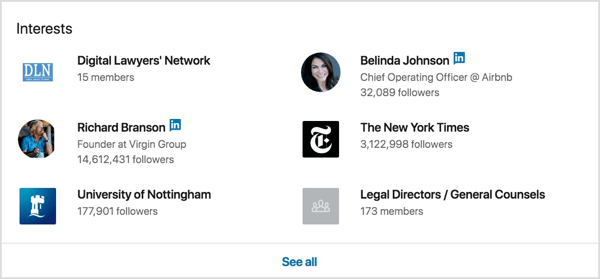
For instance, visit the LinkedIn profiles of your dream clients and view their interests near the bottom of the page. Look for shared interests among different profiles. You can use these interests as a targeting option for your LinkedIn video ads later on.

Visit the LinkedIn profiles of your dream clients and view their interests near the bottom of the page.

As you do your research, write down this information on a sheet of paper or add it to a spreadsheet. When you’re finished, you should have a pretty good idea of who your dream client is. You’ll use this info to brainstorm a few audiences to test with your video campaigns and see which performs best.

#2: Create Video Collateral for Your LinkedIn Campaign

If you want to create videos that are ideal for LinkedIn and B2B, there are a few guidelines and tips to keep in mind.

Let’s start with the technical guidelines:

  • LinkedIn video ads can be between 3 seconds and 30 minutes in length.
  • Video ads must be in a horizontal orientation. LinkedIn doesn’t support vertical video.
  • Video files must be in MP4 format and can be between 75KB and 200MB in size.
  • The video frame rate must be less than 30 FPS (frames per second).

For the best results, upload videos at the highest quality possible, which is 1080p (1440 x 1080; wide 1920 x 1080).

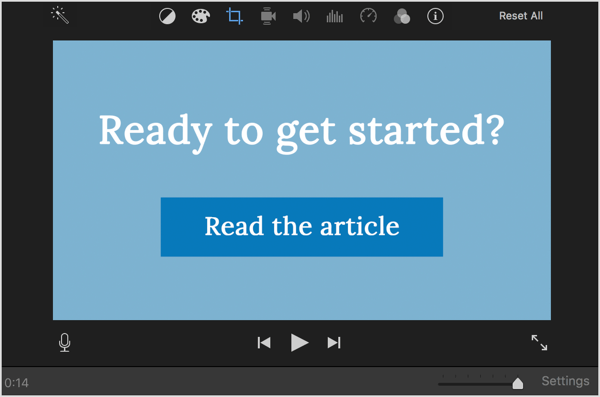
You can use any video editing program to create your video: Pinnacle Studio, Final Cut Pro, iMovie (shown below), and others. Choose the editing tool you’re most comfortable with and save your video file using the guidelines above.

Use a video editing program like iMovie to create the video for your LinkedIn ad.

When you create your video, remember that you’re trying to convince LinkedIn members to stop scrolling their feed and watch your ad, and possibly take action. How do you do that? Try these tips:

  • Make sure you grab your audience’s attention in the first 10 seconds of the video.
  • Tell a story visually with a mix of graphics, people, and text.
  • Remember that LinkedIn video plays in the feed with the sound off, so consider adding subtitles.
  • Feature a clear call to action (CTA) so your audience knows what steps you want them to take after watching your video.

Use a call to action in your LinkedIn video ads.

Once you’ve created your first video, create additional versions of it so you can test them against one another.

But which video elements should you test? Try these ideas:

  • Create videos of different lengths. Try 6-second videos to keep your brand top of mind, 30-second interview videos, or 1-minute videos where you tell a full story.
  • Add or remove introductory text or your company logo.
  • Test your original video against customer testimonial videos.

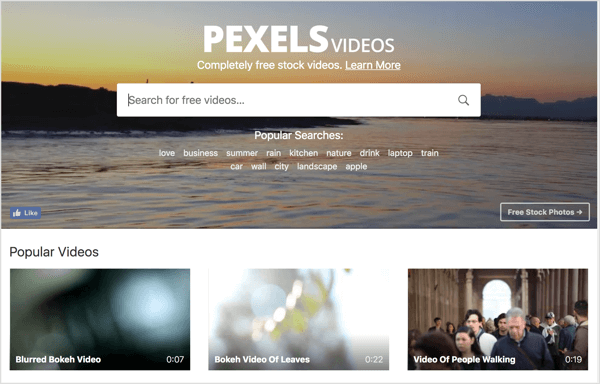
Tip: If you don’t have enough original video material, consider using free stock video from services like Pexels, Videvo, Coverr, or Vimeo.

Pexels offers free stock video you can use in your LinkedIn video ads.

You should now have enough ideas and materials to put together three to five versions of your ad. If this is your first video, you can simply create ads of different lengths. Just make sure to have more than one version of your ad to allow for proper testing.

#3: Set Up Your LinkedIn Video Ads Campaign

When your videos are ready, it’s time to upload them to LinkedIn and create your LinkedIn video ad campaign. This is the part where all of your hard work will be rewarded. You’ll upload the videos you created and target the audiences you defined earlier.

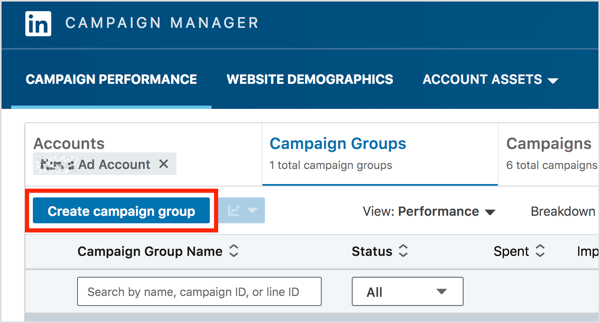
In LinkedIn Campaign Manager, first create a campaign group that will contain all of your video campaigns. On the Campaign Groups tab, click the Create Campaign Group button.

On the Campaign Groups tab of LinkedIn Campaign Manager, click the Create Campaign Group button.

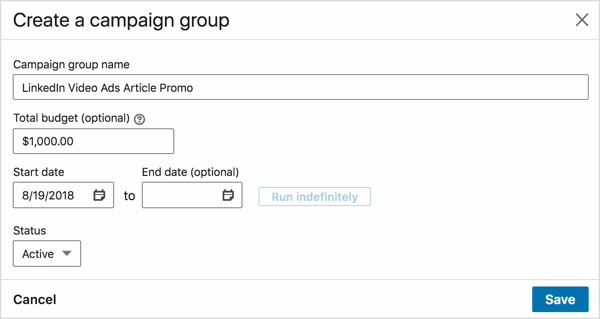
In the Create a Campaign Group pop-up box, add a group name, set a budget, and choose a start date. Then click Save.

In the Create a Campaign Group pop-up box, add a group name, set a budget, and choose a start date.

Open your newly created group and click the Create Campaign button to create your first campaign.

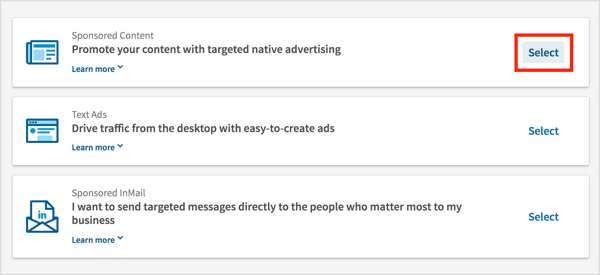
On the Choose an Ad Product page, click the Select link for Sponsored Content.

On the Choose an Ad Product page, click the Select link for Sponsored Content.

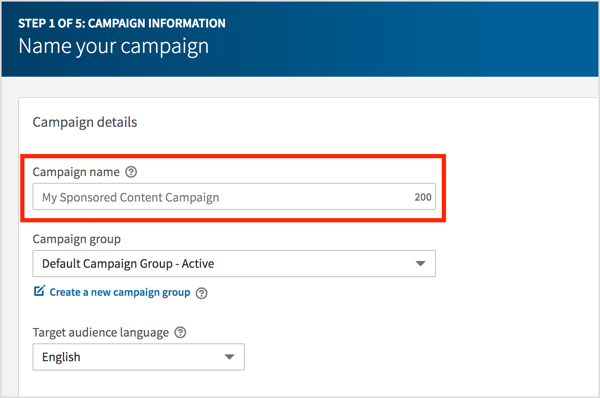
On the following page, type in a name for your campaign and click Next.

Type in a name for your LinkedIn video campaign and click Next.

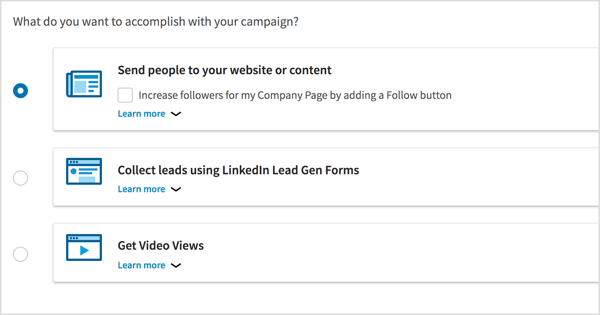
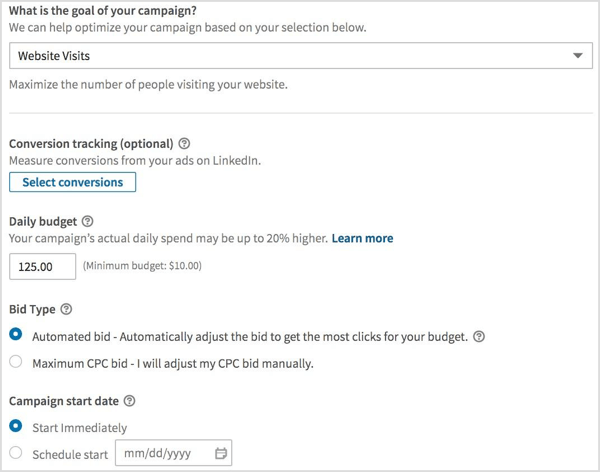
Now you need to choose your campaign goal. When people click LinkedIn video ads, you can send them to your website, collect leads, or simply do nothing (and get video views). After you make your selection, click Next.

Choose the campaign objective for your LinkedIn video ad campaign.

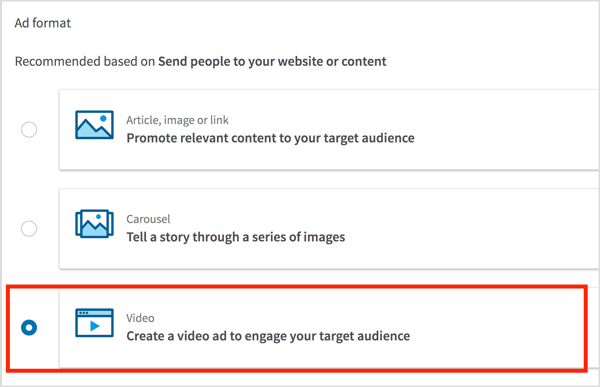
Choose Video as the ad format and click Next.

ALTChoose Video as the ad format and click Next.

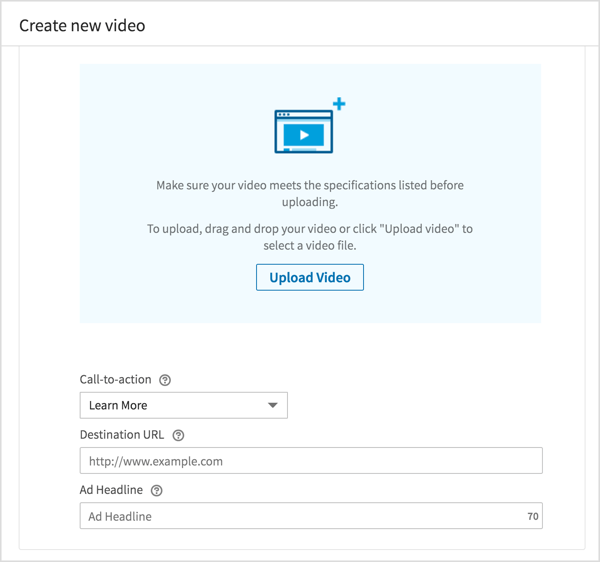
Now you’re ready to upload and manage your LinkedIn video ads. Click Create New Video and then upload each video you created.

Click Create New Video and then upload each video you created for your LinkedIn campaign.

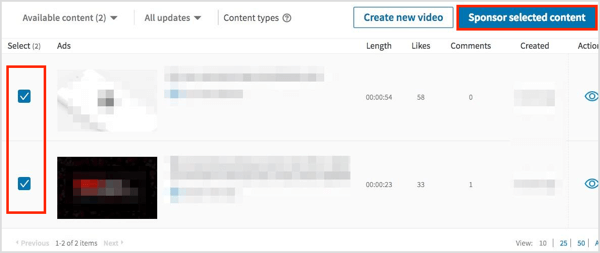
After you’re done uploading, select which videos you want to promote in your campaign and click Sponsor Selected Content.

In this example, you’re selecting two videos to promote so you can test them against one another.

Select which videos you want to promote in your LinkedIn campaign and click Sponsor Selected Content.

Next, you define whom you want to see your LinkedIn video ads, meaning you’re going to set up your first audience.

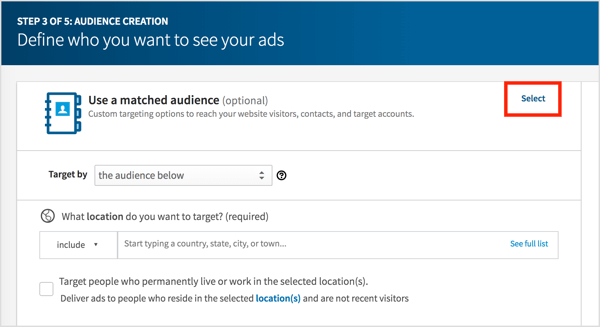
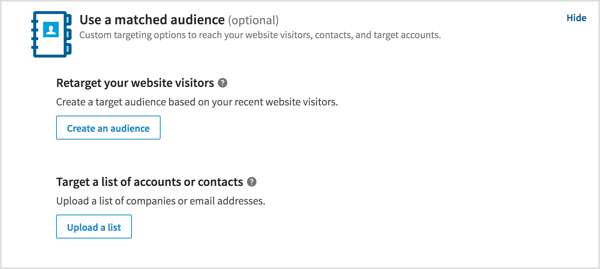
Click Select to use a matched audience.

If you want to target your website visitors, or a specific list of companies or email addresses, click the Select link next to Use a Matched Audience (as shown above) and follow the prompts to set up those audiences.

Target your website visitors or a specific list of companies or email addresses.

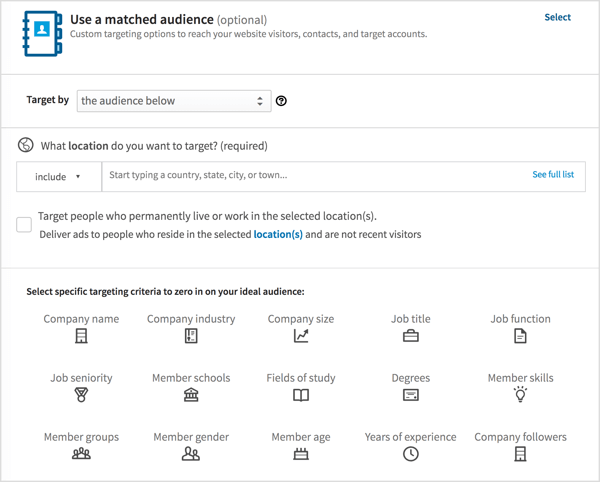
If you aren’t using a matched audience, you can target specific LinkedIn members by using the targeting criteria available to you on LinkedIn.

Choose your location, select the Target Members Who Live in This Location checkbox, and play with the targeting criteria. I recommend that you filter your audience by as many criteria as possible. Start with Company Industry, Company Size, and Job Title.

Choose your location, select the Target Members Who Live in This Location checkbox, and play with the LinkedIn targeting criteria.

When you’re finished defining your target audience, click Next.

On the final page, set a daily budget and select the start date for your campaign.

Set a daily budget and select the start date for your campaign.

When you’re done, click Launch Campaign and your first campaign will be live.

#4: Duplicate Your Campaign to Target Different Audiences

Once your first campaign is up and running, replicate it so it will automatically use the same LinkedIn video ads you selected above. This time, change your audience setting to reflect the audiences you defined in step 1 of this article.

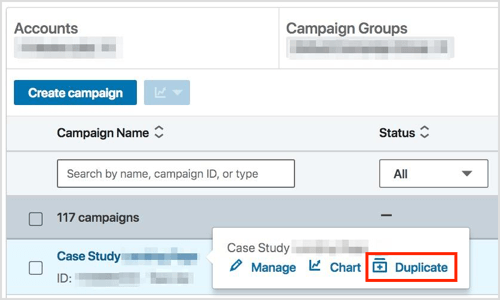
To do this, find your video ad campaign in the list and click Duplicate.

Find your video ad campaign in the list and click Duplicate.

On the next page, click the Duplicate button.

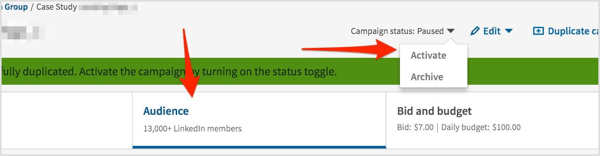
Your newly duplicated campaign will be paused, ready for you to edit it. Click on Audience and edit the targeting criteria. When you’re finished, click Activate to start your new campaign.

 Click on Audience, edit the targeting criteria, and then click Activate.

Replicate this step for every audience you want to test. I recommend that you have five or six active campaigns running simultaneously.

#5: Review Your LinkedIn Video Campaign Results

Now allow some time for your LinkedIn video ads to start generating enough views and clicks to extract meaningful data from them. It’s helpful to wait for at least 1,000 impressions.

After that, look at the average CPC of every ad and campaign. Determine which ad and campaign are winning (and put a bigger budget behind them), and which ads and campaigns are underperforming (and stop them).

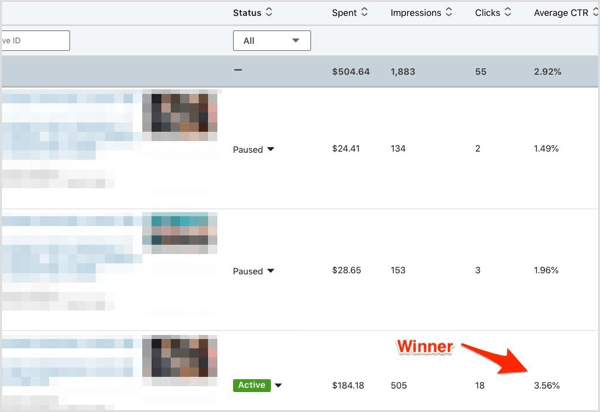
The third ad of the campaign below is the winner because it has a CTR of 3.56%, which is more than double that of the other ads. This is now the only active ad; all others have been disabled.

The third ad of the LinkedIn video campaign below is the winner because it has a CTR of 3.56%, which is more than double that of the other ads.

.

What do you think? What types of videos do you plan to use in your LinkedIn campaign? Have you previously run a LinkedIn video campaign? Were you happy with the results? Please share your thoughts in the comments below.

Learn how to plan your LinkedIn video ads and execute your first LinkedIn video ad campaign.


Social Media

via Social Media Examiner https://ift.tt/1LtH18p

August 30, 2018 at 05:04AM
0 Comments

Twitter tests suggestions on people to unfollow for when your timeline is too much

8/29/2018

0 Comments

 
https://ift.tt/2wsKrrD

Twitter tests suggestions on people to unfollow for when your timeline is too much

https://ift.tt/2PMJVN8

Twitter tests suggestions on people to unfollow for when your timeline is too much

Twitter tested unfollow suggestions, because your timeline is full enough.

Image: Richard James Mendoza/NurPhoto via Getty Images

2016%2f09%2f16%2fe7%2fhttpsd2mhye01h4nj2n.cloudfront.netmediazgkymde1lzex.0f9e7By Johnny Lieu2018-08-30 02:38:34 UTC

You're likely familiar with Twitter's suggestions on who to follow. Now, the company is asking some users if they want to unfollow people. 

As first pointed out by Slate, the social media platform is testing unfollow suggestions.

"We know that people want a relevant Twitter timeline. One way to do this is by unfollowing people they don’t engage with regularly. We ran an incredibly limited test to surface accounts that people were not engaging with to check if they’d like to unfollow them," a Twitter spokesperson told the publication.

The feature is reminiscent of Gmail's unsubscribe suggestions, which prompts you when the algorithm detects you haven't engaged with a particular sender in awhile.

People who were part of the test posted screenshots on Twitter, although the suggestions weren't entirely welcome.

Twitter's prompt tells users they "don't need to follow everyone to know what's happening."

At the moment, Twitter's explanation to users on why they should unfollow certain accounts seems pretty vague. 

Gmail's unsubscribe prompts at least make it clear that you haven't been engaging much with its suggestions, leaving no room for perceived bias in its selections — an argument which Twitter would perhaps like to avoid right now.


Social Media

via Social Media https://ift.tt/2DCFv97

August 29, 2018 at 09:46PM
0 Comments

How Companies are Using Data to Drive Value

8/29/2018

0 Comments

 
https://ift.tt/2C0W6mI

How Companies are Using Data to Drive Value

https://ift.tt/2N2vhTp

Many are referring to data as the new oil, an untapped resource with the potential to change the world. Companies across multiple sectors are taking note, and as a result, data use is on the rise. Through data, companies are making measurable and positive impacts on business strategy, revenue generation methods, and overall operations. In this article, we’ll showcase a few ways that companies are utilizing data.

New Marketing Methods

By far, marketing is becoming one of the most profitable means for data. In fact, most companies are rebuilding their marketing strategies with a central emphasis on data analytics; this type of data usage takes on numerous forms. The first is through customer interaction personalization. By accessing a combination of demographic information (gender, age, geographical location, etc.), companies can develop new insights about customer preferences and cater their marketing efforts around them. A report conducted by Salesforce found that 52 percent of customers are extremely or somewhat likely to switch brands if a company doesn’t make an effort to personalize their communications with them.

Another great example of this is channel analysis, with new and improved data analytics tracking systems, companies can closely monitor their marketing efforts. Social media based A/B testing has become a popular method for this reason. Companies can track what platforms are yielding the best traction and which ones are falling behind.

Buying and Selling Data

Another way to use data is to exchange it, in fact;  buying and selling data are the only true means of data monetization. There are numerous factors driving data exchange, among them are data creation and data ecosystems. Companies are going digital, it’s hard to find an organization who doesn’t have a website, and it’s even harder to find a company that isn’t utilizing a technological system of sorts. Whether advanced or simplistic, these companies are creating data that can be mined, refined, and made actionable. It’s estimated that roughly 90% of the digital data ever created in the world has been generated in just the past two years, and only 1% of that data has been analyzed.

This brings us to the second driver of exchange, decentralized data ecosystems; new-age blockchain companies like DACONOMY are leading this movement. DACONOMY is the world’s first decentralized ecosystem for the exchange and monetization of multi-protocol data. The company aims to increase participation within the data economy by enabling individuals, companies, and organizations of all sizes to monetize their data. They do this by taking loads of data from sellers, regardless of the data’s state, and making it tradeable. After the data is made tradeable, DACONOMY helps match the seller’s data with buyers. Companies like DACONOMY enable organizations and individuals to buy and sell data. They also offer services to help companies make their current data, or newly purchased data, more actionable.

Optimizing Operations

Companies are using data and analytics to optimize their internal operations. A great example of this can be seen in hospitals, clinics, and healthcare providers, these entities can easily lose track of the services they’ve rendered. Each procedure has a description and an assigned code, both of which may include errors. Using analytics, these organizations can identify patterns associated with the codes and procedures so that patient invoices can be flagged for potential errors or missing charges. Intelligent data use also helps those same organizations improve the ROI of collections. Specifically, they can identify the right person to contact, the channel that is most likely to elicit a response, and the time of contact that is most likely to yield a positive result.

Industries tend to move along a path until some astronomical force makes them change course. Today, data is that new force.  According to IDC, worldwide revenues for big data and business analytics are likely to grow from $150.8 billion (2017) to $210 billion by 2020; that’s a compound annual growth rate of 11.9%. Data growth is inevitable, and with new methods being created and refined, so is data monetization.

The post How Companies are Using Data to Drive Value appeared first on Social Media Explorer.


Social Media

via Social Media Explorer https://ift.tt/2onGYog

August 29, 2018 at 06:26PM
0 Comments

Google Facebook Twitter chiefs called back to Senate Intelligence committee

8/29/2018

0 Comments


Google, Facebook, Twitter chiefs called back to Senate Intelligence committee

https://ift.tt/2wpydjw

Twitter chief executive Jack Dorsey and Facebook chief operations officer Sheryl Sandberg will testify in an open hearing at the Senate Intelligence Committee next week, the committee’s chairman has confirmed.

Larry Page, chief executive of Google parent company Alphabet, was also invited but has not confirmed his attendance, a committee spokesperson confirmed to TechCrunch.

Sen. Richard Burr (R-NC) said in a release that the social media giants will be asked about their responses to foreign influence operations on their platforms in an open hearing on September 5.

It will be the second time the Senate Intelligence Committee, which oversees the government’s intelligence and surveillance efforts, will have called the companies to testify. But it will be the first time that senior leadership will attend; though, Facebook chief executive Mark Zuckerberg did attend a House Energy and Commerce Committee hearing in April.

It comes in the wake of Twitter and Facebook recently announcing the suspension of accounts from their platforms that they believe to be linked to Iranian and Russian political meddling. Social media companies have been increasingly under the spotlight in the past years following Russian efforts to influence the 2016 presidential election with disinformation.


Social Media

via Twitter – TechCrunch https://techcrunch.com

August 29, 2018 at 03:58PM
0 Comments

Diver attacked by Elon Musk as pedo guy is prepping a libel suit

8/29/2018

0 Comments


Diver attacked by Elon Musk as “pedo guy” is prepping a libel suit

https://ift.tt/2C7vfFU

A British cave diving expert who helped save the young Thai football team that got trapped in caves this summer is preparing a legal action against Elon Musk for making “false and defamatory statements”, TechCrunch has confirmed.

BuzzFeed reported the development earlier, after obtaining a letter sent to Musk’s home on August 6 by a firm representing the diver, Vernon Unsworth.

Here is the full letter sent to Elon Musk's home dated Aug. 6. pic.twitter.com/3CQHHcSrlK

— Ryan Mac (@RMac18) August 29, 2018

The background here is that in a highly offensive and extremely bizarre episode last month — even for the famously ‘loose cannon online’ Musk — the Tesla and SpaceX CEO took to Twitter to attack Unsworth, branding him a “pedo guy”.

The bizarre attack came after Unsworth had given a critical interview to the media saying the mini sub which Musk had designed and brought to Thailand “had absolutely no chance of working”. Unsworth ended an interview segment by suggesting Musk should “stick his submarine where it hurts” — a tongue-in-cheek phrase which apparently triggered Musk’s Twitter outburst.

Facing a backlash over his comments about a man who had successfully helped rescue the boys, Musk subsequently deleted the offensive tweets and quasi-apologized for slurring Unsworth in a further set of tweets, on July 18, though these were only posted within a Twitter thread, rather than being broadcast to his ~22.4M Twitter followers.

At the time Musk said Unsworth’s comment had angered him, and that had made him lash out, but he also added: “Nonetheless, his actions against me do not justify my actions against him, and for that I apologize to Mr. Unsworth and to the companies I represent as leader. The fault is mine and mine alone.”

The public element of the episode might have ended there but earlier this week Musk dredged it all up again by repeating his offensive insinuation against Unsworth during a debate with ex-TechCrunch journalist Drew Olanoff — who had brought up the “pedo guy” attack as an example of Musk himself telling untruths.

Yet instead of reiterating his apology to Unsworth, Musk doubled down on his original offensive attack — writing: “You don’t think it’s strange he hasn’t sued me? He was offered free legal services.”

You don’t think it’s strange he hasn’t sued me? He was offered free legal services. And you call yourself @yoda …

— Elon Musk (@elonmusk) August 28, 2018

To which Olanoff replied: “What I think is especially strange here is that you’re wondering why he hasn’t sued you while the rest of us are wondering why you did something so egregious that he could sue you for in the first place.”

We contacted the law firm for confirmation that it is representing Mr Unsworth in a defamation suit against Musk. Partner Lin Wood was unavailable to speak about the matter when we called but he confirmed via email that the firm is representing Unsworth in a defamation suit against Musk, and that it is preparing a legal action.

In the letter sent by the firm to Musk’s home earlier this month Wood informs Musk he has been retained by Unsworth on account of the defamatory statements made by Musk on Twitter alleging that he is a pedophile.

Wood also writes that he is preparing a civil complaint of libel and invites Musk to contact him “in an attempt to avoid litigation and to see the public record corrected”.

It’s not clear whether or not Musk had seen the letter at the time of his tweets to Olanoff.

We’ve reached out to Musk (via Twitter) for comment on the legal action and to ask whether he will be withdrawing his repeat allegation against Unsworth. We’ll update this story with any response.

The Tesla CEO’s erratic behavior online has caused other high profile headaches for his companies in recent weeks, after he tweeted about taking Tesla private — triggering wild swings in the stock price and scrutiny (and potential problems) from the Securities and Exchange Commission, only for the idea to be nixed weeks later.

The associated risks for shareholders in a public company whose CEO uses Twitter as a weapon to indulge personal spats and feuds — and to spitball major business decisions — without, apparently, any thought for the legal and reputational consequences for him or his companies, are hard to quantify but equally difficult to deny.


Social Media

via Twitter – TechCrunch https://techcrunch.com

August 29, 2018 at 12:00PM
0 Comments

Facebook has restored the cross-posted tweets that were removed from users profiles

8/29/2018

0 Comments


Facebook has restored the cross-posted tweets that were removed from users’ profiles

https://ift.tt/2MYnx4T

Facebook says it has corrected the issue of users’ deleted posts, which had affected those who had previously cross-posted their Tweets to their Facebook profile – a feature that’s no longer supported. Earlier this month, Facebook locked down its API to prevent third-party apps from being able to post to profiles as the logged-in user, and Twitter was one of those apps impacted by the change.

However, the changes to Facebook’s API would not have mass deleted all of users’ cross-posted Tweets. It should have only prevented Twitter users from continuing to automatically post from Twitter to their Facebook profile or business page.

But Twitter, for whatever reason – an accident, one would hope – requested its Facebook app be deleted. This resulted in removals of all the content that had been cross-posted by Twitter to Facebook being also deleted from users’ profiles.

Facebook was in touch with Twitter since then, and received permission to have the app re-enabled. (Though it took longer than expected – Twitter was made aware of the problem early in the evening on Tuesday but it wasn’t until the wee hours of the morning on Wednesday that Facebook confirmed it was restoring the content – which means they received permission from Twitter to do so. Obviously, Facebook can’t just turn on a third-party app again after the developer says to take it down – it had to ask. Twitter, we understand, didn’t give Facebook immediate permission to fix the problem. Maybe it’s still mad about the whole cross-posting thing being turned off?)

While, technically speaking, the error is on Twitter’s side here, Facebook probably should have had some kind of warning in place to alert the app developers – whomever they may be – of the consequences of their decisions. That is, deleting their app would also delete all the content shared through it over the years.

Many Twitter users had heavily relied on the cross-posting feature to maintain their presence on Facebook and continue their discussions with a new audience. The deletions meant they lost years’ worth of Facebook posts and conversations, in many cases.

Facebook says it has restored all the removed content, a spokesperson told TechCrunch via email around 1:20 AM ET on Wednesday. All impacted users should be able to see their cross-posts tweets and their discussions again.


Social Media

via Twitter – TechCrunch https://techcrunch.com

August 29, 2018 at 10:29AM
0 Comments

11 Ways to Make a Living on Social Media Without Selling a Single Product

8/29/2018

0 Comments

 
https://ift.tt/2PjYYgt

11 Ways to Make a Living on Social Media Without Selling a Single Product

https://ift.tt/2MZNAsl

Do you have lots of social media followers? Want to learn how to turn those followers into dollars?

Right now, there are people making a living on social media without selling anything.

We’ve all seen those profiles of seemingly regular people with tons of followers.

It always seems as if they’re traveling or doing something fun. But what exactly do they do to fund this fairytale lifestyle?

They are social influencers.

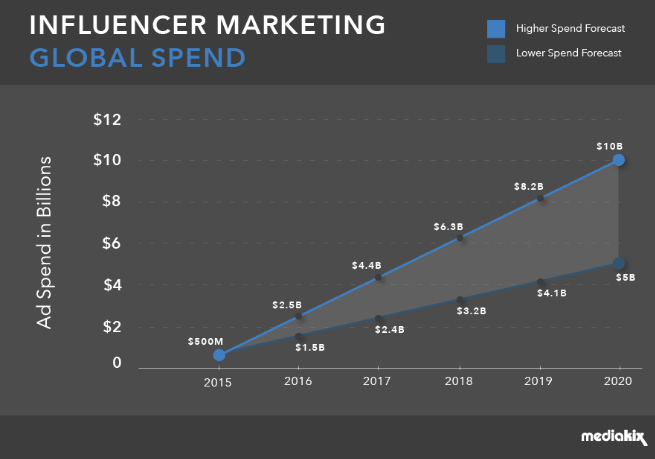
Experts predict that in the next two years, global influencer marketing will be a $5-10 billion dollar industry.

5 billion

In 2017, 86% of marketers relied on influencer marketing campaigns at some point during the year.

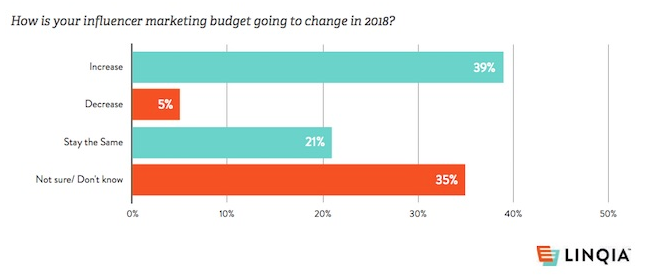
And 39% of marketers say they have increased their influencer marketing budgets for 2018.

All of this is promising news if you’re interested in making a living on social media as an influencer. Even if you don’t have lots of followers right now, this guide will show you what you need to do to make yourself more appealing to marketers and brands.

In the past, I’ve explained how to use micro influencers to increase your product credibility.

But now I wanted to write an informative guide aimed to help influencers make more money.

With influencer marketing making my list of the top marketing trends to look for in 2018, there is plenty of money to be made in this space if you position yourself accordingly.

These are the top 11 ways to make a living on social media without selling any products.

1. Pick a platform

The first thing you need to do is decide which platform you’re going to prioritize the most.

Ultimately, you’ll want to have profiles set up on as many social networks as possible, but one needs to be your bread and butter.

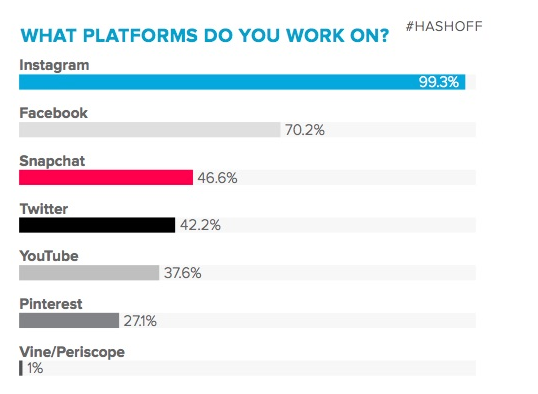
Research shows that nearly all social influencers work on Instagram.

pick a platform

In 2018, more than 82% of social influencers said that Instagram is their number one platform. Just over 12% responded with YouTube, and less than 2% said Facebook.

That’s probably because 76% of influencers say that Instagram has the best tools compared to other social platforms.

Based on these numbers, I highly recommend picking Instagram as your top priority.

You don’t need to reinvent the wheel here. If other influencers are having so much success on Instagram, you should be able to follow in their footsteps.

Your other social profiles should be used to enhance the image of your personal brand and ultimately expand your reach.

But you can use Facebook and Twitter to try to get more followers on Instagram.

2. Join a network for influencers

Another way to make money on social media is by joining networks made for influencers.

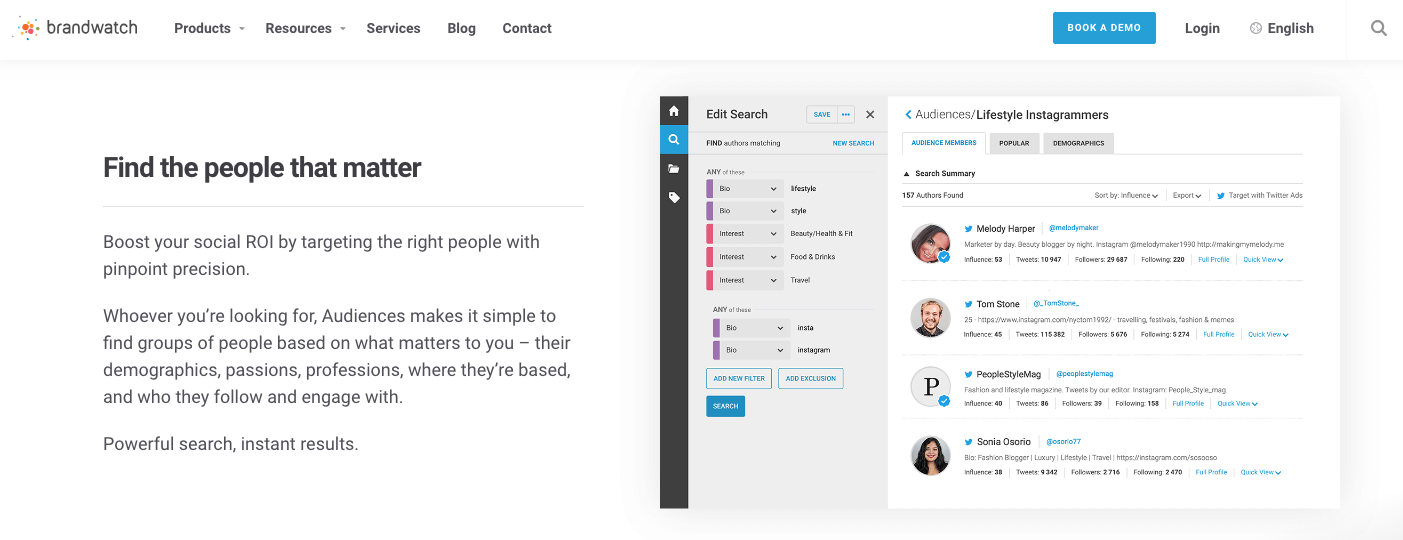
These platforms are used to connect brands with people based on their followers and specialties.

Brandwatch is a great place to start.

brandwatch

Let’s say you share lots of content related to yoga and holistic health on your social media profiles.

Your followers are obviously interested in this content as well, which is why they are following you in the first place.

If you join one of these networks, it will be easier for brands to find you if they have a product or service related to your content.

If a brand wants to work with an influencer to sell their newest yoga mat and yoga clothing, it’ll get matched with you through these networks.

You can handle all communication with the brands through these platforms as well.

This can help you stay organized as opposed to using direct messaging through social media. Once you get lots of followers, it’s tough to keep up with all of the messages in your inbox.

I recently wrote about my favorite platforms for effectively managing social influencers.

The post was intended for brands, but it’s helpful for influencers to read through it as well. Go through the list to see which platforms fit your wants and needs the most.

3. Boost your engagement rates

The reason why brands want to work with social influencers is they historically have extremely high engagement rates.

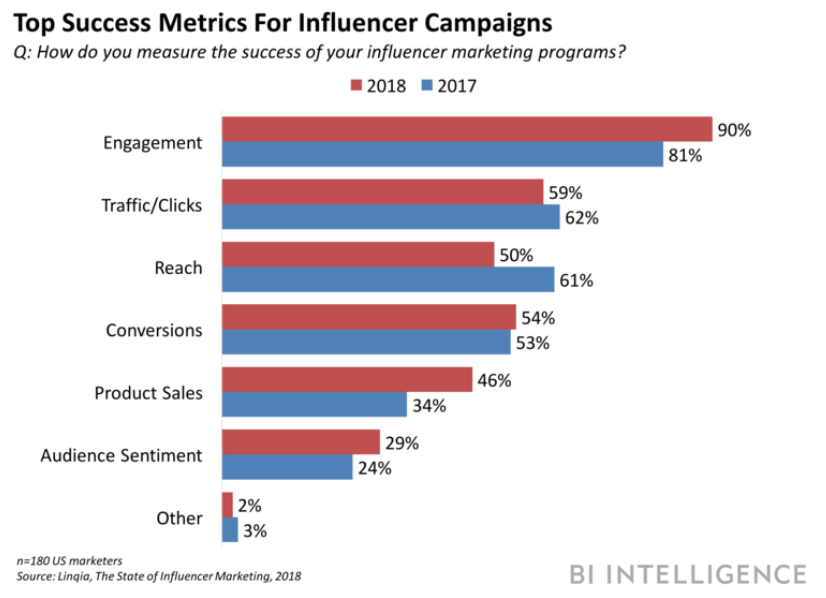
In fact, brands named engagement as the top metric for measuring the success of influencer marketing campaigns.

engagement rates

If you want to make yourself more appealing, you can show brands how high your engagement rates are with your followers.

Start by learning how to write captions that drive engagement.

You want your followers to like, comment, tag, view, and share your content.

Respond to your followers.

I know, this can be tricky, especially for those of you who have tens of thousands of followers. But the key is getting into a habit of making time to respond.

At the very least, like their comment if you can’t respond to it.

Remember, we’re treating this as your job. If you want to make a living on social media, you need to dedicate a certain amount of time each day toward making yourself a more valuable influencer.

If it were easy, everyone would be doing it.

Engaging with your followers will help them feel a personal connection with you. When you recommend a brand to them, they will be more likely to act on your recommendation, making your marketing campaigns more successful.

4. Give away free stuff

Everyone wants to get something free.

To increase engagement with your followers, hosting a giveaway is one of your top options.

Once you start negotiating with brands and deciding what kind of content you should be posting, you can suggest a giveaway.

Ultimately, the decision is theirs. They will be the ones paying you for sponsored content.

But you don’t have to commit to anything you’re uncomfortable with. If you think the content they want you to post doesn’t add value to your followers, you can respectfully turn down the offer.

After all, you don’t want to lose credibility by posting everything and anything someone presents to you.

Otherwise, you could see a drop in engagement from your followers.

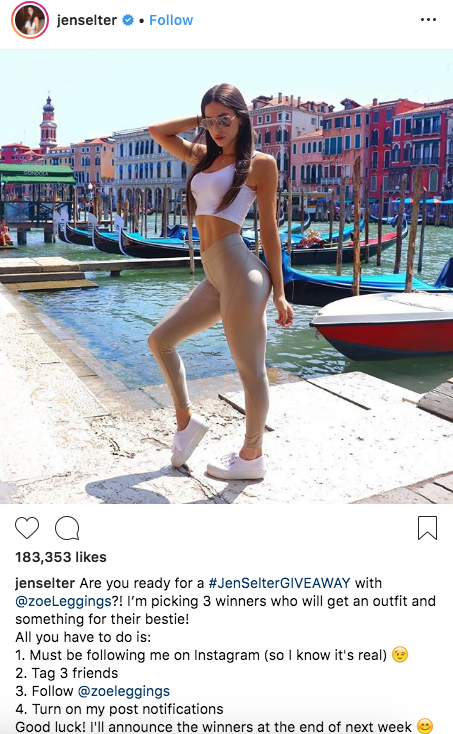
Take a look at this post from Instagram personality Jen Selter:

selter

Jen has more than 12 million followers on Instagram.

How do you keep 12 million people entertained? Don’t spam them.

Yes, it’s clear that this post is promoting a brand. But she’s doing it in a way that adds value to her followers by giving them a chance to win something free.

This post has all the elements required to run a profitable giveaway.

If you are still trying to grow your following, giving something away could be the best way to do that, even if you aren’t getting paid by any brands yet.

It may be worth spending $100 out of your own pocket on a gift card, for example, to give away to your followers.

Then you can show brands how good your engagement rates were for that campaign as you move forward with your career as an influencer.

5. Use multiple hashtags

If you’re trying to make money on social media, you can’t be afraid to use hashtags.

But don’t use only one per post.

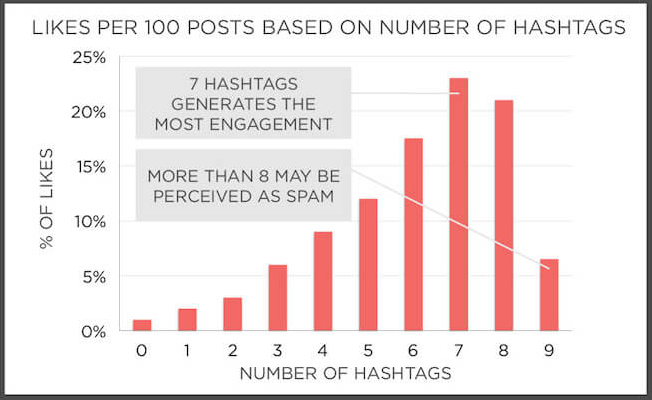
Research shows that using multiple hashtags leads to higher engagement rates.

hashtag

The magic number here is seven.

Posts with seven hashtags have the highest engagement rates.

But that doesn’t mean you should go overboard. Using more than eight hashtags on one single post can seem spammy.

Use a variety of hashtags.

Some should be broad and intended to reach the highest number of people. For example, #tbt or “throwback Thursday” is a popular hashtag used on social media.

So your post would be exposed to the masses.

However, you don’t want to get lost in the shuffle.

Create some unique and more specific hashtags appropriate for each campaign. If you look at the giveaway example again, you’ll see that Jen used #JenSelterGIVEAWAY in per post to stand out.

6. Partner with a mobile app

All too often I see social influencers partner with the same types of brands. They’re promoting clothing, fitness apparel, accessories, and food.

While there is nothing wrong with this strategy, it may not be sustainable for long-term growth.

Those brands will end up using other influencers in the future once they feel they’ve gotten the most out of you and if your cost per post rate gets too high.

Think outside the box and try to partner with unique brands, such as mobile applications.

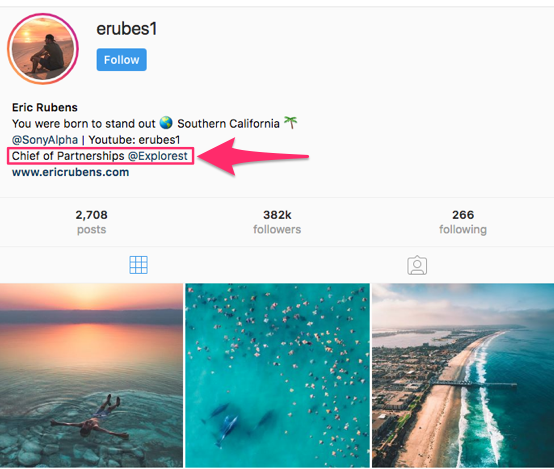
Here’s a great example of this strategy used by social influencer Eric Rubens:

erubes

Eric has more than 380k followers on Instagram.

If you look at his bio, he promotes a few different things related to his personal brand image. You can see his YouTube name and link to his website.

But look at what I highlighted. It’s his partnership with Explorest, a new mobile application.

The idea behind this app is very unique.

It shows users exact directions to places where they can take cool photographs.

This idea also fits within Eric’s personal image. If you look through his profile, he takes amazing photographs of places all over the world. So his followers are obviously interested in this type of content.

That’s why he was able to successfully partner with a mobile app such as Explorest.

7. Find your niche

It’s tempting for new influencers to take jobs from any brand that offers them money. But you need to understand how these posts can impact your future.

You don’t want to partner with any brand that goes against your core values and beliefs.

Furthermore, you need to analyze how this content will affect your followers and how you’re perceived by other brands moving forward.

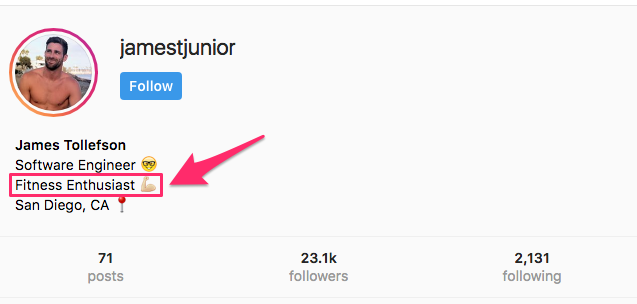
Let’s look at an example to show you what I’m talking about. Here is James Tollefson’s Instagram biography:

james1

James has just over 23k followers, which is a great number for micro influencers.

While his biography doesn’t promote anything specifically, like in the previous example, it tells you more about his life and who he is.

He’s a software engineer, living in San Diego, who is a fitness enthusiast.

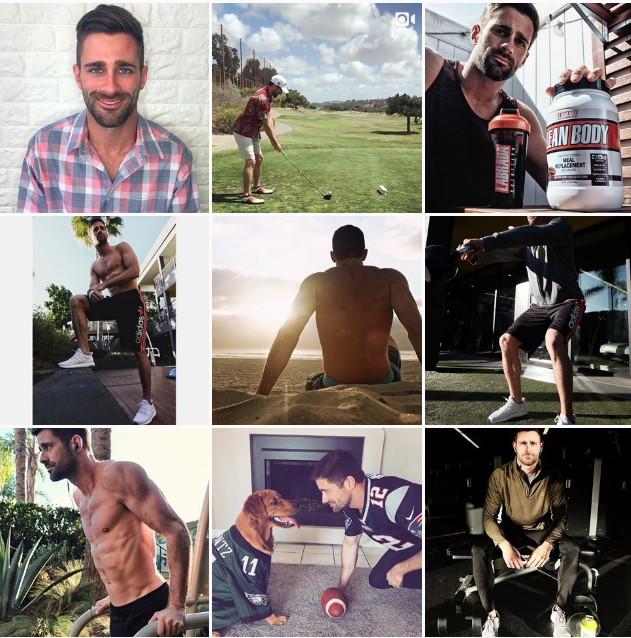
Now, just saying you’re a fitness enthusiast and being a fitness enthusiast are two different things. Let’s take a look at his pictures to see if they fit the description:

james2

As you can see, the content definitely fits the biography.

James shares content related to his fitness journey, and he promotes products that fit that niche.

If you join a community that connects brands and influencers, you want to make sure your content fits your speciality.

Don’t say you’re a foodie in your biography and then never share content related to food or work with brands in that industry. It doesn’t make sense, and it won’t make you any money.

8. Know your worth

According to research, 80% of influencers say sponsored content is their primary source of income.

This ranked higher than advertisements and affiliate links. Only 33% of influencers actually sign a contract with sponsors.

You’ve got to make sure you protect yourself and get paid for your work.

Don’t just post content for brands who offer to send you free products. That’s not enough if you’re trying to make a living.

As you can see from the graph below, marketers are planning to increase their marketing budgets for influencers:

influencer budget

Only 5% of marketers say they’re going to decrease their influencer marketing budgets.

The money is out there. It’s just a matter of finding it. Don’t settle.

How much is a post worth? The numbers will vary based on the number of followers you have and your engagement rates.

On average, 66% of businesses pay less than $250 per post.

And 27% pay between $250 and $1,000.

Just 4% pay up to $3,000 per post.

Unless you’re a celebrity, you probably won’t see $3,000 for one post. But with that said, it’s not unreasonable to aim for that $250-1,000 window.

Let’s say in a week you share two sponsored posts from two different brands. One pays you $750, and the other pays $250.

If you can continue getting rates like that steadily throughout the year, you’ll make more than $50k annually.

9. Post high-quality photos

Look back at all the examples I showed you so far. What do all of them have in common?

High-quality content.

If you want to become a social influencer, you need to make sure you’re sharing only quality photos.

Buy a professional camera if you have to. Or at least get yourself a new smartphone that takes better pictures.

Invest in yourself.

As you saw in the example of partnering with a mobile app, taking high-quality photos can lead to big opportunities for you.

Just look at Albert Hongbo Yang’s Instagram profile:

albert

These images are breathtaking.

Albert has over 24k followers who are interested in his photos, which is a huge leveraging point when it comes to working with brands.

Even if you don’t want to sell products on Instagram, if your photos are good enough, you can make money as a photographer.

Post pictures that draw attention and make you seem more legitimate.

Refer to my guide how to take and edit photos without hiring a professional to help you with this.

10. Fully disclose your relationships with brands

Part of being a social influencer means you need to fully disclose your relationships with brands.

First of all, you don’t want to mislead any of your followers or cause them to distrust you. That’s not right.

But more importantly, it’s a requirement by the Federal Trade Commission.

The FTC says that these disclosures must be clear and obvious. It doesn’t want you to use anything ambiguous, like #thanks or #collab, which could be misinterpreted.

You also can’t rely on a disclosure that will only be seen if people “click more” or view the content on a separate landing page.

To show you how to properly disclosure your relationships, look at this post from Anastasia Ashley:

anastasia

Anastasia is promoting La Roche-Posay skincare products.

As you can see, she clearly tagged them in her caption and used the hashtag #sponsored to disclose her relationship with the brand.

There is definitely nothing ambiguous about that. She’s complying with FTC regulations.

11. Promote your services

OK, so you want to make a living on social media without selling any products. But you can still sell your services.

Earlier I explained how you could make a living by taking high-quality photos and then leverage your photography skills to make money.

That’s just one way to do it, but there are plenty of others.

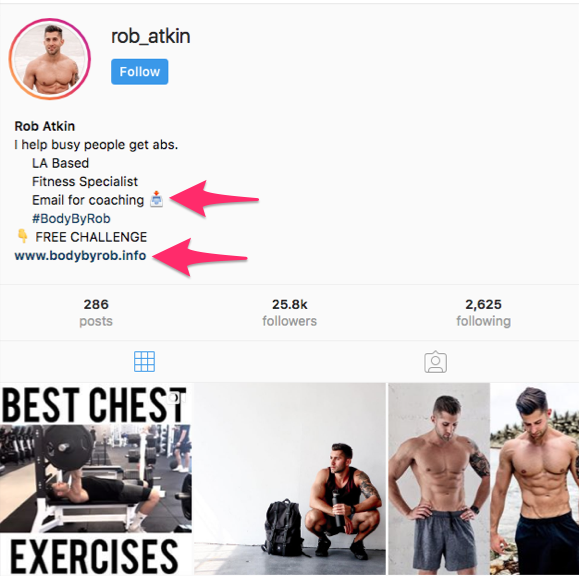
For example, let’s take a look at Rob Atkin’s Instagram profile.

rob

Rob is promoting his personal website in the biography.

Clearly, he’s a personal trainer. But the way he positions his services is much more creative than just saying “personal trainer.”

Instead, he uses creative phrases such as “I help busy people get abs” and “fitness specialist” to promote his services.

As you can see from his posts, his content fits into that niche, which is extremely important, as I mentioned earlier.

So if you want to make money on social media without selling any products, consider using your distribution channels to promote your services instead.

Conclusion

There is tons of money to be made on social media right now.

People are making a living without selling a single product.

Those of you who have a large social following can use your profiles to get paid by brands.

Even if you don’t have lots of followers right now, you can increase your following and engagement metrics to make yourself more appealing to prospective clients.

If you follow the tips and advice I’ve outlined in this guide, you can turn your social media profile into a money-making machine.

How are you leveraging your social media followers to make money as a social influencer?


Social Media

via Quick Sprout https://ift.tt/UU7LJr

August 29, 2018 at 10:06AM
0 Comments

Facebook temporarily removed status updates cross-posted from Twitter

8/29/2018

0 Comments

 
https://ift.tt/2PgVxHj

Facebook temporarily removed status updates cross-posted from Twitter

https://ift.tt/2wv2jBo

Facebook temporarily removed status updates cross-posted from Twitter

Facebook posts that were crossposted from Twitter have mysteriously disappeared.

Image: Jaap Arriens/NurPhoto via Getty Images

2016%2f09%2f16%2fe7%2fhttpsd2mhye01h4nj2n.cloudfront.netmediazgkymde1lzex.0f9e7By Johnny Lieu2018-08-29 10:52:53 UTC

For ages, you could hook up your Facebook account to Twitter, allowing you to automatically post tweets as a status update.

That feature stopped working earlier this month when Facebook made changes to its API, and as reported by TechCrunch, Facebook status updates that were crossposted from Twitter mysteriously vanished around Tuesday.

A Facebook spokesperson explained to Mashable that the deletion resulted from a Twitter administrator's request for the app to be deleted, but it's now been fixed.

"[It] resulted in content that people had cross-posted from Twitter to Facebook also being temporarily removed from people’s profiles. However, we have since restored the past content and it’s now live on people’s profiles," the statement reads.

Given that Facebook stores so much of our online conversations these days, the sudden deletions prompted complaints from users.

oh great, Facebook deleted virtually everything I posted there for over eight years, thousands of posts and every comment that came with it https://t.co/F4KtMbuyXm

— Andy Baio (@waxpancake) August 29, 2018

I did Facebook's "download my data" thing to verify and yep, they've permanently deleted all prior posts made via Twitter integration, as well as all replies attached to them. About a decade of conversations with friends deleted without notice. Seriously Facebook, fuck you.

— Rod Hilton (@rodhilton) August 29, 2018

Not only is it my posts that were arbitrarily nuked, but any friends who interacted &/or commented with those posts have had that deleted as well with absolutely no warning or notice from Facebook whatsoever.

— Joshua Meadows (@joshuameadows) August 29, 2018

@facebook I used the Twitter for Facebook app for years, and I realize it's not working and isn't going to. But I just discovered all the Facebook updates it put have been deleted and dissappeared from my timeline! Is there a way to retrieve this?

— Omer Lev (@omerlev) August 26, 2018

Over the past year, Facebook has tightened up its developer policies following the well-publicised Cambridge Analytica scandal, where the personal data of approximately 87 million users were improperly used.

Facebook announced in April that it would stop allowing third parties to directly publish posts to the platform by Aug. 1, affecting roughly 60,000 apps. 


Social Media

via Social Media https://ift.tt/2DCFv97

August 29, 2018 at 05:53AM
0 Comments
<<Previous
Forward>>

    Amazing WeightLoss

    Click Here!

    Categories

    All
    Analyze Top Competitors
    Anti-Abuse
    Apple
    Apple Watch
    Blog Posts
    Brainstorm
    Brand Awareness
    Communications
    Content Marketing
    Conversion Rates
    Editorial Calendar Tips
    Engagement
    Facebook
    Google Analytics
    How To Marketing Tips
    Influencer
    Instagram
    Instagram Live
    Keyword Search
    Marketing
    Marketing Automation
    Picture Quotes
    Podcasts
    Recording Videos
    Repurpose Blogs
    Research Trends
    Sales Funnel
    SEO Marketing
    Sharing Posts
    Slide Shows
    Smartwatch
    Social Media Marketing
    Social Media News
    Social Media Tools
    Social Selling
    Target Marketing
    Twitter
    Twitter Notifications
    User Interaction
    Video
    Video Marketing

    Archives

    November 2020
    October 2020
    September 2020
    August 2020
    July 2020
    June 2020
    May 2020
    April 2020
    March 2020
    February 2020
    January 2020
    December 2019
    November 2019
    September 2019
    August 2019
    July 2019
    June 2019
    May 2019
    April 2019
    March 2019
    February 2019
    January 2019
    December 2018
    November 2018
    October 2018
    September 2018
    August 2018
    July 2018
    June 2018
    May 2018
    April 2018
    March 2018
    February 2018
    January 2018
    December 2017
    November 2017
    October 2017
    September 2017
    August 2017
    July 2017
    June 2017
    May 2017
    April 2017
    March 2017
    February 2017

    RSS Feed

Powered by Create your own unique website with customizable templates.
  • Home
  • Blog
    • Social Media News
    • SEO Marketing News
    • Digital Trends News
    • Photography News
    • Mobile Marketing
    • Business News
    • Gadget News
    • Printing News
  • Contact
  • About
  • Subscribe