
|
https://ift.tt/2YseUkZ
Claim your Knowledge Graph: Here’s how https://ift.tt/2Otis6R Google has continued to expand the presence of its Knowledge Graph results and is now a common element in most search results. The Knowledge Graph is, of course, an organic search element and is closely tied to related elements such as featured snippets and rich results. It is now a common SEO practice to attempt to gain and optimize a Knowledge Graph result. A new feature that Google has added to its Knowledge Graph is allowing entities to claim their Knowledge Graph panel to become the authoritative owners and editors of the results within the panel. You may wonder why would Google offer this feature? Well, the answer is Google doesn’t always get things right and incorrect information can appear in Knowledge Graph results. This is a common issue in the era of fake news that we live in. Having control of your Knowledge Graph panel will ensure you can make the respective edits needed. Here is what Google has outlined as the benefits of claiming the knowledge panel.
Here is an example of the element which displays that the Knowledge Graph Panel is not claimed. It appears at the bottom left panels that are not claimed. 
Many brands and companies have not taken advantage of this feature and this element sticks out like a sore thumb in their SERPs. Here are two examples. 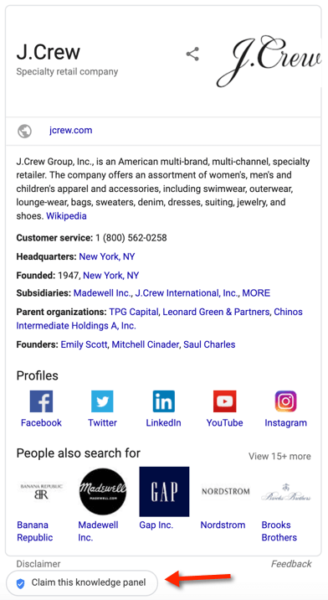
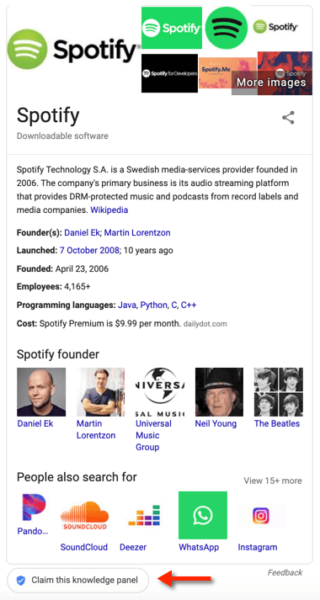
Claiming your Knowledge Graph panelHere is a step by step guide on how to claim your Knowledge Graph.


Options will typically include YouTube, Twitter and Google Search Console. Once you complete the verification the “Claim your knowledge panel” button will disappear from below your Google Knowledge Graph panel. You will now have authoritative editing power on your panel where you can suggest changes. So, if you have wrong info was appearing in your panel you now have the ability to have it updated. Here is what the editing of the Knowledge Graph panel looks like if you’re logged into your Google Search Console. account 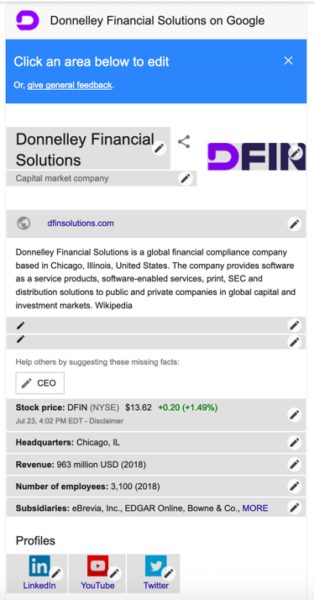
Opinions expressed in this article are those of the guest author and not necessarily Search Engine Land. Staff authors are listed here. About The Author
Tony Edward
is a Senior SEO Manager at Elite SEMand an Adjunct Instructor of Search Marketing at NYU. He leads the SEO team at Elite SEM's New York City office. Tony has been in the online marketing industry for eight years. His background stems from affiliate marketing and has experience in paid search, social media and video marketing. SEO via Search Engine Land https://ift.tt/1BDlNnc July 30, 2019 at 12:20PM
1 Comment
|
Categories
All
Archives
November 2020
|
 RSS Feed
