
|
https://ift.tt/2GxUkt1
6 Reasons Why MAC Is the Best Affiliate Marketing Conference to Attend via @LeadbitCom https://ift.tt/2ZjCHEL This is a sponsored post written by MAC Events. The opinions expressed in this article are the sponsor’s own. Following the success of last year’s series of international affiliate events, MAC Affiliate Conferences continues its global stops in 2019. The conference will be back to Delhi and Kyiv this autumn. Each event will gather more than 2,000 guests from all over the world – webmasters, affiliates, top industry experts, affiliate networks, ad agencies, and solution providers. What’s so unique about MAC events? Check out six big reasons why you should attend MAC Affiliate Conferences. 1. Efficient NetworkingMAC is one of the best platforms to connect with global industry leaders and top digital minds. It’s also a brilliant chance to establish new partnerships with media buying teams, affiliate networks, and lead gen experts. Last time MAC gathered 3400 guests from 47 countries and 150 leading international companies.  2. Practical KnowledgeIt’s widely known that MAC speakers always present only real case studies. Top industry experts share their practical knowledge and reveal up-to-date money-making approaches. Only webmasters who run traffic at the moment speak at MAC events. MAC organizers don’t invite company representatives or coaches to speak, only those who earn money online today. It’s an awesome opportunity to learn things and dramatically increase your revenue. All the methods are ready-to-use: already tested and proved to be profitable. We believe that numbers tell more than words. Here are some juicy campaigns from MAC speakers. Roman Puzat, an experienced and super successful SEO specialist, made 1 million rubles ($15,200) only on one counter-advertising article about “25th frame” weight loss offer. He spoke at the last event and shared his secrets with the audience – told everything he knows about traffic informational websites and how to earn money in this niche. Anton Voystrikov, a CPA app master, expertly promotes CPA apps on Facebook in different niches – betting, gambling, dating, finance, and sweepstakes. For example, his team promoted one betting app and earned $8,860 in 8 days which made 300% ROI. Voystrikov is a regular MAC speaker and always shares his breaking the mold ideas.  Sergei Gamolia, an education niche expert, successfully promoted the Studybay website on Facebook in the U.S.A. with a 200% ROI. Gamolia’s team found out that most of the website’s clients are parents who order essays for their children. So he targeted parents of young adults on Facebook – there are more than 13 million people in this category in the U.S. The results were impressive: Gamolia invested $6,000 and earned $13,422 in three months! Vitaliy Stetsenko, a skillful super affiliate, made 15 million rubles (about $230,000) only on Ecco and Salomon sports shoes! He ran an affiliate campaign on Instagram in CIS countries and made this amount of money for six months! At our last conference, Stetsenko covered Google Search and GDN strategies and shared tips on how to make 1,000-2,000 leads daily on Nutra products in Tier 1 GEOs, where each lead is about $10-$15. Rafael Gabitov (a.k.a. Sensey), the author of FB Bible, successfully promotes different verticals on Facebook – ecommerce, dating, Nutra and many more. Sensey is always ready to share his new and efficient marketing tricks with other affiliates. For example, he promoted ecommerce offers on Facebook using double monetization method. The result? 202,899 clicks, 59,371 unique users, and 9,947 conversions for two weeks! This guy knows exactly how to bypass limits, choose profitable offers, and make money on Facebook in 2019. 3. Fantastic All-Inclusive AfterpartyThis is truly the main trump card of MAC events: a bright show, a delicious buffet, an alcoholic bar, and hits from the best DJs are waiting for you at the end of the official program. At MAC Moscow Afterparty more than 2,000 people gathered under one roof – in the biggest club in Europe. Relax and experience the bouquet of unforgettable emotions.  4. Find Solutions for Your BusinessLooking for traffic, advertisers, ad agencies, anti-fraud software or another solution? You can find whatever you want in the exhibition market! More than 50 companies are ready to help you. Some of the MAC Moscow guests shared that most companies offered preferential terms of cooperation during the conference. 5. Topic DiversityEvery digital marketer will find something useful at MAC. Enjoy astonishing topic diversity – SEO, Facebook and Google white hat and black hat strategies, alternative traffic sources, profitable affiliate campaigns, fresh verticals, and actual offers. Learn how to unban accounts, cloak, bypass limits, and other affiliate tricks. Discover a wide variety of opinions at panel discussions. 6. Win a GiveawayFor some guests, it’s the most exciting part. ? Last time there were raffled loads of valuable prizes – $1,000 and lots of money prizes – cash and deposits, several iPhones, numerous HDDs, and power banks, Sony PlayStation and many others! Stay tuned for giveaway announcements in the exhibition zone and give it a shot!  Upcoming MAC EventsMAC Delhi Affiliate Conference
Get Your Special DiscountSearch Engine Journal readers can receive a 100% discount on GOLD conference tickets for both conferences! Use the promo code “sejournalfree”. To get your ticket, sign in as an affiliate, select Gold ticket, and activate your promo code. Only 10 users can get free passes at each conference page. For VIP conference and party passes, please use the promo code “sejournal30” to get a 30% discount for an unlimited number of tickets. Promo valid until August 15, 2019.
Image Credits Featured Image: Image by MAC Events. Used with permission. SEO via Search Engine Journal https://ift.tt/1QNKwvh July 30, 2019 at 02:26AM
0 Comments
https://ift.tt/311ydmL
Google’s John Mueller Recommends Keeping URLs Under 1,000 Characters via @MattGSouthern https://ift.tt/2Ywn1kv  Google’s John Mueller recently stated that URLs should be kept under 1,000 characters in length. This number was mentioned in a Google Webmaster Central hangout during a discussion about URL length as it relates to SEO. While it’s uncommon for URLs to reach, much less exceed, 1,000 characters – it’s not impossible. Various factors such as parameters and sub-folders can greatly expand the length of a URL. At what point does URL length start to impact SEO? Well it turns out you likely don’t have to worry about URL length until you’re approaching the 1,000 character mark. In other words, you have plenty of room to work with. With that said, it’s generally recommended to keep URLs short and avoid making them any longer than they need to be. Web browsers can handle URLs up to 2,000 characters in length, which is what makes Google’s limitation of 1,000 characters particularly noteworthy. In fairness, Mueller may have been throwing an arbitrary number out there, but he brought up this number once before. Back in 2009, in a reply to a thread in the Google help forums, Mueller stated:
So, there it is. Keep URLs short, but don’t stress about it if they get a little long. As long as they’re under 1,000 characters. Hear Mueller’s full statement in the video below, starting at the 42:39 mark:
SEO via Search Engine Journal https://ift.tt/1QNKwvh July 29, 2019 at 08:24PM
https://ift.tt/2ZmXxmM
Google Ads Editor Updated With 4 New Features via @MattGSouthern https://ift.tt/2YuZpIK Google Ads Editor version 1.1 has been released, which contains updates to improve on design and usability. Here are the new features in the latest version of Google Ads Editor:
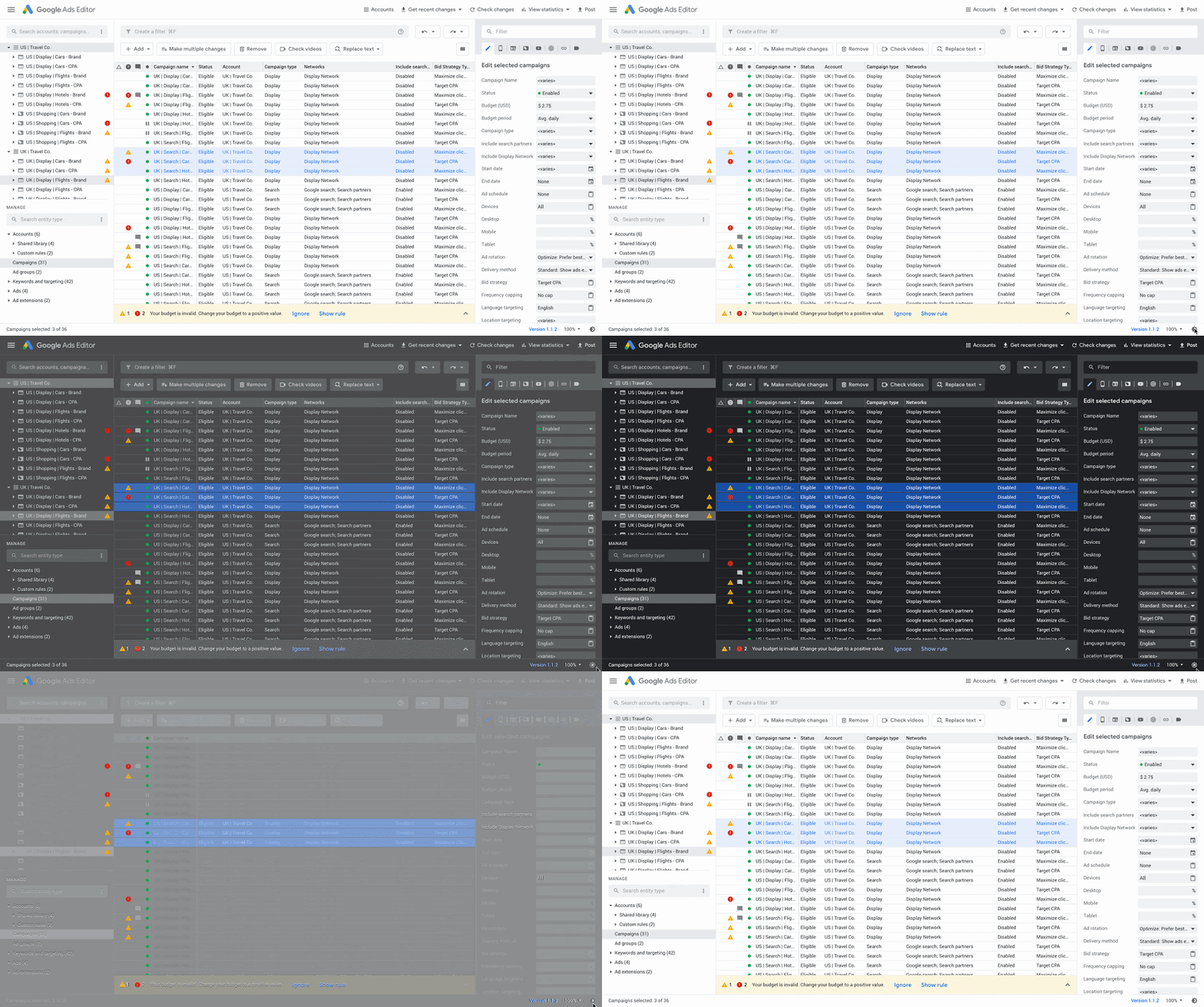 These updates are available now by downloading the latest version of Google Ads Editor. SEO via Search Engine Journal https://ift.tt/1QNKwvh July 29, 2019 at 05:23PM
https://ift.tt/2MkB9H7
Google Keyword Planner Updated to Show the Most Relevant Keyword Ideas via @MattGSouthern https://ift.tt/2MnOhuT  Google has updated its Keyword Planner tool with the ability to show the most relevant keyword ideas based on the seed keyword. This update is designed to help users prioritize which keywords to add to their Google Ads account.
Along with this update, two other features have been added to Keyword Planner:
All of these changes are rolling out in English first, with coming to other languages later this year. SEO via Search Engine Journal https://ift.tt/1QNKwvh July 29, 2019 at 04:03PM Daily Search Forum Recap: July 29, 2019 https://ift.tt/2MlT8gh Here is a recap of what happened in the search forums today, through the eyes of the Search Engine Roundtable and other search forums on the web... SEO via Search Engine Roundtable https://ift.tt/1sYxUD0 July 29, 2019 at 03:00PM
https://ift.tt/2KfwrHJ
Google to Site Owners: Remove Noindex Directives from Robots.txt via @MattGSouthern https://ift.tt/2Ye18qQ  Google is emailing webmasters via Search Console telling them to remove noindex statements from their robots.txt file. The email reads:
These notices come just weeks after Google officially canceled support for the noindex rule. For now, Googlebot is still obeying the noindex directive and will continue to do so until September 1st. Site owners will then need to use an alternative. Technically, as stated in the email, Google was never obligated to support the noindex directive in the first place. It’s an unofficial rule that Google adopted when it started to become widely used by site owners. The lack of a standardized set of rules for robots.txt is another issue in and of itself – an issue that Google is working steadfastly to resolve. Until such time as a standard list of rules is established, it’s probably best not to rely solely on the unofficial rules. Here are some other options for blocking a page from being indexed:
SEO via Search Engine Journal https://ift.tt/1QNKwvh July 29, 2019 at 02:22PM
https://ift.tt/2yJGwqj
Google swaps ‘voice search’ on Android for Google Assistant https://ift.tt/2K0rZ0S  Goodbye voice search, hello Google Assistant. The company is swapping out the familiar blue and red mic in favor of its Assistant on the home screen of Android handsets. The news was first reported by 9to5google. After seeing the report, I turned on my Pixel XL this morning and there it was. We’ve asked Google for more context but it’s relatively clear that the company is seeking to replace basic speech-to-text voice recognition with the greater capabilities of the Assistant. Assistant part of Google’s new AI-first approach. At Google’s developer conference in 2017, CEO Sundar Pichai declared the company was shifting its orientation from “mobile-first” to “AI-first.” The difference is the multi-platform emphasis and the expanding capabilities of the Assistant, which is more conversational, and potentially transactional, (e.g. Duplex) than ordinary search. Google Assistant instead of voice-search mic The conventional “voice search” blue and red mic still appears to be accessible on Chrome for Android and on the Google app and Chrome browser for iOS. It’s likely, however, that the Assistant will eventually take over across the board. It’s unclear when Google might integrate the Assistant directly into the Google app for iOS. Leading with the Assistant. Google previously announced that its Assistant resides on one billion devices. More than search, the Assistant is now Google’s “marquee” product, which spans devices and platforms. Google sees the Assistant and its cross-device ecosystem as a long-term competitive advantage over rivals. Earlier this year Google began testing ads in Assistant results. And in April, the company confirmed that it would show paid-search ads “when relevant” in responses delivered via the Assistant. Why we should care. The Assistant tries to provide “answers” and, increasingly, rich visual information rather than a list of links or conventional search results. Any distinction between the Assistant and what we might call “traditional mobile search results” will probably disappear in the relatively near future. A recent study from Adobe found that 48% of consumers are using voice for “general web searches.” Those numbers will be going up as the Assistant gradually becomes the primary way that people access information on mobile devices. SEO via Search Engine Land https://ift.tt/1BDlNnc July 29, 2019 at 01:46PM
https://ift.tt/32R7mLQ
Simplifying Google Analytics configuration with Google Tag Manager https://ift.tt/2ykRGCq Google Analytics is a crucial part of any online marketer’s toolbox. Getting analytics data starts with a proper installation of the tracking code. Thankfully, Google Tag Manager makes this process simple, even when modifications to the Analytics code are required. Google Tag Manager (GTM) allows you to deploy Google Analytics tracking without adding any further code to your website. Extensive configuration options allow you to tweak the setup based on your needs. In this article, I’ll cover how to set up Google Analytics through GTM, along with some tips for customization based on your needs. Installing a global Google Analytics tagNavigate to your desired GTM account and container. From the Overview screen, select “Add a new tag.”  Next, click within the Tag Configuration box to choose a tag type. Select “Google Analytics: Universal Analytics.”  Leave the “Track Type” dropdown set to “Page View.” Next, under “Google Analytics Settings,” choose “New Variable.”  Now, you’ll create a variable that includes your unique Google Analytics Tracking ID. After a one-time setup, you’ll be able to reuse this variable in any future GA tags. You can also customize settings for the variable under “Advanced Configuration,” or override settings within a specific tag by checking the “Enable overriding settings” box. Find your Tracking ID (you can locate this quickly by going to Tracking Info > Tracking Code within the Admin section of your GA account) and paste it into the respective field in GTM. Name and save the variable.  Now, return to editing your tag and select the GA variable you created. Next, click within the Triggering section to choose which pages you want the tag to appear on. To deploy globally wherever your GTM code is in place, select “All Pages.” Submit changes to push your tag live. Event trackingEvents are incredibly useful in Google Analytics to track any interactions that aren’t registered by default. Some possible actions include clicks on elements within pages, scroll activity, file downloads, video views, and form submissions. To fire an event, choose “Event” from the “Track Type” dropdown when creating your GA tag. Next, fill in the fields with the appropriate parameters for your event.  For instance, in this example, we’re tracking a whitepaper download. Our fields include:
Also note the Non-Interaction Hit dropdown. By default, when set to “False,” the event will count as an interaction, meaning the session won’t be considered a bounce if the user completes the associated action. If you set this dropdown to “True,” a user could complete the action but still count as a bounce if they leave the page before doing anything else. Cross-domain trackingIf you’re using the same Google Analytics account across multiple domains, you should enable cross-domain tracking to ensure that users are being tracked properly when going from one domain to another. Otherwise, they’ll be seen as separate visitors to each domain. First, under “More Settings” for your GA variable, open the “Fields to Set” section. Type “allowLinker” for Field Name and “true” for Value.  Next, further down in the “More Settings” options, click the “Cross Domain Tracking” dropdown. In the “Auto Link Domains” field, insert all domains you’d like to track, separated by commas.  If you’re using a form that takes a user to another domain upon submission, you’ll also want to choose “True” in the “Decorate Forms” dropdown. Save the variable and submit to push live. You should now see unified reporting across domains, eliminating duplication of user counts if the same people visit multiple sites with your GA tag. Enhanced link attributionGoogle offers a handy Page Analytics Chrome extension, which allows you to visualize click data for links on your site. You can see how many clicks occurred on each link, as well as what percentage of total clicks for a page went to each. Unfortunately, by default, this report groups together counts for any links going to the same URL. So if you link to the same URL from both a top navigation bar and your site’s footer, each link will show the same click count. Thankfully, a simple setting change allows you to differentiate between clicks on different elements. When editing your Google Analytics variable, look for the “More Settings” option below where you entered your Tracking ID. Within the options that appear, click “Advanced Configuration.” You’ll now see a dropdown labeled “Enable Enhanced Link Attribution.” Select “True” here.  Once you’ve saved and published this change, you’ll now see unique counts for each link in the Page Analytics report. ConclusionGoogle Tag Manager offers an extensive integration with Google Analytics, allowing you to configure anything from installing the default code to covering advanced tracking scenarios. Setting up Analytics through GTM allows you to simplify the code in place on your site, as well as easily allow access to tweak settings without requiring development updates. You can quickly set up advanced features like cross-domain tracking. If you haven’t done so yet, make GTM a part of your workflow for setting up Google Analytics implementations. Explore advanced options to customize as needed. You’ll save time and reduce friction with developers. Opinions expressed in this article are those of the guest author and not necessarily Search Engine Land. Staff authors are listed here. About The AuthorTim Jensen is a campaign manager at Clix Marketing. With over 8 years of experience in the digital marketing industry, Tim has worked with both B2B and B2C accounts in a wide variety of industries. While comfortable managing ads across all major platforms, he’s particularly intrigued with the crossover between analytics and PPC. SEO via Search Engine Land https://ift.tt/1BDlNnc July 29, 2019 at 12:40PM
https://ift.tt/2Zj8N3D
Local SEO for Enterprise Sites From 2004 to 2019 via @SEOGoddess https://ift.tt/2yphNYU  Since 2004, Google has been prioritizing searches based on local results and stressing that businesses optimize for a local presence. The idea is to connect small Mom and Pop shops, medium-sized chains and websites that cater to the local customer with users who have a high intent to purchase. It’s no wonder that a simple search for [Local SEO] brings up many checklists that provide valuable information, including Search Engine Journal’s Guide for Local SEO. However, enterprise companies that target a large audience pose a challenge in optimizing for local searches. Sites like TripAdvisor with their Activities in Seattle page, Yelp’s Restaurants in Seattle, and Groupon’s Things to do Near Me page show us that enterprise sites can properly optimize for local searches. The key is using the right signals, adding off-site optimization for local, and developing content that makes sense based on user intent. Authoritative Document Identification PatentIn December of 2004, Google filed the Patent for Authoritative Document Identification that kicked off their focus on providing local searches with quality local content. The Abstract stating:
The patent uses four main signals that determine a location for a business:
In 2005, Google announced their Maps feature with a launch to mobile later in the year. The goal was to continue to push for local results forcing websites to optimize for searches around countries, provinces, states, and cities. In 2008, I optimized a website to save the breakfast sandwich at Starbucks using the four signals from a database of cities for people looking for Starbucks in their city. The website was so successful that Howard Schultz named it in his book “Onward“. A few years later, I began work at usedcars.com and discovered that the location-specific section of the site dropped considerably with Google’s Panda and Penguin updates. Pages were developed for local searches of “used cars in..” plus each city. Each page included the four signals: addresses and phone numbers of car dealers with mentions of “used cars in…” plus city. Tiles of vehicles for sale in that location, special deals based on cars priced below KBB value and additional dynamically driven content supplemented the page for a valuable experience. The project resulted in contributing to over 60% of the revenue for the business from SEO by the time my two years there were up. Merging Search Results PatentIn March 2013, Google’s Merging Search Results patent was approved and applied in full effect forcing many sites to reconsider their local SEO strategy. The abstract:
With the authority results, the pages that have been chosen to be associated with the business entity in a local result will include the general and local page in local results. The authority page of the business is the homepage of the business. If an authority page ranks highly in both web results and local search results, that URL may be merged so that it only appears one time in the search result as a local listing. For example, a project I developed while at Nordstrom, a user searching for Nordstrom in Seattle will see the local store page as the authority page in the search results and connect to the results in the local pack rather than the Nordstrom homepage. With the patent, when the local search result is considered the authority page for the query and within proximity of the searcher, the combined results might then appear before other results in response to a query. Since the release of the patent, users are accessing search on their mobile devices. Google has placed an emphasis on more signals around “near me” and for general queries like “restaurants” or “shopping” assuming that users are expecting local results. Claiming your business page on Google Places, Yelp, TripAdvisor, Groupon, and many other location-specific websites to add local link signals to your webpage are becoming increasingly important.
The Enterprise Local SEO Checklist for 2019
Targeting ranking for local SEO can prove to be extremely successful for an enterprise company. Nordstrom is leading the omnichannel experience with the latest technologies with the local project I started in 2018. The initiative has the potential to drive hundreds of millions in increased revenue with even more potential. Connecting online with offline activity users will be able to save products and find them on hold in the store to try on and purchase. If your enterprise site doesn’t have a solid local SEO strategy it’s time to get something started. More Resources: SEO via Search Engine Journal https://ift.tt/1QNKwvh July 29, 2019 at 11:21AM
https://ift.tt/2GB9ptW
Empathetic Consulting: 3 Things to Remember When Working With Other Teams https://ift.tt/2Kf22cz Posted by LaurelTaylor
It’s easy to walk into a project thinking of it as a simple matter of “they brought me in to fix a problem.” But the reality is rarely so simple. Consulting with other teams always entails organizational and emotional nuance that you may not be privy to. Every interpersonal relationship is unique, and hopefully the circumstances I’m discussing won’t apply to many engagements or projects you take part in. However, when you do end up in a difficult consulting situation, it’s helpful to have a bit of empathy for those you’re working with. I’ve found that remembering these 3 points can help me put myself in the shoes of my point of contact and interact with them in a way that is sensitive to what they may be dealing within their environment. 1. Your point of contact may not have asked for your helpIt is entirely possible that the person you are trying to help may not want to be helped. Management has its own ideas sometimes and internal communication isn't always perfect at any company. This can lead to situations where your point of contact may feel defensive, especially if their job functions seem like they might cover what you are consulting on. The best intentions of a manager who wants to help by bringing in more resources may look like distrust or undermining to the employee who didn’t get a say. At one point during my stint as an in-house SEO, I actually found myself in this exact position. Leadership brought in an outside agency to help with SEO during a domain migration, and while their intentions may have been to provide more help, they didn’t effectively communicate that to me. As a result, since I was the one who was responsible for that area, it made me feel insecure about how management viewed me and my skills. I was lucky enough to work with a great consultant who was able to support me and help move forward the many projects that were already in-flight. But because I initially felt like they were undermining my credibility by being involved in the first place, it took a while to build that trust and be able to get things done effectively. 
The best way to deal with this potential issue is to ensure that you respect the context and institutional knowledge that the team you are helping possesses. Work to have a collaborative relationship instead of an authoritative one. The more context and communication you have, the better the recommendations you can contribute. 2. If they did ask for help, they may be feeling vulnerable or insecureStep back for a second and think about why a team might bring in an outside consultant, to begin with. There are tons of specific issues they could need assistance with, but all of this boils down to a problem that they presumably want or need help to solve — a problem that they couldn’t solve on their own. Regardless of whether they couldn’t solve it because of knowledge, resources, or even office politics, your contributions add something that they couldn't contribute themselves — and that can be hard to deal with. This isn’t something that needs to be discussed with the client or another team, but it is something that you should acknowledge and keep front-of-mind when you communicate with them. Respect the vulnerability of seeking out help, and appreciate the trust that they have placed in you. 3. Your client is accountable for the results of their projectWhen planning a long-term strategy, making tactical recommendations, or accessing the results of a marketing campaign that you helped execute, it’s easy to feel invested or accountable for the results of a project. However, it’s important to remember that your point of contact is usually far more accountable for results than you are. Their job, success, and emotions are all on the line much more than yours. As an outside subject matter expert, your job is to give them all the information and resources to make the best decision. At the end of the day, the choice is theirs. I know how hard it can be to see your recommendations or projects rejected, but it’s important to try not to take it personally if they, having all the facts, make what they believe to be the best decision. 
If they seem like they are questioning everything you say, maybe it’s because they want to be 100 percent sure it’s the best approach. Perhaps their micromanaging comes from a place of good intentions — just wanting to follow through and get the best outcome with every aspect of a project. Even what can come off as argumentative or difficult could be them playing devils advocate to ensure that everything has been considered. Wrapping upAll this being said, perhaps none of these circumstances apply to the client that you are finding it hard to work with. People can have bad days, hard years, or even just generally prickly dispositions. But more empathy and compassion in the world is never a bad thing. So, I would encourage anyone who works with other teams to avoid the impulse to judge a harsh response, and instead, consider what may be behind it. Have you ever been faced with a complicated consulting situation? Share what helped you navigate it in the comments below! Sign up for The Moz Top 10, a semimonthly mailer updating you on the top ten hottest pieces of SEO news, tips, and rad links uncovered by the Moz team. Think of it as your exclusive digest of stuff you don't have time to hunt down but want to read! SEO via SEOmoz Blog https://moz.com/blog July 29, 2019 at 10:42AM |
Categories
All
Archives
November 2020
|

 RSS Feed
